
At this point, a chatbot for e-learning industry platforms is nothing unusual — it’s become a pretty standard fix for a problem nearly every online education provider eventually runs into: learners often need help at times when there’s simply no one at the help desk. Think of a student working through a module at 11 p.m., stuck on one small thing. She isn’t looking for an email reply that shows up Monday morning. She wants an answer immediately — whether Module 4 actually has to be completed before she’s allowed to attempt the final quiz.
That, in short, is why chatbots ended up becoming so common in online learning. They respond right away, guide learners to the correct resource within a course, and take a good chunk of repetitive queries off the plate of a support team that’s already stretched thin most of the time. That said, simply attaching a chatbot to an LMS doesn’t automatically improve a course, and it’s worth saying that upfront. A chatbot that confidently gives wrong answers, or one that fails to hand things off to a human when it clearly should, can end up causing more harm than the support gap it was meant to fix in the first place.
This guide gets into what these tools really do, how they function behind the scenes, where they fit within a learning management system, and what a real implementation looks like heading into 2026. It also covers the areas most promotional material tends to skip past entirely — privacy, security, academic integrity, hallucinations, and exactly when a chatbot should admit “I don’t know” and pass the conversation over to a real person.
What Is a Chatbot for the E-Learning Industry?
So what exactly counts as a chatbot for the e-learning industry? In plain terms, it’s a piece of conversational software that lets learners, instructors, and admins talk to it in normal, everyday language — no special commands needed. It answers questions, points people in the right direction when they’re lost inside a course, drops in small pieces of instructional content here and there, and quietly automates the routine LMS tasks nobody wants to do manually. Think of it as sitting right in the middle — between the learner on one side, and the course, the LMS, and the institution’s knowledge base on the other.
And here’s the thing — not every chatbot handles this the same way. The gap between how different tools actually operate is bigger than most vendor pages ever admit.
Rule-Based Chatbots vs AI Chatbots
A rule-based chatbot is pretty rigid — it just follows a decision tree. Step outside its scripted paths even slightly, and it either dumps you back at a menu or simply gives up. An AI chatbot works differently. It leans on natural language processing to actually figure out what you mean, so even if a learner phrases the same question five different ways, it can still land on a usable answer.
AI Chatbot vs AI Tutor vs AI Agent
People throw these three terms around like they’re interchangeable, but they’re really not. A basic AI chatbot mostly sticks to support and navigation stuff. An AI learning assistant — sometimes called an AI tutor — goes a step further, pulling from a learner’s actual progress data to shape its answers, which brings it closer to real tutoring, even if it still can’t fully stand in for a human instructor. Then there’s the AI agent, which does more than just talk back — it can actually go ahead and take an approved action, say, enrolling a student into a make-up session or tweaking a reminder schedule on its own. Not sure which category a particular tool actually belongs to? It’s worth reading up on the difference between an AI chatbot and an AI agent]] first, since vendors blur this line all the time.
| Technology | Main role |
|---|---|
| LMS | Stores and manages learning content |
| Chatbot | Conversational support |
| AI tutor | Personalized instructional help |
| AI agent | Reasons and performs approved actions |
Where Does a Chatbot Fit Into an LMS?
Most chatbots sit as a layer on top of the LMS instead of replacing any part of it. They read course structure, FAQs, and sometimes learner progress, then respond through a chat widget, a mobile app, or a channel like WhatsApp or Microsoft Teams.
How Does an E-Learning Chatbot Work?
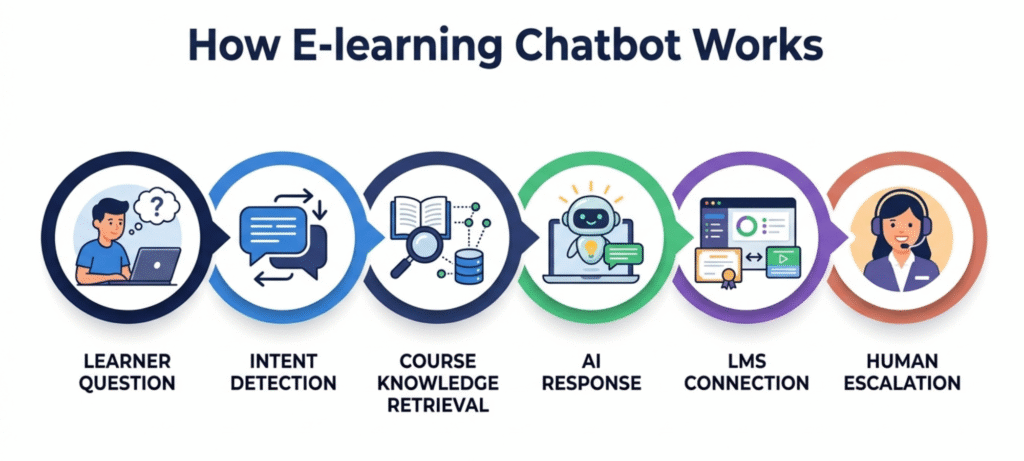
An e-learning chatbot works by interpreting a learner’s question, pulling relevant information from course content or a knowledge base, generating a response, and, when it’s connected to the LMS, sometimes taking a small action like showing progress or setting a reminder.
Understanding the Learner’s Question
First, the system has to figure out what’s actually being asked. “What do I need before the final?” and “Can I skip ahead to the exam?” are phrased differently but point at the same intent underneath.
Retrieving Course and Knowledge-Base Information
Once intent is identified, the system pulls from whatever it’s been given access to: course content, FAQs, policy documents, or a dedicated knowledge base.
Generating a Response
From there, the chatbot either selects a pre-written answer or generates one on the fly. Which approach it uses depends entirely on its underlying architecture.
Connecting the Chatbot With an LMS
Anything beyond a static answer, like showing a student’s actual completion percentage or enrolling them in a make-up session, requires an active connection to the LMS through an API or webhook.
Escalating Complex Questions to Humans
A well-built chatbot knows where its own competence ends. Grading disputes, accommodations, anything emotionally loaded. Those go to a person, not to a guess.
E-Learning Chatbot Architecture
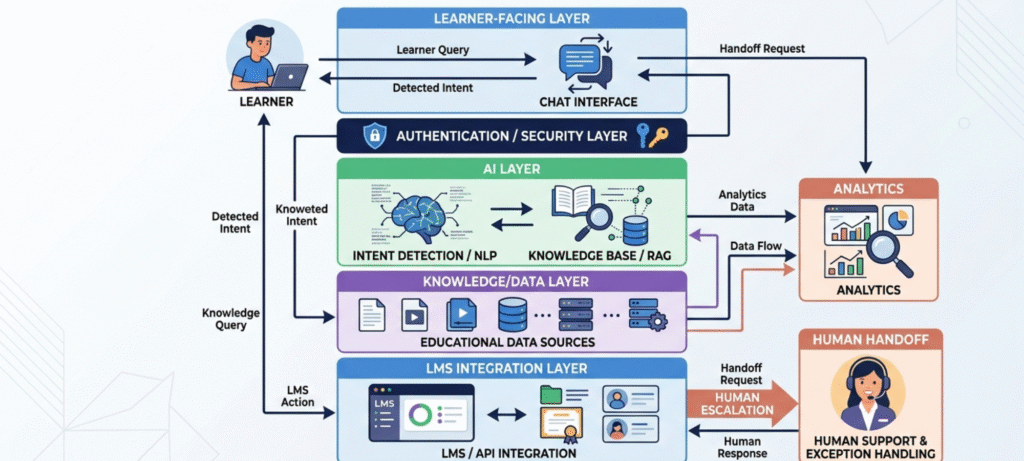
It helps to see the pieces laid out rather than treated as one black box. A typical flow looks like this:
Learner → Chat interface → Authentication layer → AI/NLP layer → Knowledge base or RAG layer → LMS/API connection → Response → Analytics or human handoff.
- Chat interface: where the learner types or speaks the question, whether that’s a widget on the course page or a mobile app screen.
- Authentication layer: confirms who’s asking, which matters more than people assume, since it controls what data the chatbot is even allowed to touch.
- Intent detection / NLP layer: interprets what’s actually being asked, regardless of phrasing.
- Knowledge base / RAG layer: retrieves the specific material the chatbot should ground its answer in, rather than relying purely on general model knowledge.
- LMS/API connection: lets the bot pull or update live data, like enrollment status or quiz scores.
- Analytics layer: logs what’s happening across conversations, which is useful for instructors and admins later.
- Human handoff: the exit ramp when a question crosses into territory the bot shouldn’t touch alone.
A chatbot that skips the authentication or handoff pieces isn’t really a finished system. It’s a chat window bolted onto some content.
Types of E-Learning Chatbots
Not every “e-learning chatbot” is doing the same job. It helps to separate them by function:
- FAQ chatbots handle administrative questions like password resets or enrollment deadlines.
- LMS support chatbots deal with navigation, scheduling, and account issues.
- AI tutors explain concepts and walk learners through practice problems.
- Course recommendation chatbots help with course discovery based on stated goals.
- Assessment chatbots deliver quizzes and light formative assessment.
- Student-success chatbots send progress nudges and re-engagement reminders.
- Corporate learning chatbots cover onboarding and compliance training reminders for employees.
A single platform sometimes blends two or three of these into one interface, but knowing the underlying category helps when evaluating a vendor’s actual claims.
What Can an E-Learning Chatbot Do?
Day to day, a chatbot for e-learning industry platforms typically handles a mix of support, navigation, and light instructional tasks. Say a learner asks, “Which lesson do I need to finish before the final quiz?” A properly connected assistant checks the syllabus structure and answers directly. If that same learner asks something the course rules don’t clearly cover, like whether a late submission will be accepted, the right move isn’t a confident guess. It’s an honest “I’m not certain, let me connect you with your instructor.”
Common capabilities include answering routine support questions, helping learners locate the right module, recommending supplementary resources based on progress, delivering short conversational practice quizzes, sending deadline reminders, and giving instructors a rundown of commonly misunderstood topics.
E-Learning Chatbot Use Cases
Student Onboarding
New learners often don’t know where to start. A chatbot can walk them through account setup, first-lesson navigation, and where assignments live, which matters more than it sounds since a confusing first week is a common reason people drop a course early.
Course Discovery
A learner browsing a catalog can ask something like “Which course fits someone wanting digital marketing basics?” and get a short list instead of scrolling the entire catalog.
Course Navigation
Simple wayfinding questions, “Where’s Module 4?”, are some of the highest-volume, lowest-complexity queries a chatbot can absorb.
24/7 Student Support
This is the most cited use case, for good reason. Online learners study across time zones and outside office hours, and a chatbot fills a gap a human support team physically can’t staff around the clock.
Personalized Learning Recommendations
Based on quiz results or course history, a chatbot can suggest a review module or an easier entry point before a difficult unit. The quality of that suggestion depends entirely on the quality of the underlying data, though. Garbage progress data produces garbage recommendations.
Quiz and Exam Preparation
Conversational practice quizzes feel less intimidating than a formal test interface, and immediate feedback helps correct small misunderstandings before they pile up.
Assignment Guidance
There’s an important line here. A chatbot can explain a rubric or clarify instructions. It shouldn’t write the assignment. That distinction shows up again later in this guide.
Progress Tracking
“You’ve completed 65% of this course” sounds simple, but it keeps learners oriented, especially in self-paced formats with no fixed class schedule.
Deadline and Course Reminders
Reminders that adapt to a learner’s actual habits, instead of blasting the same notification to everyone, tend to land better and annoy people less.
Instructor Support
Chatbots aren’t purely student-facing. See the dedicated section below.
Corporate Training and Employee Learning
Outside universities, chatbots handle onboarding, compliance training nudges, and quick policy lookups for employees. This use case gets underrepresented in most articles on the topic, but it’s a big part of how the technology is actually deployed.
Multilingual Learning Support
For international learners, a chatbot can translate instructions or explain a concept in a preferred language. Translation quality for subject-specific terminology should be tested, not assumed.
Benefits of a Chatbot for the E-Learning Industry
Benefits for Learners
Immediate answers, more flexible support outside standard hours, easier navigation. Accessibility gains, like text-based interaction for learners who’d rather not make a phone call, are a real but underappreciated benefit here.
Benefits for Educators
Fewer repetitive emails, faster resolution of routine questions, better visibility into where students get stuck. That last point frees up instructor time for actual feedback instead of administrative back-and-forth.
Benefits for Administrators
Fewer routine tickets landing on a small support team, more consistent answers as the student base grows, and a clearer paper trail of what’s actually being asked.
Benefits for E-Learning Businesses and Institutions
Scalable support and lower routine workload for staff. Worth being careful here though: chatbots can support better completion and retention by removing friction, but they don’t guarantee it. Outcomes still hinge on course design, content quality, and how motivated the learner already is.
What Problems Does an E-Learning Chatbot Actually Solve?
It’s easier to judge the value of a chatbot by matching it to a specific problem rather than a generic benefit.
- Students repeatedly ask where to find course materials → chatbot handles direct navigation.
- Support teams get flooded with the same handful of questions → chatbot absorbs the FAQs.
- Learners get stuck outside office hours → chatbot provides first-line assistance around the clock.
- Learners don’t know what to study next → chatbot offers a personalized recommendation based on progress.
- Instructors can’t tell which topics are confusing students until grades come in → chatbot surfaces the pattern earlier.
Framed this way, a chatbot starts to look less like a feature and more like a specific fix for a specific bottleneck.
Essential Features of an E-Learning Chatbot
What really separates a useful e-learning chatbot from a gimmicky one? A handful of things tend to matter most. Natural language understanding comes first — learners shouldn’t have to guess the “right” way to phrase a question. Then there’s proper LMS integration, so the bot is working off actual course and progress data instead of assumptions. Answers need to stay grounded in an approved knowledge base rather than floating free, and RAG support helps make that retrieval sharper and more dependable. Student authentication matters too, since every response has to respect whatever access permissions are already in place. Beyond that, good recommendations should come from a learner’s real history, not a generic script — and progress tracking works best when it’s woven directly into the conversation instead of sitting somewhere separate.
Reminders should flex around how each learner actually behaves, not get fired off identically to everyone. Quiz support works better when it feels casual rather than like a formal exam, and multilingual support widens who the tool can actually serve. On the backend, analytics help track usage and resolution rates over time, while a clear escalation path to a human is non-negotiable the moment a question goes beyond the bot’s depth. Role-based access needs to properly separate what a student, instructor, and admin each get to see, privacy controls should spell out exactly what’s stored and for how long, and accessibility — including screen-reader support — shouldn’t be an afterthought.
How E-Learning Chatbots Help Instructors
Most guides barely touch on what a chatbot can do for instructors, which honestly feels like a gap. It can absorb the same repetitive questions instructors would otherwise have to field one by one, all day. It can also flag which parts of a course tend to confuse students the most, or roll up common student questions into a short, easy-to-skim weekly summary. Beyond that, it can help draft practice questions tied to a specific lesson, walk every student through a rubric the exact same way instead of explaining it slightly differently each time, and catch students who are falling behind early enough in the term for it to actually matter. It can run reminder sequences on autopilot so instructors aren’t manually chasing down late work, collect quick informal feedback right after a lesson ends, and in general, take enough of the administrative load off an instructor’s hands that there’s more time left for the feedback that actually helps students learn.
How Chatbots Help E-Learning Administrators
Administrators run into a completely different set of repeat questions: things like enrollment and registration status, password resets and account recovery, attendance records, certificate issuance, billing and payment questions, scheduling conflicts, instructor availability, and simply routing tickets to whoever should actually be handling them. Even covering half of that list through a chatbot frees up a meaningful amount of staff time — especially during enrollment periods, when ticket volume tends to spike hard.
How to Integrate a Chatbot With an LMS
How deep an integration goes really depends on the platform. In some setups, it’s as simple as dropping a chat widget on top of Moodle, Canvas, or Blackboard. In others, it goes much further — pulling enrollment records, grade data, and calendar events through APIs and webhooks. It’s fair to say upfront that not every chatbot plugs into every LMS out of the box, and exactly what data it can reach comes down to how the institution has set up its authentication and permissions layer in the first place. A well-structured learning management system makes all of this considerably easier, since clean, organized course data is really the foundation everything else gets built on.
How to Implement a Chatbot for an E-Learning Platform
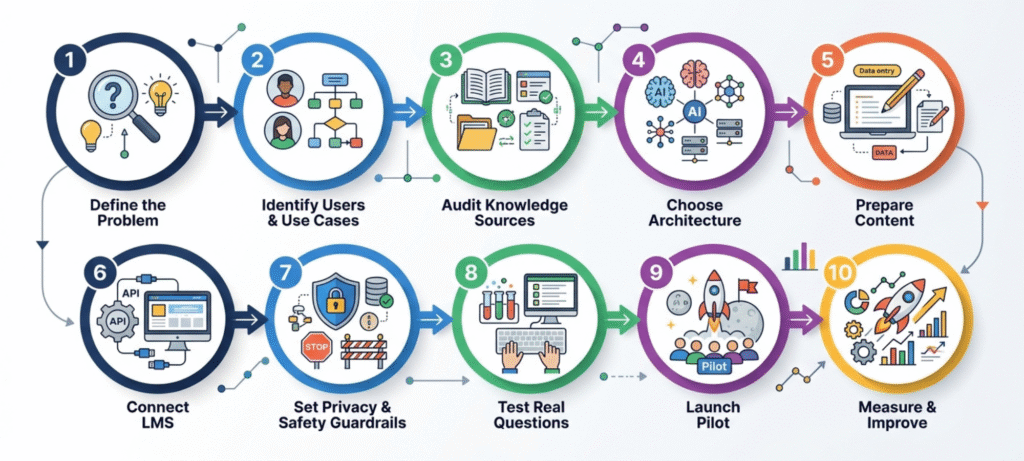
1. Define the problem. Start with something concrete, like “students ask the same 20 questions every week,” not a vague desire to “add AI.”
2. Identify users and use cases. Students, instructors, and administrators each need different things from the same tool.
3. Audit existing knowledge sources. Check whether FAQs, policies, and course content are current enough to trust.
4. Choose the right chatbot architecture. Rule-based, AI-driven, generative, or a RAG-based hybrid, depending on complexity and budget.
5. Prepare course and support content. Feed the system material that’s actually accurate and current.
6. Connect the chatbot to the LMS. Set up the API or webhook connections needed for live data access.
7. Establish privacy and safety guardrails. Decide what the chatbot is and isn’t allowed to say or store.
8. Test with real student questions. Use actual support tickets, not hypothetical ones, including messy and ambiguous ones.
9. Launch a pilot. Roll it out to one course or cohort before a full rollout.
10. Measure and improve. Review conversation logs regularly and adjust the knowledge base as gaps appear.
How RAG Improves an E-Learning Chatbot
RAG, or retrieval-augmented generation, is a technique where the chatbot searches a defined knowledge base before generating its response, instead of relying only on what a general-purpose model already “knows.” In practice, this means a chatbot answering a question about a specific course policy pulls from the actual syllabus document instead of guessing based on typical academic norms.
This grounding reduces the odds of a confidently invented answer, one of the more common failure points of AI chatbots. It doesn’t eliminate the risk entirely, though. If the underlying knowledge base is outdated or incomplete, a RAG system will retrieve and repeat that outdated information just as confidently as a correct one. Keeping source material current matters as much as the technology itself.
How to Prevent AI Hallucinations in E-Learning Chatbots
Hallucination prevention isn’t one setting you flip on. It’s a combination of things: grounding responses in RAG rather than open-ended generation, restricting the chatbot to approved sources, building in confidence thresholds so low-certainty answers trigger a fallback, showing source references where possible so a learner can verify a claim, letting the bot say “I don’t know” instead of guessing, routing uncertain answers to a human, updating the knowledge base on a regular schedule, and testing the system against real, messy student questions before launch, not just clean ones written by the product team.
Conversation Design for E-Learning Chatbots
An AI chatbot isn’t just a chat window connected to a language model. Good conversation design shapes whether it actually helps.
That means a welcome message that sets expectations instead of a blank prompt, a handful of suggested prompts so learners aren’t staring at a cursor, short responses instead of walls of text, follow-up questions that narrow down ambiguous requests, context retention across a few turns so learners don’t repeat themselves, graceful error handling, and a clear path to a human at the end.
Instead of a dead-end reply like “I don’t understand,” a better fallback looks like: “I can help with course navigation, assignments, deadlines, and lesson questions. Are you looking for the Module 4 assignment or the final quiz?” That single sentence does more for user trust than most FAQ pages manage in a full page.
Privacy and Security Considerations for E-Learning Chatbots
Privacy and security get lumped together often, but they’re different concerns.
Privacy is about what data gets collected and why. Any chatbot with access to learner data touches sensitive territory: enrollment records, progress history, sometimes payment information. Institutions should think through data minimization, retention limits, and how the vendor itself handles and trains on conversation data. UNESCO’s guidance on generative AI in education specifically calls for mandating the protection of data privacy and considering age limits for independent use of these tools , which is a useful reference point for any institution drafting its own chatbot policy. This isn’t legal advice, and specific obligations vary by jurisdiction, but privacy shouldn’t be an afterthought bolted on after launch.
Security is about who can access what, and how that access is enforced. This covers authentication, authorization, role-based access control, encryption, API security, data retention limits, audit logs, and protection against prompt injection attempts. A concrete example is worth spelling out: a student should never be able to ask the chatbot for another student’s grades simply because the LMS API technically contains that data somewhere. Permissions have to be enforced at the API layer, not assumed away because “the chatbot wouldn’t do that.”
AI Chatbots and Academic Integrity
There’s a real difference between a chatbot helping a student learn and a chatbot doing the work for them. Hints, Socratic-style questioning, practice problems, and feedback on reasoning fall into the first category. Writing a complete assignment, answering a graded test, or generating a submission-ready essay falls into the second, and it undermines the entire point of the course.
EDUCAUSE notes that common uses of AI across campus now include personalized learning, virtual assistants and chatbots, learning analytics, and grading, which is exactly why institutions need a clear, written policy on acceptable chatbot use before students start relying on one by default.
Human-in-the-Loop E-Learning Chatbots
The best-performing setups don’t treat AI as a full replacement for staff. They split the work. AI handles FAQs, navigation, reminders, and basic explanations well. Humans still handle grading disputes, accommodations, disciplinary matters, complex academic guidance, and anything emotionally sensitive. Building that split explicitly into the escalation rules, rather than hoping the bot figures it out, is what separates a trustworthy deployment from a frustrating one.
Accessibility and Inclusivity in E-Learning Chatbots
Accessibility should be part of the design from day one, not an add-on after complaints start. That means screen-reader compatibility, full keyboard navigation, clear and jargon-free language, multilingual support, and text alternatives for anything visual. A chatbot built around the assumption that every learner interacts the same way will quietly exclude a chunk of its own audience.
How to Test an E-Learning Chatbot Before Launch
Testing needs to go beyond clean, well-phrased sample questions. A reasonable pre-launch checklist includes normal questions, ambiguous questions, misspelled questions, out-of-scope questions, sensitive or policy-related questions, multi-turn conversations that build on earlier context, permission tests (can a student see data they shouldn’t?), prompt injection attempts, and human escalation paths to confirm they actually trigger when they should. Skipping this step is one of the most common reasons a chatbot embarrasses an institution in its first month live.
How to Measure E-Learning Chatbot ROI
A few formulas make this concrete:
- Automation rate = automated resolutions ÷ total chatbot conversations × 100
- Human escalation rate = conversations transferred to staff ÷ total conversations × 100
- Cost per resolved query = total chatbot operating cost ÷ resolved conversations
Beyond that, track average response time before and after deployment, learner satisfaction from direct feedback, adoption numbers like active users and repeat usage, and learning metrics such as assessment performance and time to completion. Usage volume alone doesn’t prove educational success. A chatbot fielding a thousand conversations a month tells you it’s being used, not that it’s actually helping anyone learn better.
Should You Build or Buy an E-Learning Chatbot?
| Approach | Best when |
|---|---|
| Build your own | You need deep customization, have in-house development resources, or your workflows are unusual |
| Buy an existing platform | You want faster deployment and standard LMS integrations are sufficient |
| Hybrid | You use a vendor platform but customize the knowledge base, prompts, and escalation rules |
Most institutions land in the hybrid category, since building a chatbot from scratch is a heavier lift than most teams anticipate going in.
How Much Does an E-Learning Chatbot Cost?
There’s no single standard figure here, and anyone quoting a flat number without asking about your setup is probably oversimplifying. Cost mostly comes down to a handful of factors: number of learners, monthly conversation volume, whether you’re paying per-API-call for an underlying AI model, how deep the LMS integration goes, which channels you support beyond the LMS dashboard, whether RAG requires a custom knowledge base, analytics requirements, security requirements, and ongoing maintenance and human support.
A low-complexity setup, an FAQ chatbot on a website widget, sits far below a fully LMS-connected AI tutor with RAG, multiple channels, and human escalation built in. Knowing which tier a use case actually needs is more useful than chasing a specific dollar figure.
Common Mistakes When Implementing an E-Learning Chatbot
- Automating too much, too fast. Start with low-risk, high-volume questions.
- Using outdated knowledge sources. A chatbot is only as accurate as what it’s fed.
- Ignoring human escalation. Don’t trap learners in a loop with no way out.
- Measuring only usage. Track learning outcomes too, not just conversation counts.
- Ignoring privacy from the start. Retrofit fixes are harder than building it in from day one.
- Launching without real-world testing. Ambiguous, misspelled, and adversarial questions will happen.
What Should an E-Learning Chatbot Not Do?
This is where a lot of vendor content goes quiet, but it’s worth being direct about. An e-learning chatbot shouldn’t make final grading decisions, provide unsupported academic claims as fact, expose one student’s private data to another, complete graded assignments on a student’s behalf, make disciplinary decisions, replace legally required accessibility accommodations, invent institutional policies it wasn’t given, or offer medical or legal advice as though it carries institutional authority. Drawing this line explicitly, in writing, before launch does more for trust than any feature list.
Future of Chatbots in the E-Learning Industry
Current development is moving toward more agentic workflows, where an assistant doesn’t just answer a question but performs an approved action on the learner’s behalf, like enrolling them in a make-up session. Multimodal support combining text, voice, and video is expanding too. AI literacy is becoming a topic institutions need to teach directly, rather than something learners just absorb by using the tools. None of this changes the core idea running through this guide: a chatbot works best as a layer of support, not a stand-in for a human educator.
E-Learning Chatbot Implementation Checklist
- Define target users
- Identify high-value use cases
- Audit content sources
- Select chatbot technology
- Plan LMS integration
- Establish privacy and security controls
- Create human escalation rules
- Test accuracy and accessibility
- Train support staff
- Launch a pilot
- Monitor analytics
- Review and improve responses on a schedule
helpful => Best Learning Apps for Adults
FAQ:
What is a chatbot for the e-learning industry?
It’s a conversational software system built into an online education platform that helps learners, instructors, or administrators get answers, navigate courses, and complete routine tasks without waiting on a human response.
How does an e-learning chatbot work?
It interprets a learner’s question, retrieves relevant course or knowledge-base information, generates a response, and, when connected to an LMS, can take actions like showing progress or sending a reminder.
Can an e-learning chatbot integrate with Moodle, Canvas, or Blackboard?
Many can, though the depth of integration depends on the specific platform and how it’s configured. Not every chatbot supports every LMS equally.
Can an AI chatbot replace an online instructor?
No. It can handle routine support and navigation well, but nuanced feedback, mentoring, and judgment calls still need a human.
How much does an e-learning chatbot cost?
It varies widely based on user volume, integration depth, and whether the system relies on paid AI model access. There’s no single standard price.
Are e-learning chatbots safe for student data?
Safety depends on the guardrails an institution puts in place: authentication, data minimization, encryption, and clear vendor data policies.
What is RAG in an e-learning chatbot?
Retrieval-augmented generation grounds a chatbot’s answers in a defined set of approved course materials instead of relying purely on general model knowledge, which reduces (but doesn’t eliminate) the risk of confidently wrong answers.
Final Thoughts
A chatbot for e-learning industry platforms isn’t valuable simply because it answers questions fast. It’s valuable when it connects learners with accurate information, useful LMS functionality, and a clear path to a human when the situation calls for one. Institutions that treat it as a support layer, built on solid content and honest limitations, tend to see it hold up over time. Those that treat it as a shortcut around real instructional design usually find out the hard way that a chatbot can’t fix a course that wasn’t built well in the first place.