

Let’s be honest: running a school without a proper system is absolute chaos. When you rely on mismatched spreadsheets, paper permission slips, and sticky notes, things get lost. That is exactly why the benefits of student management system tools have become such a hot topic for educators lately. It isn’t just about trading old, dusty metal filing cabinets for digital folders. A great system acts like a central dashboard that links up your student records, daily attendance, tuition bills, and parent messages in one clean place. It cuts out the annoying, repetitive office work for administrators, frees up teachers to actually focus on teaching their classes, and stops parents from feeling left in the dark about their child’s grades.
When a school dumps the old paper ledger and goes digital, the difference is night and day. Ask any principal or front-office clerk who has made the switch—having accurate, real-time records saves a massive amount of sanity. As schools, sports programs, and colleges grow, tracking everything by hand simply stops working. Moving your operations over to a solid digital workspace keeps your data safe, cuts down on human error, and makes day-to-day life easier for everyone on campus.
What Is a Student Management System?
Think of a Student Management System (or an SIS, as a lot of tech folks call it) as your school’s digital master database. It tracks a student from the day they apply until the day they graduate.
Because there are so many educational apps and software programs on the market right now, it’s easy to mix them up. If you are trying to figure out what your school actually needs, it helps to look at how an SMS compares to other tools like an LMS or a full School ERP:
- Student Information System (SIS / SMS): This is the operational backbone. It looks after enrollment records, family contact info, daily schedules, report card history, and student fee accounts.
- Learning Management System (LMS): This is your digital classroom. Teachers use it to hand out homework, post reading materials, and host quick online quizzes. For a deeper look at managing digital course content, check out our comprehensive Learning Management System.
- School ERP: This is a much bigger enterprise tool. It handles the entire business operation of an educational institution—like employee payroll, campus maintenance, and deep financial accounting—right alongside the basic student records. Often, designing these complex academic pathways requires the expertise of educational leaders; you can learn more about their role in our guide on What is a Curriculum Specialist.
Switching over to a secure, cloud-based platform means your staff can log in and update info securely from anywhere. You no longer have to worry about a file being trapped on one specific desktop computer in the front office.
Top Benefits of Student Management System for Modern Educational Institutions
1. Centralized Student Information Management
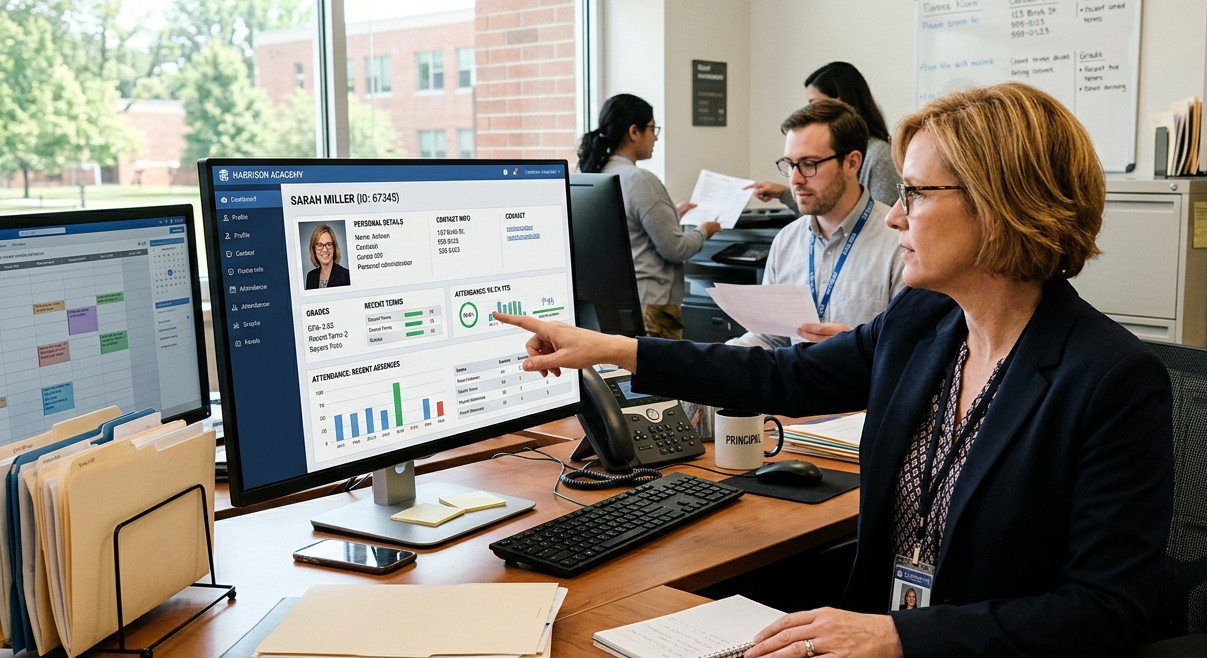
When different departments use their own separate systems, records get messy fast. One of the core benefits of student information management system integration is getting all that data into one single home. When student profiles, grades, contact numbers, and payment histories live in a shared database, any change made at the front desk updates everywhere instantly.
If a teacher needs to check a student’s emergency phone number or view their past academic history, they can pull it up in seconds. Nobody has to hunt through old boxes or wait for another department to reply to an email. This setup keeps records highly accurate and cuts down on frustrating data entry typos.
2. Saves Time and Reduces Administrative Workload
Talk to any school office worker and they’ll tell you the same thing: they spend way too much time tracking down paperwork, filling out spreadsheets, and answering repetitive phone calls from parents. Handling things like multi-step registration forms, manual exam timetables, quarterly report cards, and tuition tracking by hand can easily waste dozens of hours every single week.
An SMS steps in and automates those boring, repetitive workflows. The software takes care of online applications, processes fee payments, and compiles grade sheets automatically. This gives school leaders and administrative teams their time back so they can focus on looking after the students instead of pushing paper.
3. Improves Student Attendance Tracking

Taking attendance on a clip-board or a paper sheet is a recipe for lost notes and data entry mistakes. Moving this task online shows you the immediate benefits of student attendance management system tools by taking the manual work out of the equation.
Instead of reading names out loud from a printed list and manually typing up attendance reports at the end of the day, teachers can log everything digitally in just a few quick taps.
- Teachers: Open up a simple portal, mark absences in under a minute, and send that data straight to the main office database.
- Parents: Get an instant text message or mobile notification if their child misses a class without an excuse note.
- Administrators: Run quick, school-wide reports to catch chronic absenteeism habits early in the semester before they hurt a student’s grades.
4. Enhances Communication Between Students, Parents, and Teachers
When announcements don’t make it home, students fall behind. A modern SMS bridges that gap by using a dedicated parent portal and automated messaging tools.
Families don’t have to wait around for printed progress reports to show up in the mail at the end of the term. Instead, parents can jump online whenever they want to check up on missing assignments, read teacher notes, track behavior metrics, and keep tabs on upcoming school events.
5. Better Academic Performance Through Data Insights
An SMS isn’t just a digital filing cabinet—it actually helps you spot learning issues early on. When teachers log test scores and class milestones directly into the system, the platform creates clear, easy-to-read student progress summaries.
Why This Matters: If an educator can see a student’s quiz scores starting to dip over a couple of weeks, they can step in right away. They can set up extra help or tutoring sessions before that minor hiccup turns into a failing grade on a final exam.
6. Supports Online Learning and LMS Integration
An SMS looks after your core student information, but it becomes twice as valuable when you link it directly to an online learning platform. Understanding the distinct benefits of learning management system to students highlights the value of this integration:
When you connect your virtual classroom space straight to your master records database, life gets much simpler. Students can log into one spot to view their classes, read digital materials, and submit homework. As soon as a teacher grades a project inside the LMS, those points slide right into the official school gradebook without any manual exporting or file matching. Many schools find that integrating digital learning tools helps students access resources more easily and stay engaged.
7. Overhauls Security and Data Privacy
Keeping rows of physical files in office cabinets leaves a school open to serious security leaks, accidental fires, or water damage. Modern cloud systems protect this sensitive info with high-level data encryption and automatic offsite backups.
Role-based access controls let you decide exactly who sees what on the platform. Your homeroom teachers can check grades and attendance, but they have no way to access family billing information. On the flip side, a financial clerk will never see private medical logs. Setting things up this way protects student privacy and keeps your school fully compliant with local data laws.
8. Helps Schools Make Data-Driven Decisions
Planning for your school’s future shouldn’t feel like a guessing game. An SMS gives your leadership team a clear look at school performance dashboards. Principals and board members can quickly analyze multi-year enrollment trends, look at seasonal dropout rates, monitor tuition collection balances, and review overall grade averages. Having this real-world data makes it much easier to build accurate budgets for the coming school years.
Real-World Examples: How Schools Use an SMS
Example 1: The Administrative Shift
Imagine a busy campus with a thousand kids. If you aren’t using an SMS, your enrollment forms are stuffed inside a front-office cabinet, daily attendance sheets are buried under coffee cups on random desks, tuition records sit on one specific laptop in the back office, and report cards are scattered across dozens of different hard drives. If a parent calls to ask why their child’s grades dropped or if an invoice went through, the front desk worker has to call three different offices just to track down the facts.
With a student management system, every single department looks at the exact same screen. Front office staff can pull up a student’s whole profile in the middle of a phone call with a parent. In just a couple of seconds, you have their attendance, test scores, and unpaid bills right on your screen. You can actually give answers and fix the issue right then and there instead of playing phone tag later.
Example 2: The Teacher Experience
Think about a teacher trying to finish up end-of-term report cards. Typically, they have to spend hours digging through old spreadsheets, cross-referencing paper attendance registries, and typing out individual comments by hand. With an SMS, that data is already tracked automatically all term long. The teacher can compile and publish report cards for the whole class with just a few clicks, leaving them with more time to focus on lesson planning and working with students who need extra help.
Benefits of Student Athlete Management System for Sports Programs
For schools with highly competitive sports teams, standard academic tracking tools don’t always cover everything. Bringing in a specialized sports module helps athletic directors track a student’s training milestones alongside their classroom performance.
[Athlete Profile Hub]
 ├── Academic Eligibility Tracker (Links to Core SMS Gradebook)
 ├── Athletic Performance Tracking (Metrics, stats, video links)
 └── Health & Compliance Portal (Injury logs, physicals, insurance)
With a dedicated student athlete management system, nobody has to spend hours checking who is actually allowed to step onto the field. The software takes care of sports eligibility by pulling data straight from the main school database automatically. Because it updates constantly, coaches know instantly if a player’s grades drop below the line. It also clears out the paperwork mess by putting medical waivers, practice schedules, workout stats, and away-game travel plans into one place.This means coaches know right away if a player’s GPA dips too low to stay on the roster. Plus, you can run all your sports logistics out of this single app—everything from tracking medical waivers and practice schedules to logging fitness stats and planning trips for away games.
Key Features of a Student Management System
If you want to maximize these administrative advantages, look for a platform that includes these core pieces:
| Feature Component | Core Operational Purpose | Key Institutional Output |
| Student Database | Acts as the system-wide single source of truth for personal records. | Zero data duplication across offices. |
| Attendance Management | Digitizes daily roll call routines and aggregates trends. | Lower absenteeism via instant parent text alerts. |
| Gradebook Management | Records test outcomes and calculates weighted averages. | Automated generation of quarterly report cards. |
| Fee Management | Automates invoicing, processes cards, and sends payment reminders. | Improved collection rates and predictable cash flow. |
| Parent Portal | Grants family members role-restricted access to performance metrics. | Stronger accountability and community trust. |
| Reporting Tools | Compiles demographic, financial, and performance metrics. | Actionable data summaries for school boards. |
Who Can Benefit From a Student Management System?
K-12 Schools
Elementary, middle, and high schools see massive benefits from quick digital roll calls, behavioral tracking logs, direct parent-teacher messaging setups, and instant report card generation at the end of each term.
Higher Education and Universities
Large colleges use these platforms to handle massive registration rushes, organize intricate course schedules across multiple campuses, map out degree tracks for different majors, and manage financial aid payouts without a hitch.
Specialized Training Centers
Trade schools and short-term certificate bootcamps use these platforms to run rolling admissions, track quick course modules, and issue student certifications automatically the moment a final test is passed.
Student Management System vs. Learning Management System
Understanding how these two systems work together will save your school from accidentally buying duplicate software tools:
| Operational Dimension | Student Management System (SMS) | Learning Management System (LMS) |
| Primary Focus | Institutional management, operations, and compliance. | Day-to-day instructional delivery and coursework. |
| Core Managed Asset | Official student records, demographic data, and financials. | Educational content, tests, and course materials. |
| Primary User Base | School registrars, business clerks, and principals. | Classroom educators, instructional designers, and students. |
| Standard Actions | Processing tuition fees and confirming enrollment eligibility. | Submitting class papers and hosting virtual lectures. |
Challenges of Operating Without an SMS
Schools that stick to old manual routines or outdated, offline software usually run into the same old problems over and over again:
- Too Many Costly Mistakes: Manually re-typing the same data into three different spreadsheets leads to mismatched records, lost information, and grading errors.
- Scattered Records: Staff waste a lot of time digging through individual paper folders or tracking down a file saved on another department’s computer.
- Communication Delays: Relying on paper notes in backpacks or manual emails means busy families frequently miss urgent alerts about absences or past-due tuition invoices.
- Security Risks: Physical binders and basic Excel sheets don’t have user restrictions, leaving sensitive student data vulnerable to security breaches or accidental loss.
Checklist: How to Choose the Right Platform
When you are ready to shop around for new school software, keep this practical checklist in mind to find an option that fits your long-term goals:
- [ ] Cloud-Based Setup: Avoid expensive server installations and maintenance costs with a system you can securely log into from any web browser.
- [ ] Solid Security Controls: Check that the software features multi-factor authentication and role-based permissions so people only see what they need to see.
- [ ] User-Friendly Mobile Access: Make sure the platform has responsive mobile layouts or dedicated apps for parents, teachers, and students on the go.
- [ ] Smooth Integrations: Ensure the database links up easily with your current accounting software and your LMS.
- [ ] Room to Grow: Choose a platform that can handle an expanding student body without forcing you to completely rebuild your system down the road.
Frequently Asked Questions
What are the main benefits of a student management system?
The biggest advantages are easier record management, faster attendance tracking, better communication with parents, and less manual work for staff.
How does a student management system help classroom teachers?
It cuts down on boring office chores. Teachers can take attendance in seconds, enter grades directly into a shared digital book, and send updates to parents without managing massive, manual email lists.
What is the structural difference between an SIS and an LMS?
An SIS (Student Information System) manages official administrative files like registration history, tuition billing, and final grades. An LMS (Learning Management System) is the digital classroom space used to share class readings, hand out homework assignments, and host online discussions.
Why do schools need dedicated student management software?
Schools use this software to stop relying on slow paper forms, protect sensitive student identities from digital breaches, avoid expensive record-keeping mistakes, and keep their entire operation running smoothly in one place.
Can a student management system improve parent engagement?
Yes. By giving parents direct access to real-time grade books, immediate attendance notices, and quick messaging tools to reach teachers, an SMS breaks down traditional barriers and helps families stay involved in their child’s daily school life.
Is a student management system suitable for small schools?
Yes. Many software companies offer smaller, scalable tiers built for micro-schools or small private institutions. For small schools with limited office staff, automating these daily administrative tasks is often the only way to keep up with the workload.
How much does a student management system cost?
The price usually depends on how many students you have and what features you need. Most providers use a per-student subscription model (either monthly or annually), which can range from a few dollars per student per year for simple configurations to premium rates for large university systems.
Conclusion
The clear operational benefits of student management system platforms make them essential technology for modern educational institutions. Moving away from siloed spreadsheets and paper forms allows schools to protect sensitive student records, simplify complicated tuition workflows, and track student attendance automatically. By reducing daily administrative workloads, these systems help institutions optimize their operations and dedicate more focus to supporting student learning and growth.