Pressing play is not evidence of learning. A student can finish a short explanation and feel confident, yet struggle once the screen no longer supplies the sequence and cues. Pairing an instructional video with a brief retrieval-practice task reveals what students can recall, explain, or apply.
This does not require a formal test after every clip. A one-sentence explanation, worked step, prediction, or correction can provide evidence that guides the next teaching decision.
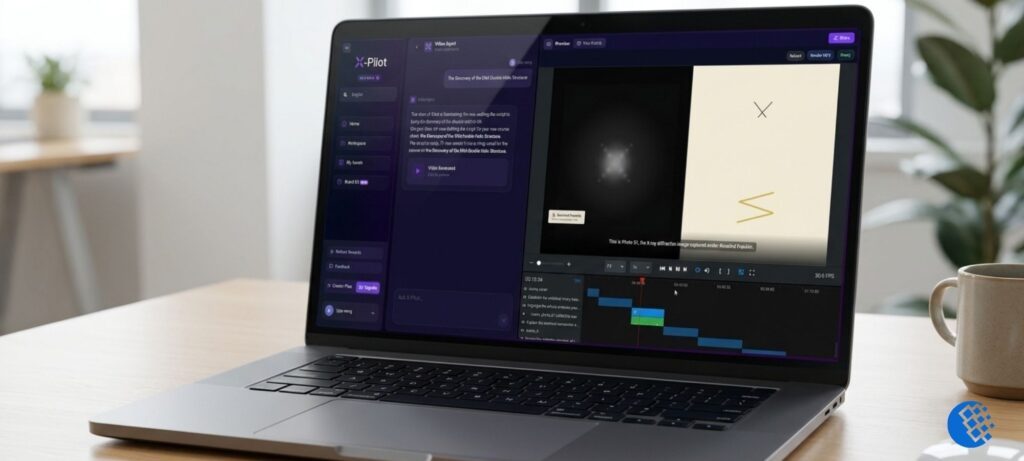
Figure 1. Watching a preview inside production software confirms playback, not learning; a retrieval task must still follow.
Why Familiarity Feels Like Learning
Video makes information easy to recognize. The explanation arrives in order. Labels appear at the right time. The speaker supplies transitions. Replaying a difficult section restores missing context immediately.
Those features can create an illusion: “This makes sense while I watch it, so I must know it.”
Retrieval removes some of that support. When students close the video and produce an answer from memory, they discover which parts they can reconstruct and which parts were only familiar.
In their peer-reviewed study of test-enhanced learning, Henry Roediger and Jeffrey Karpicke compared repeated study with free-recall testing. Repeated study helped after five minutes, but prior retrieval produced substantially better retention after two days or one week. The study used prose passages, not every classroom or video format. Its relevant lesson is narrow: retrieval can contribute to later retention, rather than merely measure it.
Watch Time and Learning Evidence Are Different
Teachers should also avoid making the opposite mistake: assuming that video analytics prove learning.
A widely cited study by Philip Guo, Juho Kim, and Rob Rubin analyzed 6.9 million video-watching sessions across four edX courses. Shorter videos were associated with stronger viewing engagement, and the researchers recommended planning lessons in short chunks.
That finding concerns viewing behavior. It does not prove that every video under six minutes improves understanding, or that completion is a learning outcome.
Length is a design constraint, not an assessment. A concise video is easier to place inside a learning loop, but the teacher still needs evidence of what the student can do afterward.
A Six-Step Retrieval Practice Loop After Video
The following routine can fit inside a classroom, tutoring session, homework assignment, or self-paced module.
1. Name One Observable Outcome
Before selecting or creating a video, complete this sentence:
After watching, students should be able to…
Use an action that can produce evidence:
- label the three parts of the process;
- calculate the missing value;
- explain why the character’s decision matters;
- place four events in order;
- identify the unsafe step in a demonstration.
“Understand photosynthesis” is difficult to observe. “Explain how light energy contributes to glucose production using three required terms” gives students and teachers a clearer target.
2. Show One Coherent Concept
Keep the video focused enough that the retrieval prompt matches what was taught. If the clip introduces six unrelated ideas, one missed answer does not show where the difficulty began.
A useful scene has one main instructional job. It may define a term, demonstrate a procedure, compare two examples, explain one causal relationship, or correct one misconception.
Do not shorten a video by removing necessary reasoning. A two-minute list of facts is not automatically better than a seven-minute worked explanation. The goal is coherent scope, not an arbitrary timer.
3. Remove the Supports
Pause or close the video before asking the retrieval question. Hide the transcript, worked example, and answer choices briefly.
This matters because copying a visible phrase tests location and recognition more than recall. A brief pause can show whether students know where to begin.
Tell students that the first attempt is diagnostic. Low pressure encourages an honest response instead of answer hunting.
4. Ask for a Small Product
Choose the lightest task that can reveal the intended learning:
- One-sentence summary: State the main idea without using the title.
- Blank diagram: Add the labels or arrows from memory.
- Next step: Continue a procedure from the point where the video stopped.
- Worked example: Solve one similar problem with changed values.
- Misconception check: Explain why a plausible wrong answer is wrong.
- Prediction: State what should happen next and why.
- Teach-back: Record or tell a partner a 30-second explanation.
Avoid asking “Do you understand?” Students may answer honestly and still overestimate what they can retrieve.
Research on generative learning provides a useful caution about matching the activity to the material. In a study of 196 college students learning from a narrated kidney lesson, students who wrote explanations after each segment outperformed rewatching groups on retention and transfer. They also outperformed students who drew the material in that specific diagram-heavy lesson. The authors did not conclude that explaining is always best. They showed that the learning activity should fit the video and content.
Not every retrieval attempt needs points or detailed comments.
Use a method proportionate to the decision:
- scan mini whiteboards for a class-wide pattern;
- provide an answer key for self-correction;
- ask partners to compare against two success criteria;
- collect one digital exit response;
- review a sample before deciding whether to continue;
- mark complete, revise, or confer rather than assigning a percentage.
If 80 percent of the class omits the same step, reteach the step. If two students show a different misconception, meet with them while others advance. If answers are strong but explanations are vague, model what sufficient reasoning looks like.
The evidence is valuable because it changes what happens next.
6. Give Feedback While It Can Still Be Used
Feedback should arrive before students mentally leave the task.
That can be as simple as:
- “Your sequence is correct; add why step two comes before step three.”
- “Rewatch from 2:10 and listen for the exception.”
- “The formula is right, but your units changed.”
- “Compare your explanation with the three required terms.”
Then let the student revise, rewatch a targeted segment, or continue to the next concept.
A Ten-Minute Classroom Pattern
The loop does not need to consume a full lesson:
- Minute 0-1: State the outcome and retrieval task.
- Minute 1-5: Watch one focused video segment.
- Minute 5-6: Close the video and retrieve individually.
- Minute 6-8: Compare, self-check, or submit.
- Minute 8-10: Address one pattern and revise.
For homework, students can use the same pattern with a notebook or form. Ask them to submit the retrieval product, not a screenshot of the completed video.
Design the Video and Retrieval Prompt Together
Do not wait until the video is finished to decide how learning will be checked.
Add the intended retrieval prompt to the scene plan. If students must reconstruct a cycle, the video should explain the relationship among stages rather than flash a finished diagram. If students must solve a new example, the narration should model the reasoning, not only show an answer.
When teachers produce or adapt the clip themselves, a workflow that keeps scenes editable helps keep the visual explanation aligned with that prompt before anything is exported. X-Pilot’s editable video workflow for teachers and tutors is one option built around reviewable outlines, scene editing, preview, and MP4 export. Retrieval tasks, grading, and learning evidence still sit with the teacher.
The Grade Comes After the Evidence
Teachers do not need to grade every retrieval attempt. In many cases, the best result is a small correction before a misconception reaches a quiz, project, or exam.
The important sequence is:
Video -> Retrieval -> Evidence -> Feedback -> Revision
Without retrieval, a video may be clear, concise, and engaging while leaving the teacher with no information about learning. With a well-matched prompt, even a short clip can become part of an active lesson.
Completion tells you that the player reached the end. Evidence tells you what to teach next.