

There’s no single best study app for 2026. It really comes down to picking the right tool for the specific problem you’re dealing with. A student buried under lecture notes needs a completely different setup than one trying to memorize four hundred anatomy terms, or someone who simply can’t put their phone down for even twenty minutes.
Quick answer first, details after: the best study apps in 2026 split across a few distinct jobs. Anki and Quizlet take care of memorization through spaced repetition. Notion and OneNote keep notes and coursework organized. Goodnotes is the go to choice for handwritten notes on iPad. Forest tackles focus. AI tools, especially source grounded note apps, can turn a whole batch of lecture slides into ready made flashcards within minutes. No app checks every one of these boxes at once, and that’s exactly why most “top 20 apps” roundups end up leaving readers more confused than when they started.
That’s the gap this guide is meant to fill. Rather than dumping fifteen app names on you and moving on, we’re structuring things around the actual problem you’re facing first, then pointing you to the apps built to solve it, then giving you a straight answer on who each one actually suits.
What Makes a Study App Actually Useful?
Honestly, what makes a study app worth using isn’t about how good it looks in the App Store. It’s about what’s actually happening under the hood. There’s a well-known review by Dunlosky and colleagues that looked into which study techniques really work, and the answer keeps coming back to the same few things: active recall, spaced repetition, and spreading your review sessions out instead of cramming everything the night before.
So a good app isn’t just a blank page waiting for you to fill it with notes. It actually nudges you toward one or more of those habits. There’s some practical stuff to think about too, like whether it works smoothly across your phone and your laptop, whether the free version is something you’d actually stick with or just a taste before a paywall, and if it’s made for kids, whether it’s careful with their data or not.
Best Study Apps at a Glance
Here’s a quick comparison table before we get into the detailed breakdowns.
| App | Category | Best For | Free Option | Platforms |
|---|---|---|---|---|
| Anki | Flashcards | Long-term memorization | Yes on desktop and Android | Desktop, Android, iOS |
| Quizlet | Flashcards | Ready-made study sets | Limited free tier | Web, iOS, Android |
| Notion | Notes | Organizing multiple classes | Yes | Web, iOS, Android, desktop |
| OneNote | Notes | Cross-platform note-taking | Yes | Most major platforms |
| Goodnotes | Notes | Handwritten iPad notes | Limited free tier | Apple devices |
| Obsidian | Notes | Linking ideas across a semester | Yes | Desktop, mobile |
| Forest | Focus | Reducing phone distractions | Limited free tier | iOS, Android |
| Google Calendar | Planning | Time-blocking study sessions | Yes | Most major platforms |
| Todoist | Planning | Assignment tracking | Yes | Most major platforms |
| Zotero | Research | Citation management | Yes | Desktop, browser |
Pricing, free-tier limits, and available features tend to shift over time, so it’s worth double-checking an app’s current listing before you commit to it for a full semester.
Best Study Apps for Students
Need to memorize stuff? Go with spaced repetition. Want your notes actually organized? A note-taking app does the trick. Struggling to focus? A timer or blocker helps more than people expect. Got assignments piling up? A calendar or planner sorts that out. Pretty much sums up what students are actually looking for when they type in “best study apps.”
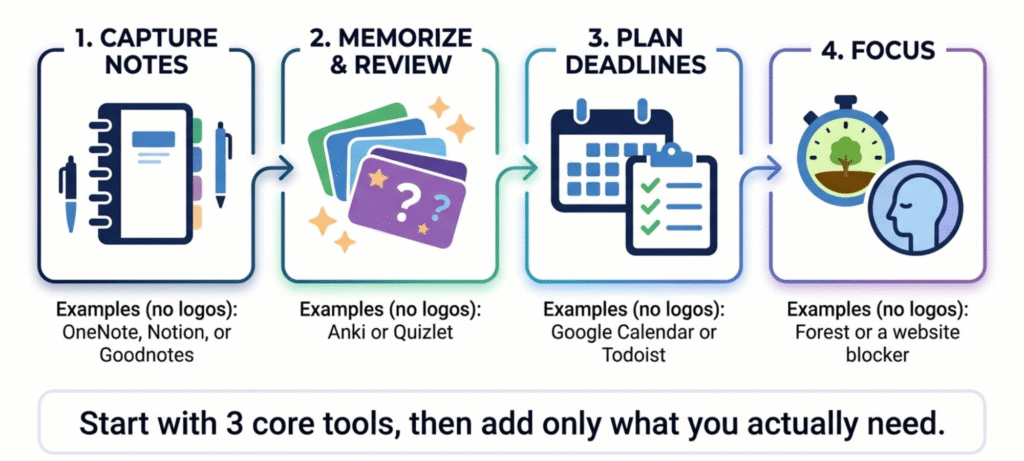
Here’s the real point though. You’re not trying to build a huge collection of apps you never open. You just need a small setup that covers notes, memorization, and focus, one that doesn’t take up more time than it saves. Hopping between apps every couple weeks usually backfires too, especially once you realize you’re spending more time rearranging your system than actually studying with it.
A solid starting point? One app for notes, one for flashcards or spaced repetition, one for focus. That covers it for most people, honestly. If you’ve got four or five classes with overlapping deadlines, throw in a planner too. Past that, don’t bother until the basics stop working for you.
Best Free Study Apps for Students
Free study apps cover most of what students need day to day. You generally don’t need to pay for anything until you’ve used a free tier consistently for a semester and run into a real limit.
Solid free options by category:
- Notes: OneNote has a free version available across major platforms, with audio recording built in.
- Flashcards: Anki is free on desktop and Android, though the iOS app has a one-time purchase price.
- Planning: Google Calendar is free and works across just about every device.
- Focus: Forest offers a working free tier on both iOS and Android.
- Research: Zotero is free and open source, with enough storage to get most students through a degree before you’d need to pay for more.
Worth checking each app’s current free-tier limits before leaning on them for a whole semester, since features and pricing do change.
Best Study Apps for College and University Students
College students usually need more than a single note-taking app. Between lecture notes, assigned readings, citations, and exam prep, the whole workflow gets messy fast if you’re not intentional about it.
A simple college study stack looks something like this:
- Lecture notes: OneNote, Notion, or Goodnotes
- Exam memorization: Anki or Quizlet
- Deadlines: Google Calendar or Todoist
- Research and citations: Zotero
- Focus: Forest or a stricter blocker
- Lecture slides into study material: a source-grounded AI note tool
So what does this actually look like week to week? Take notes during lecture, then turn the confusing bits into flashcards. Go over them a few times as the week goes on. Block off a proper focus session right before the exam. And squeeze in a quick weekly review just to catch whatever’s slipped through.
Notion tends to shine here since it can hold your class notes, a reading list, and a task tracker all in one workspace instead of scattering them across three separate apps. If you’re in a reading-heavy major, Zotero is worth adding just for citations. Building a bibliography by hand eats up hours you’d rather spend actually studying. There’s a real skill to putting a workflow like this together, and our guide on how to study smarter, not harder walks through some of the habits that make any app stack actually worth using.
Best Study Apps for High School Students
High schoolers generally need less complexity than college students, but the core needs overlap: homework tracking, test prep, and a way to review material without cramming everything into one night.
A workable setup for high school looks like:
- Quizlet for vocabulary and quick flashcards
- Anki if you want a more serious memorization tool for AP-level material
- Google Calendar for assignment deadlines
- OneNote for class notes
- A basic focus timer app for study sessions
For subjects like math, where you need step-by-step working shown rather than a flashcard with just an answer, a dedicated practice app usually helps more than a general note-taking tool. At this age, the goal is really just building the habit of spaced review, not adopting a complicated system. An overbuilt setup tends to get abandoned within a couple of weeks anyway.
Best Study Apps for Kids and Young Children
Apps for young kids need a different lens than apps built for teenagers or adults. Age appropriateness and how the app handles a child’s data matter a lot more here than a long feature list.
For younger children, look for apps built around specific skills rather than general productivity: early reading practice, basic math drills, sight words, and simple interactive games tend to hold a kid’s attention far better than anything modeled on an adult note-taking app. A short, focused session most days usually beats one long session once a week.
Before installing anything for a child, it’s worth checking a few things:
- Does it include ads or in-app purchases aimed at kids?
- Does it collect more data than it needs to function?
- Are there parental controls or activity reports?
- Is the content actually matched to the child’s grade level, or just labeled “educational” for marketing?
Independent reviewers like Common Sense Media publish evaluations specifically focused on age appropriateness and privacy for kids’ apps, which is a useful second opinion since app store descriptions rarely tell the full story. It’s worth pulling up their current recommendations for your child’s age range and reading level before downloading anything, since a good pick for a six-year-old and a good pick for a ten-year-old can look very different.
Best AI Study Apps
AI study tools got genuinely useful in 2026, mostly by taking over the part of studying that used to eat the most time: turning a stack of lecture slides into flashcards, summarizing a long reading, or answering a question using only the material you actually uploaded instead of pulling from wherever.
That last part matters more than it sounds. A tool that only answers from your own documents is far less likely to make something up than a general chatbot with no source material attached to the conversation. A few AI note tools now build this kind of source-citing directly into how they answer, which is worth checking for specifically if accuracy matters for your exam prep.
What to actually look for in an AI study tool:
- Does it cite the specific source or page it pulled an answer from?
- Can it generate flashcards or quizzes directly from a PDF or lecture recording?
- Does it flag when it’s uncertain, rather than answering confidently either way?
- Can you export what it generates, or are you locked into one app?
Let’s be honest about the limits too. AI can cut down the time it takes to build study materials, sure, but it’s not a replacement for actually studying. You still need to go through the flashcards it spits out, catch anything that looks off, and put in the recall practice yourself. Treating an AI summary as a stand-in for reading the source material usually backfires, especially on exams built to test understanding rather than just memorized facts.
Best Study Apps for Memorization
Subjects that lean heavily on memorization, anatomy, vocabulary, case law, historical dates, respond much better to spaced repetition than to generic flashcards you just flip through once and forget about.
This isn’t a new idea either. It traces back to Hermann Ebbinghaus’s research on forgetting from the 1880s, and later work on spaced practice by researchers like Cepeda and colleagues backed up the same basic principle: you retain information better when you review it right before you’re about to forget it, not on some rigid daily schedule regardless of how well you already know it.
That’s why Anki is the default pick here. Its scheduling handles all of this automatically once you’ve gone through a card a couple times. Quizlet is a solid alternative if you’d rather grab pre-made decks than build your own from scratch, though a chunk of its more advanced features now sit behind a subscription. Either way, both beat passive rereading, which keeps showing up in learning research as one of the least effective study methods, even though it’s still what most students reach for first.
Best Study Apps for Focus and Productivity
A focus app isn’t the same thing as a study app, and that difference actually matters. A timer or a website blocker won’t teach you anything on its own. What it does is create the conditions where studying can actually happen, which for a lot of people is the harder problem to solve in the first place.
Gamified timers like Forest work by tying a small reward, a tree that grows while you stay off your phone, to a set focus period. Harder blockers like Cold Turkey work at the system level instead of just the browser level, which matters if you’ve ever disabled a browser extension mid-study-session (most of us have). Google Calendar, used for actual time-blocking rather than just listing deadlines, is still one of the simplest and most underused focus tools out there, mostly because it’s free and everyone already has it installed.
Best Study Apps for Note-Taking and PDFs
Dealing with a ton of PDFs? Here’s the short version: get an app that lets you annotate, search, and jump back and forth between the PDF and your notes without any hassle. Goodnotes and similar notebook apps hold up especially well on iPad for this. Desktop tools, on the other hand, tend to be the better pick when you’re working with research papers or big document collections.
Note-taking splits depending on how you work, really. Type your notes during lecture? Notion or OneNote both do a solid job with embedded PDFs, audio recordings, and linked pages. Prefer writing by hand, especially on an iPad? Goodnotes or Notability is probably your better bet, since both support Apple Pencil and can search your handwriting.
There’s a study, pretty widely cited actually, by Mueller and Oppenheimer, that found students who write notes by hand tend to remember more than those who type everything word for word. Makes sense when you think about it. Handwriting forces you to summarize instead of just copying things down. Doesn’t mean typing is useless though. What matters is putting things in your own words, not which tool you’re using to do it.
For heavy PDF annotation, whether that’s marking up lecture slides or research papers, a dedicated PDF app with real highlighting and search tends to beat a general note app that treats PDFs as an afterthought. Getting a note system that actually fits your routine set up early in the semester saves a lot of headaches later, and our guide to study tools worth trying as a student walks through a broader set of options if you’re still figuring out your setup.
Best Study Apps for iPad
iPad study apps mostly win or lose based on how well they handle Apple Pencil input. Goodnotes and Notability both offer handwriting recognition, searchable notes, and PDF annotation, which is why they’re usually the default pick for anyone doing most of their note-taking on an iPad instead of a laptop.
Beyond handwriting, look for cloud sync so your notes survive a lost or broken device, split-screen support so you can reference a PDF next to your notes app, and audio recording that syncs with what you’ve written, which is a more useful feature for reviewing lectures later than people expect going in.
Best Study Apps by Subject
Different subjects genuinely need different tools, and forcing every subject into the same flashcard-and-notes template sells some of them short.
| Subject | What Actually Helps | Look For |
|---|---|---|
| Math | Step-by-step problem walkthroughs | Apps that show the working, not just the final answer |
| Nursing and medical studies | Spaced-repetition flashcards for terminology | Pre-made decks for anatomy, pharmacology, drug classes |
| Languages | Vocabulary and grammar drills | Spaced repetition plus conversation practice tools |
Math. Step-by-step walkthroughs and graphing support matter more than flashcards here. The point of math practice is understanding the process, so an app that only shows the final answer isn’t doing much for you.
Nursing and medical studies. Terminology-heavy coursework leans heavily on spaced-repetition flashcards, especially for anatomy, pharmacology, and drug classifications. Pre-made deck libraries save a lot of setup time compared to building hundreds of cards from scratch.
Languages and other memorization-heavy subjects. Vocabulary and grammar drills pair naturally with spaced repetition, while actual conversation practice benefits more from a dedicated language app than a general study tool.
Is There One App for Studying All Subjects?
Not really. A general note-taking or organization app can cover most of your classes reasonably well, but specialized tools tend to work better for memorization-heavy subjects, math practice, language learning, or medical terminology specifically. If you’re looking for “one app to rule them all,” you’ll probably end up settling for something that’s fine everywhere but great nowhere.
Best Study Apps for Research and Assignments
Reference management becomes essential the moment a course involves a research paper with citations. Zotero is a widely used free option here, with a browser extension that saves sources with full metadata in one click and generates a bibliography automatically in whatever citation style your course requires. For thesis or dissertation-level work, starting with a reference manager from day one saves far more time than trying to reconstruct your source list after the fact, which is a headache nobody needs during finals.
How We Compare Study Apps
“Best” is doing a lot of work in a title like this one, so here’s what we actually weighed when picking these apps: how well it supports genuine learning (not just storage), how easy it is to actually use day to day, whether the free tier is realistically usable, platform support, offline access, PDF handling, AI features where relevant, privacy practices, and general value for the price. None of these apps is objectively “the best” in a vacuum. They’re the best fit for a specific job, and we’ve tried to be clear about which job that is for each one.
Which App Should I Choose?
If you need…
- Memorization → Anki
- Ready-made flashcards without building your own → Quizlet
- Organized class notes → Notion or OneNote
- Handwritten iPad notes → Goodnotes
- Research citations → Zotero
- Better focus → Forest, or Cold Turkey if you need something stricter
- Assignment planning → Google Calendar or Todoist
- AI-assisted studying from lecture material → a source-grounded AI study tool
How to Choose the Best Study App for You
Rather than picking apps based on reputation or whatever’s trending, it helps to work backward from the actual problem you’re facing.
| Student Need | App Category to Use |
|---|---|
| Memorize vocabulary or terminology | Flashcards or spaced repetition |
| Organize notes across multiple classes | Note-taking app |
| Annotate PDFs and lecture slides | PDF-focused or iPad note app |
| Stop getting distracted by your phone | Focus or blocker app |
| Track assignments and deadlines | Planner or calendar |
| Study from lecture recordings or slides | AI study app |
| Manage citations for a research paper | Reference manager |
Pick one app per row that actually applies to your workload, not one for every row just because it exists.
Free vs Paid Study Apps: What’s Actually Worth Paying For?
Most students can get through an entire semester on free tiers alone. The features worth paying for tend to be things like cloud sync across more devices, AI features that genuinely save you time on tasks you’d otherwise do by hand, and sometimes an iOS version of an app that’s free everywhere else.
Some services offer student discounts or education plans, so it’s worth checking your school email’s eligibility before paying full price for anything. Before upgrading, make sure the free tier’s actual limits are what’s holding you back, not just an assumption that the paid version has to be better.
Common Study App Mistakes
A few patterns keep showing up and quietly waste more time than they save:
- Switching apps every few weeks instead of sticking with one system for a semester
- Spending more time organizing notes than actually reviewing them
- Paying for premium features before you’ve hit the actual limits of the free tier
- Relying on passive rereading instead of active recall
- Skipping spaced repetition and cramming the night before instead
Most of these aren’t fixed by finding a better app. They’re fixed by using the one you already have more consistently.
Frequently Asked Questions
What are the best study apps for students?
It depends on the task. Anki and similar spaced-repetition apps suit memorization, Notion or OneNote suit organizing lecture notes, and Forest or a similar focus app helps cut down on phone distractions during study sessions.
What are the best free study apps?
OneNote, Google Calendar, Zotero, and the desktop and Android versions of Anki are all free and cover most of what a student needs without ever requiring a paid plan.
What are the best study apps for college students?
A stack that covers notes, memorization, deadlines, and research tends to work best: something like OneNote or Notion for notes, Anki for exam review, Google Calendar for deadlines, and Zotero if your coursework involves citations.
What are the best study apps for high school students?
Quizlet for quick flashcards, Anki for more serious memorization, Google Calendar for deadlines, and a basic focus timer generally cover most high school needs without adding unnecessary complexity.
What are the best study apps for kids and young children?
Look for apps built specifically around a child’s grade level, with clear parental controls, minimal ads, and independent privacy reviews, rather than apps just marketed as “educational.”
What are the best AI study apps?
AI tools that generate flashcards or answer questions directly from a student’s own uploaded notes tend to be more reliable than a general AI chatbot, since the answers stay grounded in the actual course material instead of wherever the model was trained.
What is the best app for memorization?
Anki, because its spaced-repetition scheduling automatically adjusts how often you see a card based on how well you already know it.
What study apps integrate with PDF notes best?
Apps with dedicated PDF annotation, highlighting, and search, combined with handwriting support on iPad, tend to handle lecture slides and readings far better than general note apps that treat PDFs as an afterthought.
What are the best apps for studying focus?
Forest for a gentler, gamified approach, or Cold Turkey if you need a stricter, system-level block on distracting sites and apps.
Should I use multiple study apps or just one main system?
A small stack of three or four apps, one each for notes, flashcards, planning, and focus, generally works better than either a single do-everything app or a big collection you keep switching between.
Can study apps actually improve learning?
They can, but only if the app supports habits that actually work, like active recall and spaced repetition, and only if you use it consistently. An app by itself doesn’t teach you anything. It just makes good study habits easier to stick with.
Final Thoughts
The best study apps are the ones you actually open every week, not the ones with the longest feature list. Pick one app per real need, notes, memorization, planning, focus, stick with that small stack for a full semester, and only add more once you’ve genuinely outgrown what you’ve got. That beats downloading fifteen apps and using none of them consistently, every single time.