
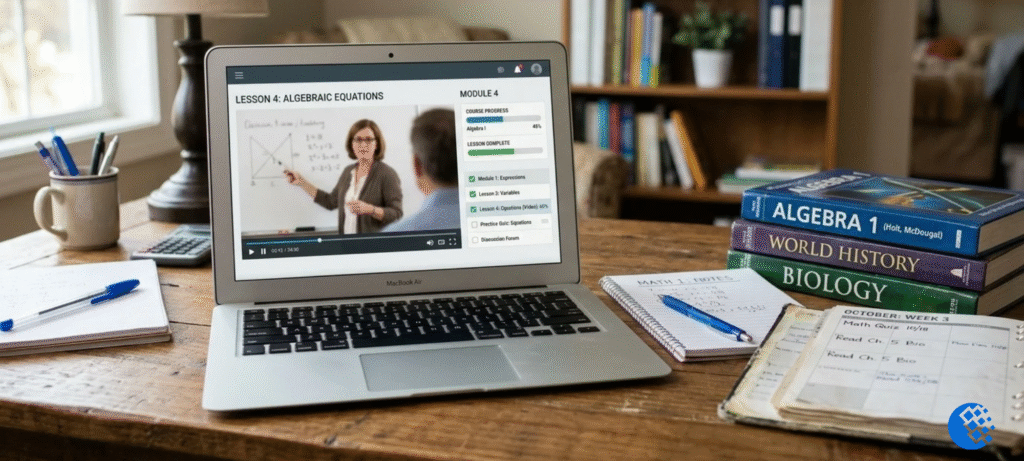
What is Edgenuity? Think of it as a website where a student sits down and does a school course online. Lesson videos, practice questions, quizzes, tests, all of it happens on a computer. It’s mostly used with middle and high schoolers. Some schools build whole programs around it. Others use it next to regular classes, and a lot of them turn to it when a student needs to make up a class they didn’t pass.
Maybe your school handed you a login and left it at that. No walkthrough, nothing. Or your teen said they were “doing Edgenuity,” you nodded, and then you waited for them to explain. Whichever sounds like you, this guide goes through what shows up on the screen, how the grading works, and the places where your school’s own rules matter most.
What Is Edgenuity and How Does It Work?
Edgenuity started life as E2020, short for Education 2020. It now sits under Imagine Learning. These days you’ll often see it called “Imagine Edgenuity,” which is how the company presents its online courses for grades 6 to 12. What a student actually gets depends on the program and on how the school has it set up.
On its own, the platform doesn’t really decide anything. That’s the school’s job, or the district’s. They pay for access first, and after that it’s up to them which student lands in which course, how long that student gets to finish it, and the way grades are counted. Once you’re inside a course, it’s pretty simple: one lesson after another. Teaching comes first, then practice, then a quick check before you move on. The order mostly stays put. But skipping ahead? Trying a quiz again? Heading back to older material? Whether any of that works depends on the course settings.
What Is Imagine Edgenuity?
It’s the name Edgenuity now goes by under Imagine Learning. Older handouts and school pages still say “Edgenuity,” while newer ones say “Imagine Edgenuity.” Don’t be surprised if the menus look a bit different from one school to another. That’s normal, because the version and the settings can vary.
Is Edgenuity a School or an Online Learning Platform?
A platform, not a school. Your student stays enrolled at their regular school, and the teachers who answer their questions work there too. Whether the course earns credit, and how that credit gets recorded, is also up to the school or district. Edgenuity just supplies the lessons and keeps track of the work.
What Is an Edgenuity Class in High School?
An Edgenuity class is a regular course, Algebra 1, Biology, English 10, but taught through a screen instead of by a teacher at a whiteboard. In high school, students mostly work through units on a laptop. Some sit in a computer lab. Some in an ordinary classroom. Some at home. A few schools set aside a fixed period every day, while others say work whenever you like, as long as you hit the weekly target.
Most courses include lesson videos, short readings, practice questions, and written responses, plus quizzes and unit tests. Some add labs or projects. What you end up with depends on the subject and on how the school configured it.
What Subjects Can Students Take?
All the main subjects are there: English, math, science and social studies. Plenty of schools also add electives, world languages and test prep, and a few bring in AP or career and technical courses through the same system. Here’s the catch, though. Students can only sign up for what their school has paid for. So the list at your school might be far shorter than the full catalog.
How Does Edgenuity Work for Students?
Picture a regular day. A student logs in, opens the course, clicks the next lesson. A video walks through the idea. They scribble a few notes, work through some practice questions, then sit a quiz. Pass it and the next lesson usually unlocks. Miss the mark and they’re often sent back to review before another try, though whether retries are allowed depends on the course settings.
That loop repeats across each unit. At the end comes a unit test, and those tests build toward a final or cumulative exam.
Video Lessons and On-Screen Teachers
Most lessons begin with a recorded teacher who explains the topic using slides, diagrams, and examples. The nice part is control. You can pause, rewind, or replay anything you missed. That helps a lot when your attention drifted for half a minute and the whole lesson stopped making sense.
Guided Notes, eNotes and Practice Activities
A lot of courses have a notes tool built in, so students can type while the video plays. Some teachers prefer handwritten guided notes instead, and a few will look at them or even grade them. That’s the teacher’s rule, not Edgenuity’s, so it’s worth asking what your teacher expects. And if note-taking still feels awkward, try the method in our Cornell notes guide. It helps you remember video lessons long after you’ve watched them.
Quizzes, Tests and Lesson Progress
A quiz checks whether the lesson sank in before you move on. A unit test does that for a bigger chunk of material. Teachers can see where each student is, how much time they’ve spent, and where the scores are low. Passing marks, retake limits, and what happens after a failed attempt are set by the school or the teacher. So two students in different districts can have very different experiences, even in the same course.
What Is Edgenuity Used For?
Schools use it in a handful of ways, and the reason behind each one is a little different.
Credit Recovery for High School Students
Honestly, this is the use you’ll run into most. A student fails a class or slips behind on credits, and the school can assign the Edgenuity version of that course. For eligible students, it’s one more way to finish the required coursework. How much work it involves and how credit is handled? The school sets all of that. Anyone searching for Edgenuity credit recovery is usually asking about exactly this. The school still decides which courses qualify, how many hours are expected, and whether the credit counts toward graduation.
Online and Blended Learning
Some schools run entire programs on it, with teachers supporting students from a distance. Others blend it in. Part of the work happens online, part in person with a teacher close by. The software doesn’t change either way, but the experience does, and quite a bit, depending on how much live teaching surrounds it.
Extra Coursework and Flexible Scheduling
Sometimes a school just can’t fit an elective into the day. Too few teachers, too many clashes on the timetable. Edgenuity gives them a way to offer the class anyway. Students use it to jump ahead, to make up ground they lost, or to keep up with school while sports practice, a part-time job, or a health issue eats into their week. Don’t read “flexible” as “anything goes,” though. Deadlines and pacing targets still count.
What Is Edgenuity for Students? Tools and Features
On the student side, Edgenuity is mostly one dashboard for the whole course, with a handful of helpful tools built in. They aren’t there to speed you through the lessons. They’re there so the material is easier to follow once you’re in it.
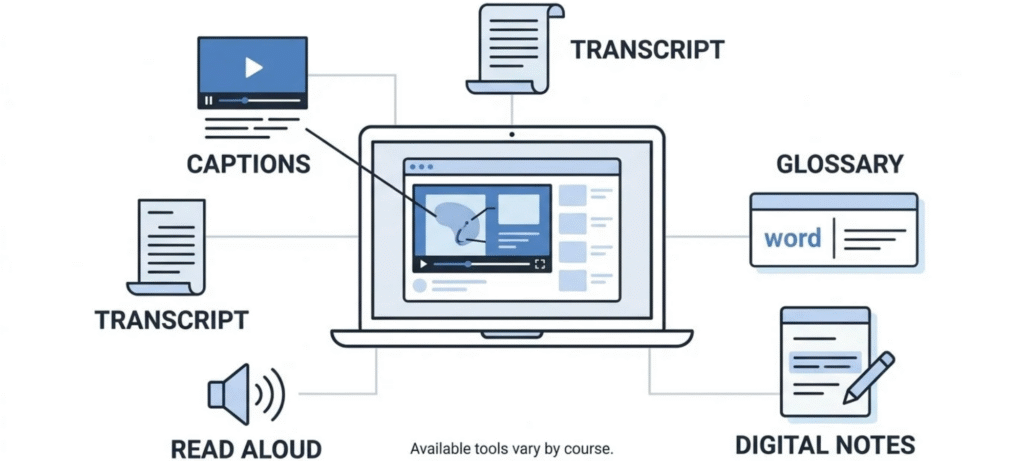
Read-Aloud, Captions and Transcripts
Many lessons offer captions, a written transcript, and read-aloud for text. They’re handy for students who like reading along and for students still building their English. They also help anyone who wants to double-check a word they missed in the video.
Glossaries, Highlighting and Digital Notes
Important terms often come with a short definition. Students can highlight text and keep digital notes, which makes reviewing before a test faster. The exact tools change by course and version. If you can’t find one, ask your teacher before assuming it isn’t there.
Is Edgenuity Self-Paced?
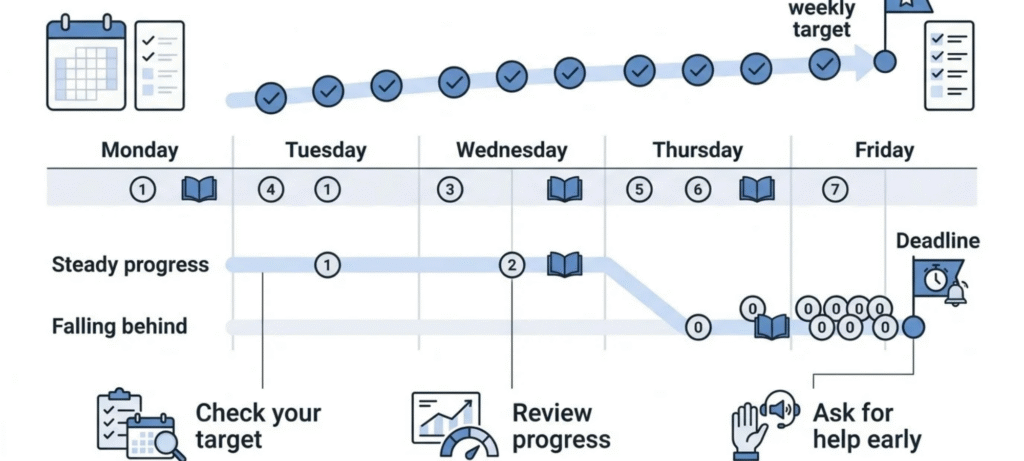
Partly. You choose how quickly you work through a lesson, how many times you rewatch a video, and when you sit down to study. But self-paced almost never means “no deadlines.” Most teachers set weekly goals or a final date for the course, and some schools also track attendance or time spent logged in.
The students who struggle most usually aren’t the ones who find the content hard. They read “self-paced” as “whenever,” fall behind by week two, and end up with a huge pile of lessons right before the deadline. Checking your progress against the school’s target every few days solves most of that. If you want more ideas, our post on tips for online learning that actually work has routines that fit this kind of course.
Benefits and Challenges of Edgenuity
Potential Benefits
Flexibility is the biggest one. Students can replay lessons, hold a steady pace, and patch up gaps left over from earlier years. When it’s credit recovery, it can get a student back on track faster than sitting through a full class again. And teachers see progress data without having to mark every small task by hand.
Common Challenges Students May Face
Learning from video asks for real self-discipline, and it’s easy to drift when nobody’s watching. Hours on a screen wear some students down. Others get stuck with no live teacher to ask, especially in math and science, where a single missed idea can throw off the next lesson. Then there’s home. Not everyone has a quiet corner or steady internet. It varies a lot, honestly. A student who thrives in one setup can struggle in another.
How Are Grades, Exams and Credits Handled?
Grades come from a mix of quiz scores, assignment scores, unit tests and exams, and each school weights them its own way. A few teachers add marks for notes, writing or participation too, on top of whatever the platform logs.
Ever wondered what a cumulative exam on Edgenuity actually is? It pulls questions from several earlier units. Why? To check whether a student still knows the material weeks later. Not just on the day it was taught. How long it runs and what the rules are depends on the course and the school.
Credit is where you need to check locally. A course finished on the platform won’t automatically be accepted by every school, since districts set their own approval and graduation rules. If the credit matters for graduating, go to the counselor and ask which courses count and what the passing requirements are. Then get it in writing. Want a quick refresher on how marks turn into GPA? Our high school grading scale guide covers it.
Is Edgenuity Right for Every Student?
Not really, and that’s okay. Students who are organized, comfortable with screens, and keen to catch up tend to do well. Students who need regular back-and-forth with a teacher, or who lose focus without structure, usually need extra check-ins. The software is only one piece. The support around it matters just as much. If you’re not sure, talk to the teacher early about pacing and help options. Don’t wait until a bad grade turns up in the grade book.
Frequently Asked Questions About Edgenuity
What is Edgenuity in high school?
It’s an online course platform that high schools use for regular classes, blended learning, and credit recovery. Students watch lessons, do practice, and take tests on a computer, while the school sets the rules.
What is Edgenuity used for?
Mostly credit recovery, online or hybrid courses, and extra electives a school can’t fit into its normal schedule. Some schools also use it for test prep or advanced classes.
What is an Edgenuity class like?
Expect recorded lessons, notes, practice questions, quizzes, and unit tests, usually in a set order. How much help you get depends on whether your school runs it in a classroom or fully remotely.
What is Edgenuity for students?
It’s a way to take a course online, with built-in tools like captions, transcripts, read-aloud, and definitions. Students can follow their own progress, and teachers can see it too.
Is Edgenuity self-paced?
Within limits. Students control how fast they get through each lesson, but the school or teacher still sets deadlines and targets.
What is a cumulative exam on Edgenuity?
It’s a bigger test that covers material from several units, or sometimes a whole semester. The format and passing score depend on the course settings.
Does Edgenuity count toward high school credits?
It can, but only if the school or district approves the course. Check with a counselor before counting on it for graduation.
What is the difference between Edgenuity and Imagine Edgenuity?
Mostly the name. Edgenuity is the original, and Imagine Edgenuity is how the courses are presented now that the product is part of Imagine Learning. Features and catalogs can differ by school.
Final Thoughts
So, what is Edgenuity once you boil it down? It’s a way for schools to deliver courses online, with videos, practice, and checkpoints that keep students moving. How well it works depends on the course, the teacher support, and the school’s own policies. The simplest first step is to ask your school how it’s set up. Students who keep up with the pacing and ask for help early usually get the most out of it.