

The massive push toward digital transformation has completely changed how companies handle their IT setups. Today, understanding how cloud computing essentials unlock benefits means you no longer have to pack a loud, hot closet full of expensive servers or pay crazy fees for a local data center. Instead, smart companies run everything right through the web to stay agile. Learning these core pillars allows modern brands to cut heavy upfront costs and scale daily workloads instantly. Ultimately, mastering these basic systems is the best way to secure data, boost workforce productivity, and build a highly resilient operation.
Traditional On-Premise IT vs. Modern Cloud Infrastructure
| Feature | Traditional On-Premise IT | Modern Cloud Infrastructure |
| Hardware Costs | Massive upfront spending on physical hardware | On-demand virtual servers with zero upfront cost |
| Maintenance | Annoying manual software patches and constant local IT labor | Automated security updates completely handled by the vendor |
| Capacity | Fixed, unyielding resource capacity (with a high risk of running out) | Instant scalability to spin resources up or down on the fly |
To strip it down to the absolute basics: cloud computing is simply renting out your tech resources—things like virtual servers, data storage space, databases, networking tools, and runtime software—over the internet. Once you get a solid handle on these baseline fundamentals, you can easily bypass those incredibly slow, bureaucratic corporate buying cycles and build an operation that can pivot instantly.
Understanding exactly how cloud computing essentials unlock benefits is how modern businesses manage to cut out heavy upfront hardware bills, scale their daily workloads on the fly, and lock down sensitive data with enterprise-grade security protocols without breaking the bank.
Cloud Computing Essentials: Quick Answer
Cloud computing simply gives you on-demand access to highly scalable tech resources—like data storage, virtual servers, databases, and business apps—entirely over the internet. When you master how cloud computing essentials unlock benefits, you position your business to slash capital expenses, scale systems instantly, deploy enterprise-level cybersecurity, and maintain completely unbroken continuity for remote teams across the globe.
Cloud Computing Essentials Explained
To really see why this is such a massive game-changer, just look at how frustrating old-school IT setups used to be. With a traditional on-premise setup, you have to physically buy the big boxes, wire up all the networking cables yourself, install operating systems by hand, and run the AC at full blast 24/7 just to stop the server room from melting down.
Cloud infrastructure completely hands that entire headache over to hyper-scale providers. They pull this off using a clever technology called virtualization. Basically, specialized software takes one massive physical server and splits it into dozens of completely isolated virtual servers. Each environment operates just like a standalone machine with its own independent operating system, making resource allocation incredibly efficient.
When you ditch local hardware for these distributed computing networks, your team gets highly secure access to remote computing power from absolutely anywhere. You aren’t stuck working at a specific office desk anymore. Your software lives inside a flexible ecosystem managed entirely through a standard web interface.
Understanding IaaS, PaaS, and SaaS
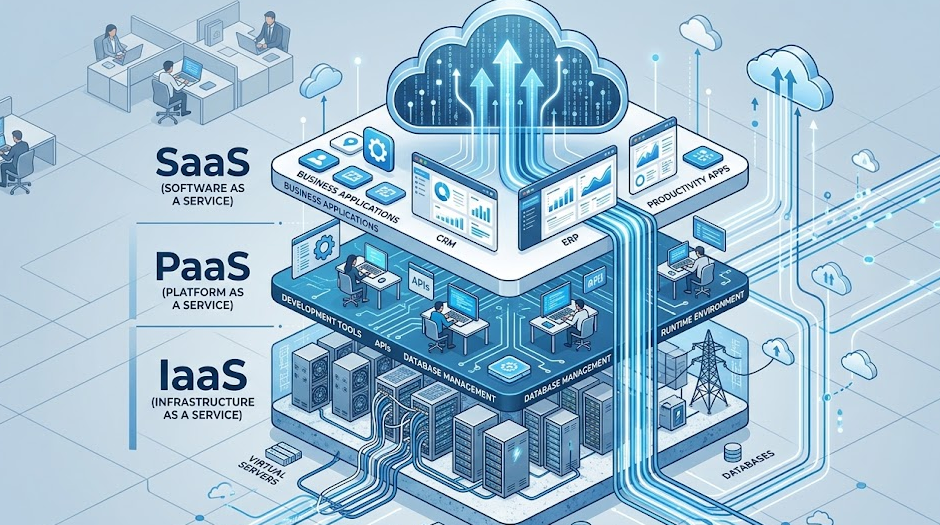
Cloud service models operate like a stack, which tech folks often call the Service Layer Matrix as defined by official industry standards. Each layer gives you a completely different level of backend control and setup freedom.
Infrastructure as a Service (IaaS)
Think of IaaS as renting a piece of empty digital real estate. Instead of going out and buying physical hard drives or network switches, you just rent virtualized computing power. Your internal team is still in charge of installing the operating systems, managing data, and setting up the apps, but the provider handles the job of keeping the underlying physical machines running smoothly.
- Major Platforms: Amazon Web Services (AWS), Microsoft Azure, Google Cloud.
- Best For: Running heavy database environments, hosting completely custom software, or building virtual network layouts entirely from scratch.
Platform as a Service (PaaS)
PaaS gives your development team a pre-configured workspace to play in. They don’t have to stress over server maintenance, operating system updates, or complex load balancing. The cloud provider handles all of that technical background noise, leaving your engineering team completely free to focus on writing and launching clean code.
- Major Platforms: Heroku, Google App Engine, AWS Elastic Beanstalk.
- Strategic Fit: This is the exact route growing tech teams take when outsourcing software development to get their products to market fast without building a deployment pipeline from the ground up.
Software as a Service (SaaS)
SaaS is fully built, cloud-native software that you log into straight from a standard web browser or mobile app. The vendor manages the base code, pushes out the latest updates, protects your user data, and makes sure the app stays online 24/7.
- Major Platforms: Salesforce, Google Docs, Gmail, Microsoft 365.
- Best For: Turning on everyday business operations instantly without dealing with annoying local software installations or manual version upgrades.
How Cloud Computing Essentials Unlock Benefits
When you actually align your real-world business goals with the right cloud management strategies, you completely bypass the annoying operational bottlenecks that tend to kill momentum in traditional IT environments.
Dynamic Business Agility
In an old-school IT world, launching a brand-new project meant waiting weeks for physical hardware to show up, get unboxed, and be configured by a specialist. Cloud services let your team spin up fresh testing environments in just a couple of clicks. This incredible flexibility keeps your workflows moving fast and seriously boosts everyday workforce productivity.
Structural Cost Savings
The cloud completely reworks your balance sheet by shifting your IT spend away from rigid capital expenditures (CapEx) over to flexible operational expenditures (OpEx). Instead of dropping thousands on physical gear that sits completely idle half the time, you pay a utility-style bill only for the exact storage and computing metrics you actually use.
Maximized Operational Efficiency
Smart automation takes those grinding, repetitive tasks completely off your internal IT team’s plate. Because your cloud host handles the hardware troubleshooting, power supplies, and routine software patches, your internal developers can finally stop acting as mechanics and focus heavily on building high-value business tools.
Top Benefits of Cloud Computing
The clear advantages of cloud migration make it obvious why modern brands are abandoning localized, on-premise servers:
- Lower IT Costs: Cuts down your physical overhead by completely removing the need for dedicated server rooms, expensive cooling setups, high electricity bills, and local maintenance techs.
- Elastic Scalability: Automatically ramps up your available resources during sudden traffic spikes (like a major holiday sale) and scales right back down when things quiet down so you never end up overpaying.
- Enhanced Security: Tier-one cloud providers pump billions into advanced digital defenses, continuous monitoring, and zero-trust security setups that easily beat a basic office firewall any day of the week.
- Reliable Disaster Recovery: Your critical files and business apps are mirrored across completely separate geographical datacenters, meaning your business stays online even if a bad storm knocks out your local power grid.
- Seamless Remote Access: Employees can log in securely from any device or location, which naturally supercharges real-time cloud collaboration and makes hybrid work completely effortless.
- Automatic Updates: Crucial security patches and software revisions happen automatically in the background, keeping you totally protected against hackers without interrupting your workday.
Public vs. Private vs. Hybrid Cloud
Finding the perfect cloud architecture means taking a close look at your budget, how much direct control you need, and your specific industry compliance rules.
- Public Cloud: You share digital space on massive, secure third-party infrastructure. It’s absolute gold for startups, standard web apps, and fast scaling.
- The Reality on Costs: Low (Pay-as-you-go setup, with absolutely zero hardware to buy).
- Private Cloud: An isolated, dedicated server network dedicated 100% to your business alone. It’s essential for strict data security or sensitive medical records.
- The Reality on Costs: High (You are paying a premium for total data privacy and completely custom setups).
- Hybrid Cloud: A smooth blend of public and private setups. Great for growing brands that need to keep core data highly locked down but still want to scale customer-facing apps easily.
- The Reality on Costs: Medium (Gives you the absolute best of both worlds).
Nailing down this specific setup early on is what delivers key competitive advantages of modern cloud software—especially when it comes to maximizing your budget, keeping your systems lightning fast, and building ironclad uptime.
Cloud Security Essentials
A lot of business owners worry that sending data offsite makes it easier for hackers to steal. But the reality is that major cloud datacenters are vastly more secure than a standard office network. Cloud security operates on a Shared Responsibility Model: the vendor locks down the physical buildings, hard drives, and base software, while your team controls who gets the keys, login tokens, and access configurations, hard drives, and base software, while your team controls who gets the keys, login tokens, and access configurations.
To protect their setups, scaling businesses rely on modern endpoint tools from industry leaders like Palo Alto Networks and CrowdStrike. A reliable defense strategy always relies on four core pillars:
- Data Encryption: Scrambling your files so they are completely unreadable while they travel across the web (in-transit) and while resting on a virtual drive (at-rest).
- Multi-Factor Authentication (MFA): Forcing users to confirm their identity through a secondary device before they can log into corporate applications.
- Identity and Access Management (IAM): Restricting user privileges so employees only have access to the exact folders and tools they need to do their job, and nothing more.
- Regulatory Compliance: Meeting strict data privacy laws (like GDPR, SOC 2, or HIPAA) using automated activity logging and structured cloud governance policies.
Industry Use Cases
Healthcare
Hospitals and medical clinics use cloud solutions to streamline electronic health records while keeping patient data incredibly secure. Moving over to the cloud allows medical groups to share imaging files across locations instantly and manage patient care in real time while maintaining total HIPAA compliance.
Finance
Fintech platforms and modern banks rely heavily on cloud systems to power fast digital banking options, run real-time fraud detection software, and process millions of everyday transactions securely. The high-speed processing power tracks down financial risks the exact second they happen.
Retail
E-commerce brands use the cloud to connect their web storefronts directly with backend inventory management software. When massive traffic waves hit during holiday sales, the cloud adjusts automatically to keep the site from crashing while using data analytics to forecast shipping needs.
Education
The massive rise in online learning platforms and virtual classrooms is completely powered by cloud networks. Cloud collaboration setups allow students to submit work, stream lectures, and collaborate on group projects from any device, keeping learning accessible everywhere.
Expert Insight: Why Cloud Migrations Fail
The Budget Trap
A lot of businesses actually lose money on the cloud because they fall into the classic “Lift and Shift” trap. Simply copying an unoptimized, legacy server setup directly onto a cloud environment means you’re just paying to run messy, non-optimized workloads 24/7.
The Fix: To get true value out of your tech spend, you need to build your systems using cloud-native applications and serverless computing. This specific architecture makes sure you only pay for resources when your code is actually running, instead of paying for a virtual machine that sits empty all night long.
Real-World Example
A growing online retail store migrated its inventory catalog away from a legacy server over to a modern public cloud setup. By switching from a fixed, always-on virtual machine to an automated serverless database, they cut their monthly infrastructure bill by 35% while increasing their peak checkout speeds by 400% during holiday promos.
Common Challenges and Solutions
- Vendor Lock-In: Getting so dependent on one cloud platform’s unique ecosystem that moving away down the road feels completely impossible.
- Solution: Build your software inside portable, open-source containers (like Docker or Kubernetes) so you can hop between cloud providers whenever you want.
- Data Privacy Concerns: Feeling uneasy about storing sensitive company data on shared public architecture.
- Solution: Go with a hybrid approach. Keep your most sensitive client records on an isolated private cloud, and run your public-facing apps on the cheaper public cloud.
- Surprise Cloud Bills: Developers can easily spin up expensive testing environments, walk away, and completely forget to turn them off, resulting in a shocking bill at the end of the month.
- Solution: Enforce strict automated rules, use clean cloud monitoring dashboards, and set up alerts that kill idle servers automatically.
How to Adopt Cloud Computing Successfully
Moving your business workflows into a cloud-native ecosystem requires a clear, step-by-step game plan to keep things from breaking:
- Step 1 (Infrastructure Audit): Run a complete audit of your current tech stack and calculate your exact hardware overhead costs.
- Step 2 (Workload Assessment): Figure out which applications and data workloads will run smoothest in a virtualized setting.
- Step 3 (Vendor Selection): Track down a reputable cloud vendor that perfectly matches your industry’s data compliance rules.
- Step 4 (Migration Mapping): Map out a clear migration pathway, choosing between a phased rollout or running systems in parallel.
- Step 5 (Protocol Training): Get your employees trained on basic cloud safety protocols, mandatory MFA, and security permissions.
- Step 6 (Cost Optimization): Keep a close eye on your live monitoring metrics to spot wasteful spending and optimize ongoing costs.
Sticking to this practical blueprint makes your cloud transition highly predictable, eliminates messy user downtime, and ensures you hit your return-on-investment targets quickly.
Frequently Asked Questions
What are cloud computing essentials?
Think of them as the foundational core pieces of modern cloud infrastructure. It really just boils down to understanding service layers like IaaS, PaaS, and SaaS, alongside deployment strategies like public, private, and hybrid setups. Together, they allow companies to ditch expensive local hardware and rent computing power over the internet instead.
What are the benefits of cloud computing?
The major perks are a massive drop in IT infrastructure overhead, the ability to scale your resources instantly up or down, ironclad cybersecurity setups, fully automated data backups, and a seamless environment for remote employees to work from absolutely anywhere.
What are the three main cloud service models?
You’ve got Infrastructure as a Service (IaaS) for raw, virtualized building blocks; Platform as a Service (PaaS) to give your developers a pre-configured workspace for coding; and Software as a Service (SaaS) for ready-to-use web applications like Microsoft 365 or Salesforce.
Is cloud computing secure?
Absolutely. Top cloud hosts inject billions into specialized data encryption and live security monitoring. Protection relies on a shared model: the host locks down the physical servers, and your internal team controls user access levels and turns on MFA.
Which cloud deployment model is best?
There isn’t a single winner; it depends entirely on your business. Public cloud is perfect for fast, affordable scaling; private cloud is mandatory for hyper-sensitive data and strict regulations; hybrid cloud lets you mix both strategies together seamlessly.
How do businesses benefit from cloud computing?
It completely changes how fast a company can move. Instead of waiting weeks or months to order and setup hardware, teams can spin up new platforms in seconds, slash operational spending, and give remote workers a fast, shared space to collaborate.
What is cloud migration?
It’s simply the digital moving process. You take your software apps, backend files, live websites, and core databases off an old, physical office server and shift them over onto a modern cloud platform.
What is cloud scalability?
It’s the digital equivalent of an accordion. Scalability allows your infrastructure to grow instantly to handle massive, unexpected traffic spikes (like a holiday sale) and shrink back down automatically when things quiet down so you never pay for idle space.
Conclusion
Grasping how cloud computing essentials unlock benefits is the ultimate key to modern enterprise growth, digital scale, and long-term data security. Trading in heavy physical servers for flexible, on-demand virtual resources helps your business stay nimble, cut out unnecessary operating costs, and keep your data protected behind the best cybersecurity defenses in the world.
A successful move to the cloud isn’t about rushing your files over onto someone else’s server overnight. It’s about matching your business goals with the right cloud models, backup pipelines, and security controls. Taking a balanced, intentional approach to your migration builds a faster, more reliable foundation that positions your business to win.