

StudentVUE Wyoming is the online student portal for Wyoming Public Schools in Wyoming, Michigan, not the state of Wyoming. Students use it to check grades, assignments, attendance and their class schedule in one place. Below is the official login link, plus everything you need for the app, GPA questions and common login problems.
StudentVUE Wyoming Login
Go to the official Wyoming Public Schools StudentVUE portal. The page is labeled “StudentVUE Account Access” with Wyoming Public Schools at the top, so you’ll know you’re in the right place.
How to log in:
- Open the StudentVUE portal link above.
- If you see a “Login via Google” button, use that. It’s the fastest option for most students.
- No Google option, or it’s not working? Enter the username and password your school provided.
- Click login and your dashboard will load.
If you never received login credentials, don’t guess. There’s no universal default password, and repeated wrong attempts can lock the account. Contact your school, or email pvue@wyomingps.org for activation and password issues. If you’d rather not wait on email, most district offices will also handle activation requests over the phone during school hours.
Wyoming StudentVUE Login: What You Need
- A district-issued student account (username and password), or
- A Google login, if your school has enabled it
- If neither works, contact the school office directly. They handle activation and resets, and can usually resolve access issues within a day or two.
It’s worth keeping your login details written down somewhere safe rather than relying on memory, especially early in the school year when students are juggling several new accounts across different platforms.
What Can You See in StudentVUE Wyoming?
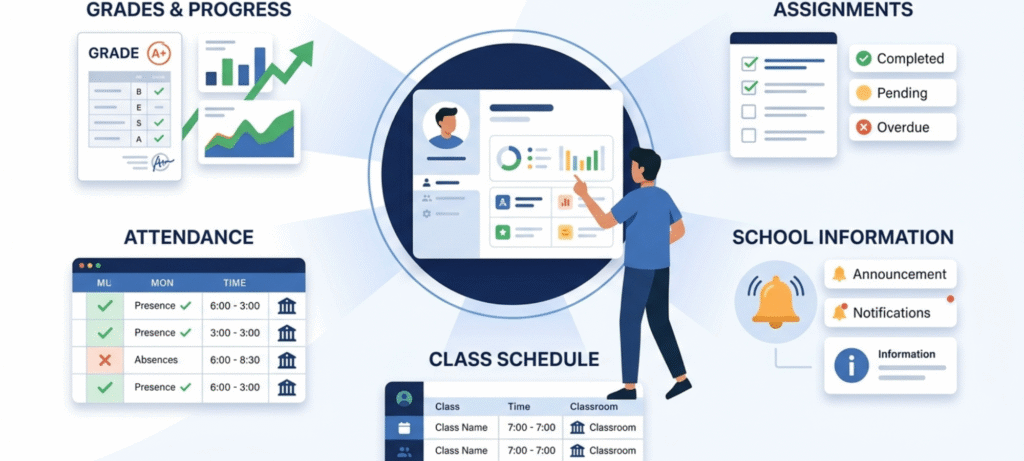
| Feature | What it shows |
|---|---|
| Grades | Current class grades and progress |
| Assignments | Scores and status per assignment |
| Attendance | Absences and tardies |
| Schedule | Classes, periods and teachers |
| School information | Announcements and enabled student details |
A grade in StudentVUE is only as current as your teacher’s last update. If something looks missing, it may just not be entered yet. Not every feature is turned on for every school, since Edupoint (the company behind the Synergy student information system that StudentVUE runs on) lets each district configure what’s visible.
If you’re trying to make sense of what a specific percentage or letter grade actually means for your overall standing, our high school grading scale guide breaks down how percentages typically map to letter grades and where cutoffs tend to fall.
How to See Your GPA in StudentVUE
This is one of the most common questions, and the honest answer is: it depends on your school’s setup.
Sign in and check your grades area and any academic information pages for a GPA field. If your school displays it, that’s where it’ll be. If you don’t see one, it doesn’t mean you don’t have a GPA. Schools calculate GPA differently (weighted, unweighted, cumulative), and some only show it on report cards or transcripts rather than in the day to day portal. Your counselor’s office can tell you exactly where yours is tracked and how it’s calculated.
If you’re aiming to bring your GPA up rather than just check it, our guide on how to raise your GPA walks through practical, low stress steps that actually move the number, rather than vague advice like “study more.”
StudentVUE Wyoming Mobile App
Wyoming Public Schools has moved to a new StudentVUE app. The older “Classic” version is no longer supported, so if you still have it installed, it’s worth replacing before it stops working entirely.
- iPhone/iPad: Search “StudentVUE” in the App Store.
- Android: Search “StudentVUE” in Google Play.
During setup, the app may ask for a district URL. Use: https://spportal.westmihosting.com/wps_pxp. If the app shows a different school’s login screen after you enter this, you’ve likely mistyped the URL or copied an old one from a bookmark. Delete the app’s saved district setting and re-enter it carefully.
One small tip: if you’re switching from the Classic app, uninstall it completely first rather than installing the new one alongside it. Having both on the same device sometimes causes login conflicts, especially on Android.
StudentVUE Wyoming Login Not Working?
- Wrong username/password. Retype carefully and check caps lock. If it keeps failing, contact the school rather than guessing repeatedly, since too many failed attempts can lock the account.
- Account never activated. The school office can activate it, usually the same day if you call rather than email.
- Google login won’t connect. Confirm you’re using the Google account linked to your student profile, not a personal one. Try another browser if the issue persists.
- Browser issues. Clear your cache, try a private window, or switch to a different browser entirely. This resolves more login problems than people expect.
- App not working. Update it, force close and reopen it, or use the web portal instead while you troubleshoot.
- Portal down. Sometimes it’s a temporary issue on the district’s side. Wait a bit and try again; if it lasts more than a few hours, let the school know.
- No grades showing. Teachers may not have posted anything yet. This isn’t an error on your end.
- Attendance looks wrong. Only the school can correct this, so reach out to the office with specific dates.
StudentVUE vs ParentVUE
| StudentVUE | ParentVUE | |
|---|---|---|
| Who it’s for | Students | Parents/guardians |
| Account | Student login | Separate parent login |
| Typical use | Checking your own grades, schedule, attendance | Following a child’s progress, registration tasks |
Wyoming Public Schools also uses ParentVUE for registration, which is why the two are often mentioned together. Parents and students each need their own separate account since the two portals show different levels of detail and different permissions.
Is StudentVUE Wyoming for Wyoming, Michigan?
Yes. This portal belongs to Wyoming Public Schools, located near Grand Rapids, Michigan, not the U.S. state of Wyoming. If you’re searching “studentvue wyoming mi,” you’re in the right place. This mix up happens often enough that it’s worth stating clearly: there is no statewide StudentVUE portal for the state of Wyoming. Each district runs its own separate instance of the system.
StudentVUE Wyoming for High School Students
High schoolers use the same core features as any other student: grades, assignments, attendance, schedule and, where enabled, GPA. There’s no separate high school only version of the app or portal. Access and which features are visible depend on how your specific school building has configured the system, so a senior at Wyoming High School might see slightly different options than a middle schooler in the same district.
High school students in particular tend to check GPA and transcript related information more often, since these numbers start feeding into college applications. If GPA isn’t visible in your account, that’s a good reason to reach out to your counselor early rather than waiting until application season.
StudentVUE Wyoming Teachers and Staff
Teachers and office staff enter grades and attendance through Synergy, the system behind StudentVUE, but they don’t use the StudentVUE login itself. That’s the student facing view only. Staff access happens through separate district tools built for grading and record management, which give them permissions students and parents don’t have.
Other Districts Near Wyoming, MI
If you’re enrolled in a nearby district, such as Kentwood, Godwin, Northview or Kelloggsville, each has its own separate StudentVUE portal. The Wyoming Public Schools login won’t recognize accounts from other districts, so make sure you’re using your own school’s portal link rather than the one in this guide.
Frequently Asked Questions
What is StudentVUE?
An online student portal that shows grades, assignments, attendance and schedules, built on the Synergy student information system.
How do I log into StudentVUE Wyoming?
Use the official Wyoming Public Schools portal, then sign in with Google (if enabled) or your district username and password.
How do I find my GPA in StudentVUE?
Check your grades and academic information pages. If your school displays GPA there, you’ll see it; otherwise, ask your counselor.
Why is StudentVUE not working?
Usually a wrong password, an inactive account, a browser issue, an outdated app, or a temporary portal outage.
Is StudentVUE free?
Yes. Access comes through your school district at no separate cost to students or families.
Can I use StudentVUE on my phone?
Yes, through the StudentVUE app (iOS/Android) or a mobile browser.
Is StudentVUE the same as ParentVUE?
No. StudentVUE is for students, ParentVUE is for parents/guardians, each with its own login.
Is Wyoming StudentVUE for Wyoming, Michigan?
Yes, it belongs to Wyoming Public Schools near Grand Rapids, not the state of Wyoming.
Final Thoughts
Log in regularly, check assignments before grades pile up, and don’t panic over a number that just hasn’t updated yet. If you’re using StudentVUE Wyoming, keeping an eye on your grades, attendance and assignments can help you stay on top of your schoolwork. For login or activation trouble, go straight to your school. pvue@wyomingps.org is the fastest route for account issues, and the office can usually sort out access problems faster than any troubleshooting guide.