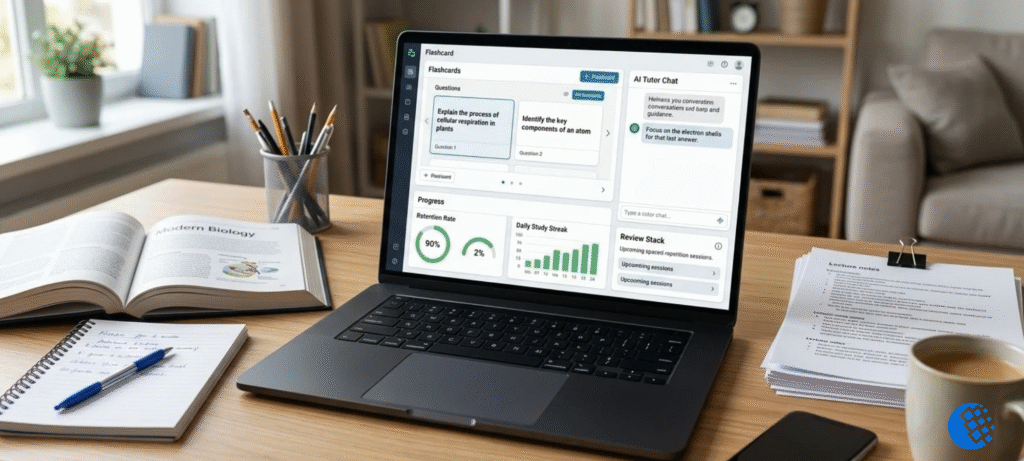

Picture a folder of forty PDFs and a week to get through them. You can’t read every paper closely, and you can’t ignore them either. Scholarcy is built for that squeeze.
Here’s what I cover in this review: what Scholarcy actually does, how to use it, what you get from each feature, the file types it takes, what’s included for free, and where it falls short. When a point comes straight from Scholarcy’s own documentation, I’ll say so. Sometimes its official pages contradict each other, and then I list both numbers rather than guess. One caveat up front: I didn’t run my own benchmark tests. Everything below comes from the official docs and published reviews, not from lab work of my own.
What Is Scholarcy?
Scholarcy is an AI summarizer built for academic reading. Feed it a research paper, report, book chapter or article and you get back a “summary flashcard”, a structured card that splits the paper into highlights, a summary, key terms, figures and tables, and references. The help guide says over 400,000 people have used it. Take that with a pinch of salt, since the number comes from Scholarcy itself.
Per a CASRAI guide, the company began in London back in 2018, and Texthelp Group acquired it in November 2024. If you’re digging through older reviews, that’s worth remembering. Tools often change quite a bit once a bigger company takes over.
CASRAI also explains how the summaries are made: extractively. In other words, Scholarcy doesn’t write new sentences. It pulls the important ones, plus key data, directly from the paper. The upside is that you can usually follow a summary point back to where it came from. The downside is that it sometimes picks the wrong sentence.
What Is Scholarcy Used For?
Mostly for triage. You have a list of search results and need to decide which papers deserve a full read. Students use it for coursework, researchers use it to screen literature, and anyone who reads a lot of dense text can use it to build a searchable personal library.
It isn’t a writing tool. Scholarcy’s FAQ says it can’t write your literature review for you, but it can help you read and synthesize a collection of papers and structure your thinking before you write.
How Does Scholarcy Work?
You feed it a document. It reads the text, identifies the structure and builds a flashcard. From there you read, check, annotate and export.
There are several ways in:
- Upload PDF, Word, PowerPoint, HTML, XML, LaTeX or plain text files.
- Paste the URL of an open-access article.
- Import from Dropbox, Google Drive, OneDrive or Zotero.
- Paste a YouTube or news article URL, or paste plain text.
- Use the browser extension (Chrome, Edge and Firefox are listed) on a page you already have open.
- Subscribe to an RSS feed inside a library folder, and Scholarcy turns each new article in the feed into a flashcard.
You can import up to 64 documents in one go, and you can start reading the first summaries while the rest process.
How to Use Scholarcy to Summarize a Research Paper
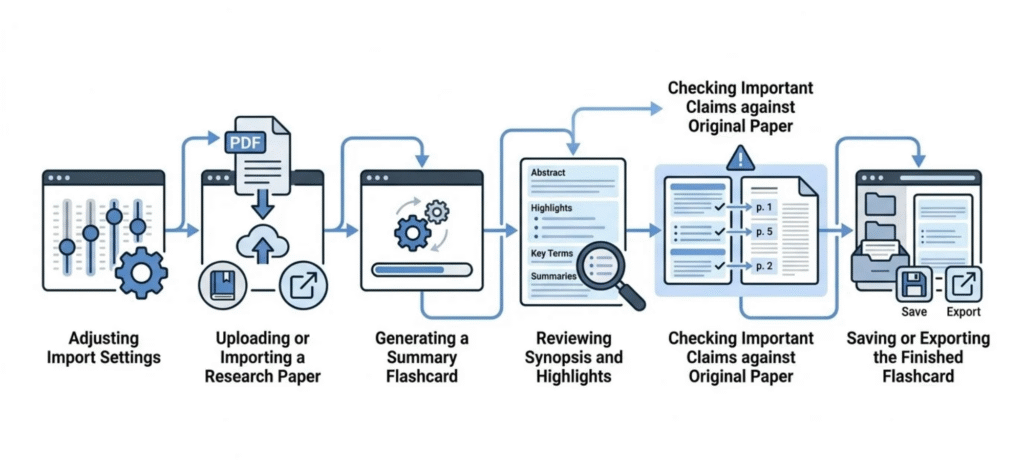
Here’s a workable routine based on how the official guides describe the tool:
- Set your import settings first. You can choose whether the article is summarized by section, set the length of the summary, choose the number of highlights and decide whether to extract figures and tables.
- Import the paper. Use the file upload, a link or the browser extension.
- Read the synopsis and highlights. Decide whether the paper is relevant to your question.
- Change the reading style if needed. The Enhance option offers School level, General reader, Bulleted list, Undergrad level, One liner and Researcher styles. You can also pick up to five keywords to steer the summary toward a topic.
- Check the claims that matter. Open the original and confirm sample size, method, results and limitations before you cite anything.
- Save, annotate and export. Save the card to your library, add notes, then export what you need.
If a PDF runs slowly, the FAQ suggests turning off image and table extraction and importing it again.
Scholarcy Features Explained
Summary flashcards. The main product. A single card gathers highlights, a summary and extracted details so you can scan instead of wading through pages. It works best when you screen many papers, because every card has the same layout.
Synopsis and enhanced summaries. The synopsis gives a narrative overview in accessible language. Enhanced summaries go into more detail and let you pick a reading style, which helps if you’re new to a field and want a plainer version first.
Highlights. Key points are surfaced automatically, and you can set how many to generate. Useful for quick skimming, but treat them as pointers, not conclusions.
Figures and tables. Extraction is switched off by default in both the Chrome extension and the web app. You turn it on in the import settings. It’s handy when you need a table, but it can slow processing.
Library, notes and collections. On the paid plan you can save flashcards, take notes, highlight and edit text, and organize cards into collections. The FAQ also mentions shared libraries and a way to find duplicates in your library.
Reference extraction and bibliographies. You can export references from one flashcard or several at once, and the paid plan adds one-click bibliographies.
Comparative analysis and literature matrix. The FAQ explains that you build a literature matrix by exporting a selection of flashcards to Excel. It puts papers you’ve already chosen side by side. It does not find papers for you, and it doesn’t replace a proper literature search or your own judgment.
Browser extension. Opens the flashcard in a window beside the article, so you stay on the page you were reading.
Supported File Types, Imports and Export Options
Scholarcy’s import guide lists PDF, Word, PowerPoint, HTML, XML, LaTeX and plain text. Cloud imports cover Dropbox, Google Drive, OneDrive and Zotero.
File size depends on your plan. The FAQ says the maximum import size is 11MB on a free account and 50MB on a premium subscription.
Long books are a problem. The FAQ says the underlying models were trained on academic articles and individual book chapters, not whole textbooks. Its own example makes the point: a 400-page textbook squeezed into a 400-word summary gives you about one word per page. Split a textbook into chapters and import them separately.
For exports, you can export up to 100 flashcards at a time in various formats, and free users export one at a time. Your files themselves aren’t kept: Scholarcy says imported files are deleted once processed.
Scholarcy Pricing in 2026: Free vs. Paid
Scholarcy free plan
The free Article Summarizer costs $0. It lets you import a range of file formats and export flashcards one at a time. How many summaries you get is where things get messy. Three official pages give three answers:
- The plan card on the pricing page says “Limit of 10 summaries.”
- The FAQ on that same page says up to 1 summary per day.
- The separate article-summarizer page says 3 articles a day.
I can’t tell you which one is current. If free access matters for a deadline, create an account and test it before you plan around it.
Scholarcy Plus (paid)
The paid plan adds unlimited summaries, enhanced summaries, saved flashcards, notes and highlights, collections, export of up to 100 flashcards at once, literature matrix creation and one-click bibliographies. It also raises the file limit to 50MB.
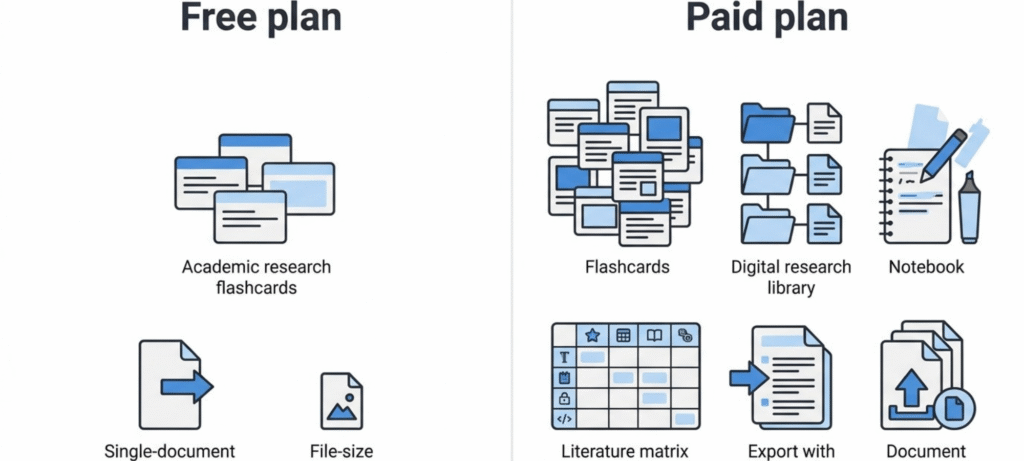
Scholarcy monthly and yearly pricing
There’s a monthly plan and a yearly plan, and the yearly plan is labelled with a 25% discount. The dollar amounts didn’t render when I fetched the official pricing page, which showed only “$/month” and “$/year.” Third-party sites list anything from about $4.99 to $9.99 a month, and CASRAI’s guide says roughly $9–$10 a month. Those numbers disagree, so I won’t give you one as fact. Check the checkout screen for the real price, currency and renewal date before paying.
Free trial and cancellation
The monthly plan starts with a 7-day free trial, then bills monthly, and you can cancel any time. Cancelling doesn’t delete your saved flashcards, and you can resubscribe later to carry on. One small thing from the FAQ: your card may show a £0 or £1 authorisation during the trial, which is a validity check that’s reversed within a day or two.
Institutional access
Scholarcy offers multi-user and institution licenses. If you’re at a university, ask your library first, because you may already have access.
Is Scholarcy Free, and What Are the Limits?
Yes, in a limited way. The free tier is built for trying the tool, not for running a literature review. Its limits are the summary allowance (unclear, as above), one-at-a-time export, an 11MB file cap and no saved library. If you summarize a few papers a month, it may be enough. If you’re working through dozens, plan on paying or on using your library’s license.
How Accurate Is Scholarcy? What to Check in a Summary
No summarizer is a substitute for reading. Before you rely on a card, check:
- The main finding. Make sure the highlighted sentence is actually the paper’s conclusion.
- Sample and method. Confirm who or what was studied and how.
- Limitations and caveats. These are the details most likely to get lost.
- Numbers. Compare any figure you plan to quote with the original.
A weak flashcard usually means the tool couldn’t read the text. The FAQ says an empty flashcard is typically caused by inaccessible text, for example a scanned book page.
Scholarcy Pros and Cons
Pros
- Fast first-pass screening of many papers.
- Consistent card layout across documents.
- Wide import options, including cloud storage, Zotero and RSS.
- Adjustable summary length, highlights and reading style.
- Literature matrix and bibliography export on the paid plan.
Cons
- The free allowance is unclear because the official pages disagree.
- The exact paid price isn’t visible on the official page I retrieved.
- Scanned PDFs and image-only files can produce empty or weak cards.
- It isn’t designed for whole textbooks.
- Paywalled articles can’t be pulled directly from a library link. The FAQ says Scholarcy needs access to the text, so you download the PDF and import it yourself.
- It isn’t a conversational tool, so you can’t question a document the way you can with a chat assistant.
Does Scholarcy Work With Non-English Papers?
Partly. The FAQ says Scholarcy can summarize articles in most European languages. The Highlights, Summary, Comparative Analysis and Full text stay in the original language. The Synopsis and enhanced summary modes are rewritten in English because of the third-party APIs it uses. So some competitors’ claim that the tool simply “struggles” outside English is too blunt, and an assumption that everything stays in the original language would be wrong too.
Is Scholarcy Safe for Academic and Unpublished Research?
Scholarcy says imported data is encrypted, that files are deleted after processing, that payments run through Stripe and that you can delete your account to remove your information, apart from data it must keep for legal reasons. It also says the browser extension passed security checks from Google, Microsoft and Mozilla.
For published papers, that’s reasonable. For unpublished manuscripts or anything covered by a confidentiality agreement, read the current privacy policy and terms yourself first, and check your institution’s and target journal’s rules on AI-assisted work. On paywalled papers, the FAQ says you can upload one without breaking copyright as long as you have legitimate access to it.
Scholarcy vs. ChatPDF, Elicit, SciSpace and NotebookLM
The right choice depends on the job. I haven’t verified current pricing for these tools, so check each site before you decide.
- ChatPDF suits readers who want to ask questions about a single PDF in plain language. It’s flexible, but it doesn’t give you a structured card for every paper. Our guide to AI PDF chat tools compared goes deeper on that category.
- Elicit is aimed at finding and comparing studies across a topic, so it fits the “what does the research say” stage more than the “summarize this file” stage.
- SciSpace is described by CASRAI as leaning toward a fuller literature-review workspace, with chat and discovery alongside summaries.
- NotebookLM is a better fit if you want to question a collection of your own sources conversationally.
Scholarcy’s niche is repeatable, structured summaries across a pile of papers you already have. For other tools students use alongside it, see our roundup of the best study apps.
Who Should Use Scholarcy, and Who Should Skip It?
A good fit: students and researchers who screen many papers, anyone building a personal library of summaries, and people who want a literature matrix without building it by hand.
Probably skip it if: you read a handful of papers a year, you want a chatbot to answer follow-up questions, or you mostly work with scanned documents or whole textbooks.
Frequently Asked Questions
What does Scholarcy do?
It turns papers and articles into structured summary flashcards with highlights, a summary, extracted details and references.
How do I use Scholarcy?
Import a file, link or cloud document, or use the browser extension. Read the flashcard, adjust the reading style if you need to, check key claims against the original, then save and export.
What is Scholarcy used for?
Screening and organizing research papers, mainly for students and researchers.
Is Scholarcy free?
There’s a free plan, but the official pages disagree on the summary limit (10 summaries, 1 per day or 3 per day), so test it yourself.
How much does Scholarcy cost?
The official page didn’t show dollar amounts when I checked. Third-party sources report roughly $9–$10 a month, with a discounted yearly plan. Confirm the price at checkout.
Can Scholarcy summarize PDFs?
Yes, as long as the text is accessible. Scanned, image-only PDFs can return empty flashcards.
Can Scholarcy summarize non-English papers?
Most European languages, yes. The Synopsis and enhanced summaries are rewritten in English.
Can Scholarcy write a literature review?
No. It can help you read, compare and organize papers, but it doesn’t write the review.
Does Scholarcy work with Zotero?
Yes. The FAQ and help guide say you can import papers from your Zotero library.
Can it summarize paywalled articles?
Not from a link. Download the PDF you’re legitimately entitled to and import it.
Is Scholarcy worth paying for?
For heavy readers who use the library, matrix and bibliography features, probably. For light use, the free tier or your library’s license may be enough.
Final Thoughts
Scholarcy does one job well enough to be useful: it helps you decide what to read closely. Treat a flashcard as a map, verify anything you plan to cite, and test the free plan before you pay. Because limits, plans and prices change, read the official Scholarcy FAQ once more right before you subscribe.