
A student sees “34% AI” on a report and panics. A teacher sees the same number and isn’t sure what to do with it. Both reactions are understandable, and both usually come from misreading what the number says. Turnitin AI detection is a real tool with real limits, and a percentage on its own is not proof that anyone cheated. This guide covers how the detector works, how accurate it is in 2026, what the scores mean, whether students can use it for free, and what to do if your own writing gets flagged.
What Is Turnitin AI Detection?
Turnitin AI detection is a feature inside Turnitin’s software that estimates how much of a submitted document was likely written by generative AI. It isn’t switched on for everyone. An institution needs a Turnitin Originality licence (or the AI writing add-on for iThenticate 2.0) and has to enable the feature. Instructors and administrators then see the result inside the Similarity Report.
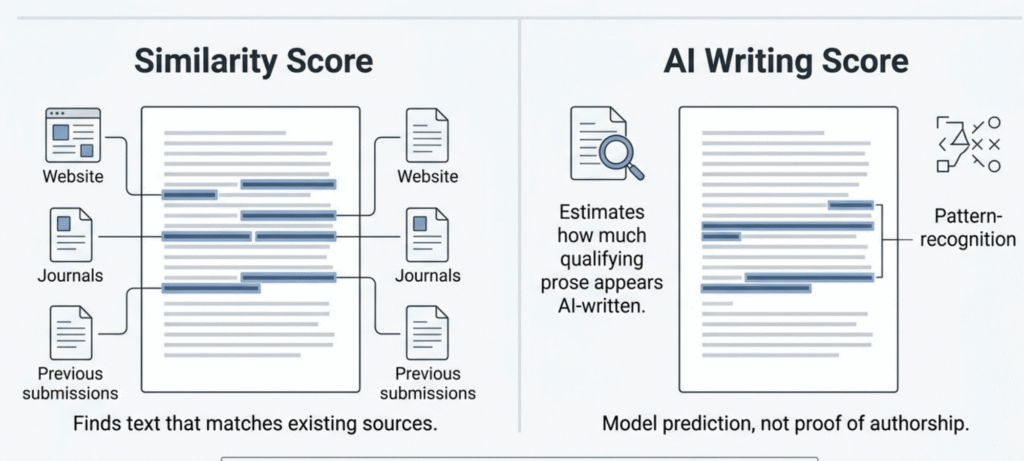
It’s easy to confuse with the plagiarism checker, but the two do different jobs. The similarity report compares your text against a database of web pages, journals and past submissions and shows where it matches. The AI writing report doesn’t look for matches at all. It looks at the writing itself and estimates whether the wording follows patterns typical of AI-generated text. A paper can have a 0% similarity score and still get a high AI score, or the other way around. Turnitin says the two scores are independent and don’t influence each other.
Turnitin presents the feature as an aid for educators, not a verdict machine. Its own AI writing detection model page and its guide on using the AI Writing Report both say the percentage shouldn’t be the sole basis for action against a student. In practice that means the report is supposed to start a conversation about academic integrity between teacher and student. It shouldn’t end one.
How Does Turnitin AI Detection Work?
Turnitin splits qualifying prose into overlapping segments, and its model gives each segment a probability of being human-written or AI-written. Each sentence takes the score of its segment, overlapping scores are pooled, and the result becomes the overall percentage. The report also estimates how much of the flagged text may have been run through an AI paraphraser or bypasser tool afterwards. Turnitin hasn’t published the full model, so nobody outside the company can describe the internals in detail, and anyone who claims to is guessing.
What Turnitin Says Its Model Looks For
Turnitin describes the idea in terms of word probability. Large language models tend to pick the next word that is highly likely, so their text comes out consistent and predictable. Human writing is more inconsistent and idiosyncratic, with odd turns of phrase, uneven pacing and the occasional awkward sentence. Turnitin says its model learns these patterns from training data rather than following hand-written rules, which means individual results can’t always be explained signal by signal. It also explains why the tool wants a decent stretch of text to work with.
For English submissions, Turnitin lists the specific models its detector can identify, including recent GPT, Gemini and Claude versions and tools built on them. That list changes, so check the current FAQ instead of trusting any article’s snapshot.
File, Word-Count and Language Requirements
Some practical limits come straight from Turnitin’s documentation:
- The document needs at least 300 words of prose in a long-form writing format and can run up to 30,000 words.
- Files must be under 100 MB.
- Accepted formats are .docx, .pdf, .txt and .rtf.
- Language support is limited, and Turnitin’s own pages don’t fully agree. The main AI writing FAQ lists English, Spanish, Japanese, Modern Arabic, Dutch, German and Turkish, while some help pages still list only the first four. AI paraphrase and bypasser detection works for English only.
- The model is built for long-form prose. It doesn’t reliably assess bullet lists, tables, annotated bibliographies, code, poetry or scripts.
That last point matters more than people think. A lab report full of tables and short answers gives the detector very little to judge, and the percentage and the highlights can end up disagreeing because only qualifying prose is counted.
How Accurate Is Turnitin AI Detection in 2026?
Turnitin says it aims to keep its document-level false positive rate under 1% for documents with over 20% AI writing. That figure comes from the company itself and shouldn’t be treated as an independent guarantee. It’s the best-documented number available, and it’s worth knowing exactly what it covers.
What Turnitin Says About Its Own Accuracy
Turnitin describes the under-1% claim as roughly one in 100 fully human-written documents being wrongly flagged. It says it tests this on more than 700,000 academic papers written before ChatGPT existed, before each update or new model release. It also says it accepts missing some AI text to hold that rate, so a document flagged at 50% could actually contain as much as 65% AI writing.
What the claim doesn’t tell you is how the tool behaves on a short essay with a low score. It also doesn’t mean 99 out of 100 flagged students are guilty. On fairness, Turnitin says it built its training data to include second-language writers and less common subject areas to reduce bias. I couldn’t find a published false positive rate broken out by language background, so treat any claim of identical rates for native and non-native writers as unverified.
The model has changed during 2026. Turnitin’s release notes list an update on 12 February 2026 that improved detection while keeping false positives low, and a Spanish-language update on 5 May 2026. Its FAQ also says the model was consolidated into a single model in July 2026, though that change wasn’t on the release notes page when I checked. One detail from those notes is easy to miss: reports generated before an update aren’t recalculated. To get a score from the newer model, the paper has to be resubmitted. If a result is being disputed, ask when the report was generated and whether the paper has been run again since the latest update.
Can Turnitin Flag Human-Written Text?
Yes. Every AI detector, Turnitin included, can flag text that a person wrote. Turnitin itself notes that false positives can involve writing without much structural variation, text that repeats itself, or text paraphrased without adding new ideas. Formal academic prose, heavily edited work and writing by someone who learned English through very structured instruction can all look “smooth” to a model.
Mixed documents are harder still. If a student drafts their own paragraphs and then uses an AI tool to tidy a few, the report has to draw a line through text that was never cleanly one thing or the other. Very short documents are the extreme case. Turnitin says that with only a few hundred words the prediction is mostly all-or-nothing, so a mix of AI and original writing can come back flagged as entirely AI.
So the realistic reading of accuracy is this: the tool is useful as one signal, more reliable at higher percentages than lower ones, and not strong enough to carry a misconduct case by itself.
Is Turnitin More Reliable Than Free AI Detectors?
Probably more transparent, but nobody can honestly say “more accurate” without independent head-to-head testing on the same set of documents, and that kind of testing is hard to find. What you can compare is access and accountability. Turnitin publishes documentation, explains what its score represents, and sells to institutions that can question it. Many free “Turnitin checkers” online do none of that. They give a number with no explanation, and as we’ll cover below, they aren’t Turnitin at all.
What Does a Turnitin AI Detection Score Mean?
The score is the percentage of qualifying text in your document that Turnitin’s model believes was AI-generated, or AI-generated and then modified by a paraphraser or bypasser. It’s a share of the text, not a measure of how sure the system is that you cheated. People get this wrong constantly.
Take a 1,000-word paper with a score of 40%. That doesn’t mean there’s a 40% chance the student used AI. It means roughly 400 words of qualifying prose were flagged as likely AI-written. The two readings lead to very different conversations.
Why Some Reports Show an Asterisk (*%)
When the result falls between 1% and 19%, the report shows an asterisk (*%) instead of an exact number, and it doesn’t highlight specific sentences. Turnitin made this choice because its testing found more false positives in that range, and a visible “8%” tends to get treated as evidence when it’s mostly noise. The asterisk is a deliberate warning that the number isn’t solid enough to act on. Reports generated before 8 July 2024 may still show a numerical score below 20%. For Turnitin’s own wording, see its guide on how to access the AI Writing Report.
You may also see a gray indicator with no percentage. That doesn’t mean “0% AI”. It means the submission couldn’t be processed, usually because it’s under 300 words of prose, in an unsupported language or format, or was submitted before AI detection was enabled. Resubmitting is the only way to score older submissions.
AI Score vs Similarity Score
| Report | What it shows |
|---|---|
| Similarity score | How much of the text matches sources in Turnitin’s comparison database |
| AI writing score | How much of the qualifying prose the model judges likely AI-written, or AI-written and then modified by a paraphraser or bypasser |
A high similarity score points to overlap with existing sources. A high AI score points to a writing pattern. Neither one alone proves misconduct, and they shouldn’t be added together or confused for each other.
Is Turnitin AI Detection Free?
Not for individual students. There’s no official way to create a personal account and scan any document you like, and there’s no official free way to check your own paper before you submit it. Access is licensed by institutions. Two questions get mixed up here, so it helps to separate them: whether you can run a free check, and whether you can see your teacher’s report. The second one is covered further down.
Can Students Get the Official Detector for Free?
No. The AI writing detector sits behind an institutional licence, and some Turnitin subscriptions don’t include it at all. If your school uses Turnitin, the AI check happens on the instructor’s side when you submit. The straightforward move for a student is to ask your teacher or your institution’s academic integrity office how AI detection is used in your course.
Are Free “Turnitin AI Checkers” Official?
No. Websites with “Turnitin” in the name, or ones promising a free Turnitin AI check with unlimited words, are third-party tools. A name proves nothing about what’s running underneath. Their scores come from their own models, which may behave very differently from the real thing.
There’s a privacy side too. When you paste an assignment into an unfamiliar site, you’re handing over your work. Before doing that, read the site’s privacy and data retention policy, and think twice about unpublished or confidential material. A number from one of these tools is not a prediction of what Turnitin will say. For comparison, Turnitin says its own AI check doesn’t feed papers into a separate repository, and that whether papers are added to its repository is an institutional choice.
What About Pricing and Licensing?
Turnitin sells to institutions through contracts, and those vary, so I couldn’t find a public price for AI detection that applies to everyone. According to Turnitin’s FAQ, AI writing detection comes with the Originality licence, and institutions that want it should talk to their account manager. If a website quotes you a “Turnitin AI detection price” or subscription fee for individuals, treat it with caution.
How to Use Turnitin AI Detection
In practice, only instructors and administrators use it. They open a submission’s Similarity Report, find the AI writing indicator, and review the percentage and highlighted passages.
How Instructors Access the AI Writing Report
In the new Similarity Report, instructors select the AI Writing tab in the top menu. In the classic report, the AI indicator sits in the right-hand toolbar, and selecting the percentage opens the report. From there they can see the overall percentage and, for scores of 20% and above, the highlighted passages. A blue indicator means the file processed, an asterisk means a result under 20%, and gray or red means it couldn’t be processed. Interface details change between versions, so Turnitin’s guide to accessing the report is worth a look.
Can Students See the AI Report?
Not directly. Turnitin states that the AI writing indicator and report aren’t visible to students. An instructor can download the report as a PDF and share it, so you’ll only see it if your instructor chooses to show you. If you want to understand a result, ask your instructor whether they’re willing to walk through it with you. Asking early, before a deadline, also helps you understand the rules your school is working under.
What Should You Do If Turnitin Flags Your Writing?
Stay calm, don’t rewrite your paper in a panic, and start collecting evidence of how you actually wrote it. A flag is a reason for a conversation, and you’ll be in a much stronger position if you can show your process.
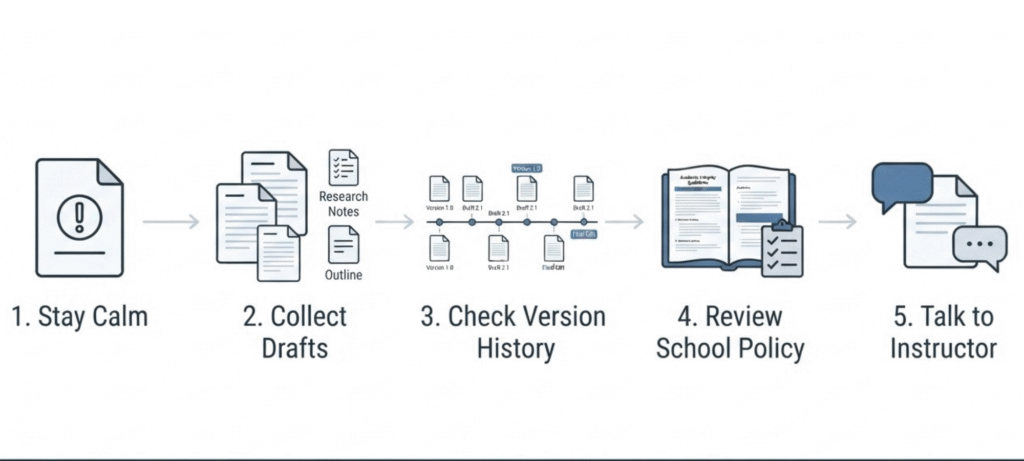
Here’s what helps in practice. Keep your outlines, early drafts, research notes and browser history for sources. If you write in Google Docs or Word, version history is often the best proof you have, since it shows a document growing over hours or days. Read your institution’s AI policy so you know what’s allowed. Plenty of schools permit some uses, like brainstorming or grammar checks, and prohibit others. Then ask your instructor to walk through the highlighted passages with you and be honest about how you wrote each part.
What not to do matters just as much. Searches like “how to bypass Turnitin” lead to paraphrasing tools and “humanizers,” and relying on them is risky. Turnitin says its English model also looks for AI text that has been run through paraphrasers or bypasser tools, so they don’t guarantee anything, and using them may breach your school’s rules anyway. Likewise, a clean score from a random free checker isn’t proof of anything. If your concern is using AI tools responsibly, our guide on how to use AI humanizers responsibly covers the policy and honesty side in more detail.
Turnitin AI Detection Updates and Limitations
The detector changes over time, and that affects how much weight any single report deserves. Turnitin’s release notes show updates in February and May 2026, with the model consolidated in July 2026 according to its FAQ. Reports run under earlier versions aren’t recalculated unless the paper is resubmitted, language support has shifted before and may again, and the tool still isn’t designed for code, tables, poetry or very short text.
If you’re reading older articles about accuracy from 2025, treat them as history. They describe an earlier version of the tool, and the most useful source on current behavior is always Turnitin’s own up-to-date documentation, including its AI writing detection FAQ. Our wider overview of AI detection tools and academic integrity looks at how these tools fit into school policy more broadly.
Frequently Asked Questions
Is Turnitin AI detection accurate?
It’s reasonably reliable at higher percentages and much less so at low ones. Turnitin aims for a false positive rate under 1% for documents with over 20% AI writing, but that’s the company’s own figure. Treat the score as one piece of evidence, never the whole case.
What AI detector does Turnitin use?
Turnitin uses its own transformer-based deep learning model, built into its Similarity Report. It isn’t a third-party detector, and it isn’t the same as the many websites that borrow the Turnitin name.
Does Turnitin detect ChatGPT writing?
Yes, it’s designed to. Turnitin’s FAQ lists specific models its English detector can identify, including recent GPT, Gemini and Claude versions, plus tools built on them. The list is updated over time, and detection is never perfect.
Can students check Turnitin AI detection for free?
Not through any official personal account. Access is licensed by institutions. Free sites that claim to be Turnitin checkers are third-party tools with their own models.
Can students see their AI writing score?
Not directly. Turnitin says the indicator and report aren’t visible to students, but instructors can download the report as a PDF and share it.
What does *% mean on a Turnitin AI report?
It means the result was between 1% and 19%. Turnitin hides the exact number and highlights because scores in that range are more likely to be wrong and easy to over-interpret.
Is the AI score the same as the plagiarism score?
No. The similarity score shows text matches against sources. The AI score estimates how much of the writing looks AI-generated. They’re independent and can disagree completely.
Does Turnitin update its AI detection model?
Yes. Its release notes list updates on 12 February and 5 May 2026, and its FAQ mentions a July 2026 consolidation. Earlier reports aren’t recalculated unless the paper is resubmitted.
Why is my Turnitin AI indicator gray?
A gray indicator means the file couldn’t be processed. Common reasons are fewer than 300 words of prose, an unsupported language or file type, or a submission made before AI detection was turned on. Resubmitting is the only fix for older submissions.
Does Grammarly trigger Turnitin AI detection?
Turnitin says ordinary grammar-checking edits were mostly not flagged in its tests. Content produced by Grammarly’s generative features, like drafting, paraphrasing or summarising, will likely be flagged.
Does Turnitin keep my paper after an AI check?
Turnitin says AI detection doesn’t send papers to a separate repository, and that adding papers to its main repository is the institution’s choice. Ask your school about its settings.
Final Thoughts
Turnitin AI detection can be a useful signal, but a percentage is only a starting point. It needs to be read alongside the assignment, the student’s drafts and the context of how the work was produced. If you’re a student, keep your process documented and know your school’s policy. If you’re a teacher, treat a flag as a reason to talk, not a conclusion. For anything high-stakes, rely on Turnitin’s current official documentation and your institution’s rules rather than third-party summaries, including this one.