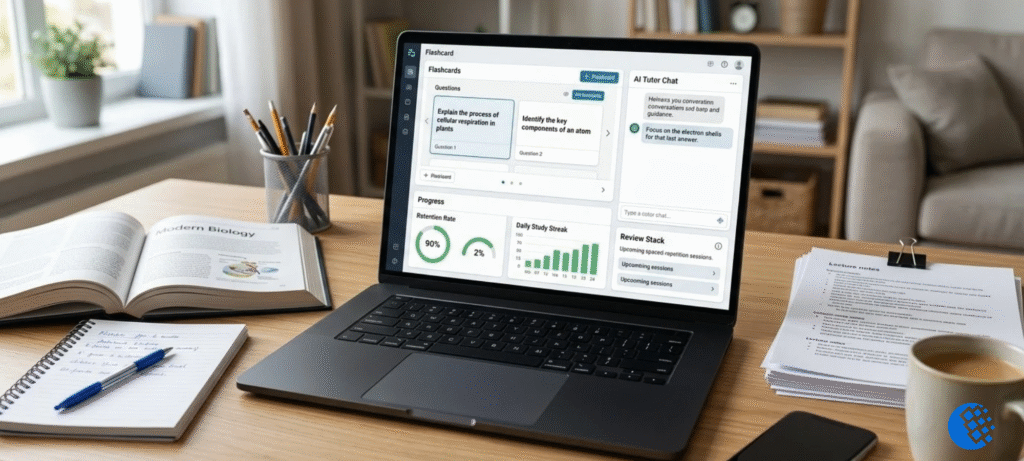

Solvely AI is more than a homework solver. Sure, you can snap a photo of a question and get a worked answer. But it also builds notes, makes flashcards, writes practice quizzes, and even helps with essays. Pretty much every stage of studying has something in it for you.
A long feature list doesn’t say much, though. What I wanted to know is whether those tools help you actually understand the material, or just hand over an answer so you can move on. So that’s how I tested it. Along the way I kept coming back to four things: how accurate it is, what it costs, what happens to your data, and whether a tool like this makes studying easier or just makes skipping it easier.
What Is Solvely AI?
Solvely AI is an AI-powered study and homework app. You can throw a question at it, build notes and flashcards, generate quizzes, or ask for an explanation in just about any subject. It lives on the Solvely website, in the mobile apps, and in a Chrome extension. That covers a proper study session at your desk, and it also covers those “wait, I’m totally stuck” moments halfway through homework.
Solvely says more than 10 million students use it. That’s the company’s own number and I can’t check it myself, so treat it as a claim, not a fact.
What Is Solvely AI Used For?
Most students use it for a handful of things:
- Homework help, especially in math and science
- Step-by-step explanations when a solution doesn’t make sense
- Turning lectures and files into notes
- Making flashcards for revision
- Generating practice quizzes before exams
- Getting help with essay outlines and citations
How Does Solvely AI Work?
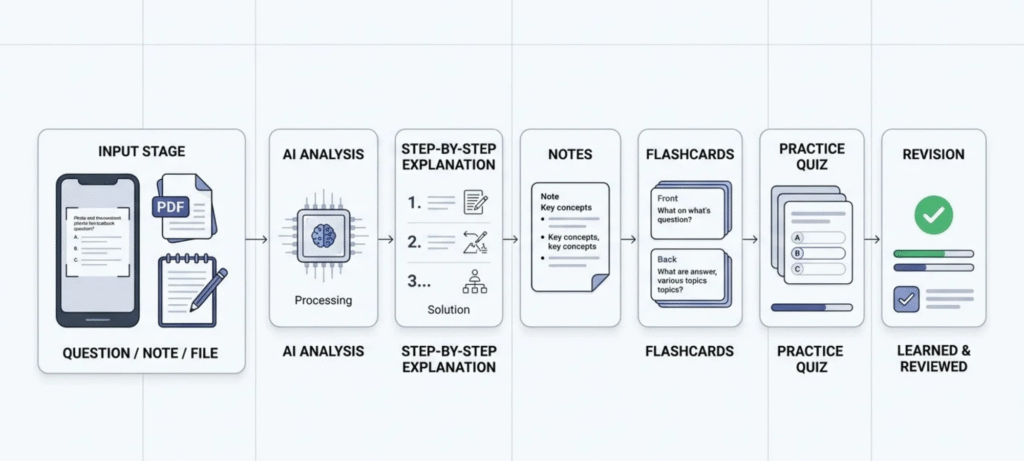
Forget the feature list for a second. Here’s what actually happens when you sit down and use it.
Start With a Question, Note or File
Say it’s 11pm and you’re staring at question 14. Take a photo of it. That’s really all Solvely needs to get going. A screenshot works too, or a PDF, or a lecture recording you never got around to rewatching. Your own typed notes are fine as well. Whatever you’ve got, just drop it in. No need to retype anything first.
Let Solvely Analyze the Material
Then it reads the thing and works out what you’re actually asking. With a math problem, it splits the work into steps. With a lecture, it pulls out the points that matter. One catch: the photo has to be decent. If you snap a blurry, tilted page with your thumb in the corner, don’t expect much back. A clear shot gets a clear answer.
Check the Explanation, Not Just the Answer
This is the step everybody skips. Don’t copy the number at the bottom and move on. Read how it got there. Does one line look strange? Ask about it. And if you can’t follow the logic, you haven’t learned the method yet, even if the final answer is correct. That bites you later, usually in the exam.
Turn the Material Into Study Resources
Once the solution makes sense to you, use it. Make notes from it, then flashcards, then a quick quiz, and come back to it a few days later for revision. That’s where Solvely AI is actually worth having, since a single question ends up giving you several ways to practice.
Solvely AI’s Main Study Tools
I’ll go through each tool the way a student would actually use it, including where it falls short.
AI Homework Helper
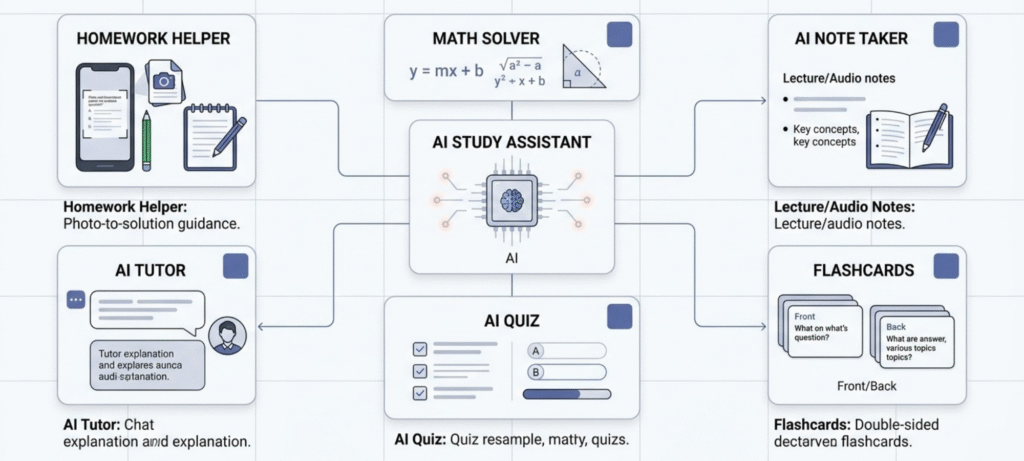
You photograph or screenshot a question and it walks you through the answer. It covers several subjects, so you’re not hopping between apps all evening.
Here’s my honest take. Getting an answer isn’t the valuable part, because answers are easy to find. The better move is to ask why it works, then try a similar problem on your own. If you can’t do it, you’ve borrowed the answer without learning anything.
Solvely AI Math Solver
Algebra, equations, calculus, word problems. It does them all and writes out every step. The real use is when you’re stuck in the middle of a problem. Lines one to three make sense, line four doesn’t, and seeing the jump spelled out gets you moving again.
Don’t take its word for everything. Steps can be wrong, and I mean actually wrong, not just “worded oddly.” If the work is graded, redo the important bits by hand. And if a test is coming, how to study for a math exam is worth a read too. The solver shows you how one problem works. That guide is about practicing until you don’t need the solver.
AI Note Taker
This one gets ignored, and I don’t get why. Give it a lecture, a YouTube video or an audio file. Out comes a transcript and a short summary of the main points.
How I’d use it: run the lecture through, read the summary, turn it into flashcards, then quiz yourself the next day. Way faster than sitting through an hour of video twice. It also patches the holes in messy notes. One catch, though. Transcripts get words wrong, and a wrong word you read three times starts to feel right. So check it against the lecture first.
Solvely AI Flashcards
Notes or files go in, flashcards come out. Takes a couple of clicks. Great for definitions, formulas, vocab, dates, any quick fact.
Big ideas? Not so much. “Why did that war start?” isn’t a card, it’s a paragraph. For stuff like that I’d skip the cards and just write a few lines in my own words. Knowing which topics need cards and which don’t is half the skill.
AI Quiz and Exam Preparation
You can generate practice questions and mock quizzes from your own material, which helps you spot weak areas before the real exam.
One thing to keep in mind. A generated quiz is retrieval practice, meaning you’re pulling the answer out of your own head. Scoring well on an AI quiz doesn’t prove you’ve mastered the topic.
Solvely AI Tutor: Can It Actually Help You Learn?
It can, if you use it the right way. It’s good at:
- Explaining a tough concept in plainer words
- Walking through a problem one step at a time
- Answering follow-up questions when the first explanation didn’t click
Here’s the trick: try the problem first. Get stuck, really stuck, and only then ask for a hint. Looking at the answer before you’ve struggled is where most people lose the benefit. If you use Solvely AI as a study tool, let the tutor be your second opinion on something you already had a go at. It should back up your thinking, not do it for you.
Is an AI Tutor a Replacement for a Teacher?
Nope. It can explain a topic, put it in different words, and talk you through a problem. What it can’t do is know your course. It won’t notice that you make the same sign error every single time, and it has no clue what your teacher wants to see in an answer. Teachers do that stuff without even thinking about it.
Is Solvely AI Accurate?
Often, yes. The explanations can be clear and correct. But sometimes it gets things wrong, so don’t take every answer as gospel. A lot depends on the subject and how tricky the question is. A fuzzy photo can throw it off. So can a question with missing details, or one that could mean two different things.
Where Accuracy Matters Most
Math and science calculations need the most care. Same goes for citations and any factual claim. All it takes is one wrong step in the middle, and the whole answer falls apart.
How Students Should Check an AI Answer
Four quick checks:
- Don’t stop at the result. Read the reasoning behind it.
- Redo the important numbers yourself.
- Look the answer up in your textbook or class notes.
- Try a similar question without any help.
Do that and most mistakes will show up. You’ll also remember the method better, which is the real point.
Is Solvely AI Good for Studying?
Mostly yes, depending on what you use it for. Here’s how it breaks down.
| Study task | How useful? |
|---|---|
| Quick homework explanation | High |
| Math problem walkthrough | High |
| Making notes | High |
| Flashcards | High |
| Practice quizzes | High |
| Exam revision | High |
| Understanding difficult concepts | Useful |
| Getting a final answer without learning | Poor use |
| Replacing teacher feedback | Not suitable |
The pattern is pretty clear. It’s strong when you use it to understand and practice. It’s weak when you use it to skip the work.
Is Solvely AI Free?
Solvely AI has a free way to try it, but fuller access usually sits behind a paid plan. That covers the two questions people ask most: is it free, and does it cost money.
What Can You Do for Free?
You can usually test the basics, like a few homework questions and some study tools, to see whether the app suits you.
What Requires a Paid Plan?
Heavier use, extra tools and higher limits generally need a subscription.
How Does the Solvely AI Subscription Work?
It’s a paid plan you sign up for in the app or on the website. Prices, plan names and limits change often, so I’m not going to quote numbers that could be out of date by the time you read this. Before you pay, open the official pricing page and check these things:
| What to check | Why it matters |
|---|---|
| What the free plan includes | So you know when you’ll hit a wall |
| Plan names and current prices | Prices change, old articles go stale |
| Billing period (monthly, yearly) | A yearly charge hits harder than you expect |
| Usage limits per plan | This is where the fine print lives |
| Free trial, if there is one | And what happens when it ends |
| Auto-renewal | Know this before you enter your card |
| Where you’re buying (website, App Store, Google Play) | It decides where you cancel later |
Is Solvely AI Unlimited?
That depends on the plan, and “unlimited” often comes with fine print. Read the limits on the official pricing page right before you subscribe instead of trusting an old article, this one included.
Solvely AI Extension: What Does It Do?
The Solvely AI extension adds the tool to Chrome. You can take a screenshot of a question on a page and get help without switching tabs. You’ll find it on the Chrome Web Store.
It’s most useful when you’re studying from something in your browser, like an online worksheet or a lecture page, and one question isn’t clicking. It isn’t meant for getting answers during a test. Many schools ban that, and using it that way can land you in real trouble.
Solvely AI App vs Website
Three ways in. Which one you pick depends on how you like to study.
Long session with documents? Website. Stuck on one question on your phone, or squeezing in some revision on the bus? App, on Android or iOS. Reading something in Chrome and don’t want to switch tabs? Extension.
Where to start? Website first. If you like it, add the app later. Just don’t assume every feature is everywhere. Same account, but the web version, the apps and the extension don’t all do exactly the same things.
Solvely AI Login
Only log in through the official site or the real app. Fake login pages are an easy way to lose a password, and they usually hide behind random links. Can’t get in? Check your email and password first, then your internet. After that, update the app or browser. Still nothing? Talk to support.
Is Solvely AI Safe and Legit?
Two questions here, so I’ll take them one at a time.
Is Solvely AI Legit?
Looks like it. Solvely has an official website, phone apps and a Chrome extension, which is more than a throwaway tool usually bothers with. But that only proves the product is real. It doesn’t mean every answer it spits out is right. And it doesn’t mean your school is okay with you using it.
Solvely also says over 10 million students use it. That’s their number, not one I’ve checked. I’d read it as a claim.
Is Solvely AI Safe?
It depends what you’re asking. On privacy, I’d keep anything personal or confidential out of it. Unless you’re comfortable with how Solvely handles your uploads, don’t send them. Before you drop in coursework, take two minutes to read the current privacy policy. It’s boring, but it’s worth it.
Then there’s accuracy. The explanations can be helpful, but AI still makes mistakes, so don’t switch your brain off. And on the school side, check what your teacher or institution says about AI help. Some classes allow it, some don’t.
So “safe,” “correct” and “allowed” are really three separate things. Solvely can be a real, trustworthy company and still give you a wrong answer. It can also be banned for one particular assignment.
Solvely AI Detector and Humanizer
Solvely has both an AI detector and a humanizer, and people mix them up. They don’t do the same job.
The detector looks at a piece of writing and guesses whether an AI wrote it. A guess is all it is. It can’t prove who wrote what, and it gets things wrong both ways, flagging human writing and missing AI text.
The humanizer goes the other direction. It rewrites text so it reads more naturally, which can help if your own draft sounds stiff.
Should Students Use a Humanizer to Hide AI Use?
No. A humanizer shouldn’t be a way to disguise AI-written coursework. Your school’s AI rules are what count. Tools like Turnitin run their own systems too, so don’t assume rewording makes AI use invisible. If AI help is allowed, be open about it. If it isn’t, don’t use it.
If you want to use these tools the right way, use the humanizer to improve writing you actually did yourself.
Solvely AI Reviews: What Do Students Need to Consider?
You’ll see plenty of star ratings online. I won’t invent one. Here’s my read instead.
What looks strong
- A broad study toolkit in one place
- Screenshot solving
- Notes, flashcards and quizzes that connect to each other
- Mobile, web and extension access
- Support for many subjects
Where students should be careful
- AI answers can be wrong
- It’s easy to lean on it too much
- Subscription limits matter
- Quality of generated content varies
- Academic integrity rules still apply
- Detector and humanizer results aren’t proof of anything
How to Use Solvely AI Without Letting It Do the Learning for You
This is the part I care about most. A good method turns Solvely from an answer machine into a study helper.
- Try the problem yourself first. Even if you get stuck, the attempt helps.
- Ask for a hint or an explanation, not the full solution right away.
- Compare its reasoning with yours. Where did you go wrong?
- Close the tool and solve it again from memory, no peeking.
- Turn your mistakes into flashcards or quiz questions.
- Review them a few days later.
When Solvely AI Is Useful, and When It Isn’t
Good uses
- You’re stuck on homework
- You want to check a calculation
- You’re revising from your notes
- You need practice questions
- You want a lecture summarized
- You’re building flashcards
- A concept just won’t make sense
Poor uses
- Copying answers
- Submitting AI-generated work as your own when your course rules don’t allow it
- Trusting calculations without checking them
- Using it during an exam where it’s banned
- Skipping practice
How to Cancel a Solvely AI Subscription
Where you cancel depends on where you signed up.
- Apple App Store: cancel in your Apple subscription settings.
- Google Play: cancel in your Google Play subscription settings.
- Website: log in and look in your account or billing settings. If you can’t find a cancel option, contact support.
Menu names change, so check the current steps in the app or on the site. Also, cancelling isn’t the same as deleting your account. Cancelling normally just stops future payments.
How to Delete a Solvely AI Account
Cancel any active subscription first. Then look for a delete option in your account settings. If you can’t find one, ask support to delete the account for you. Think about your saved notes and flashcards before you confirm, because deleting may be permanent.
Solvely AI Customer Service
For account, billing or technical problems, contact Solvely through the support option on its official website or inside the app. Don’t go through third-party sites. When you write in, include:
- The email on your account
- What happened, and when
- Whether it’s a billing, subscription, technical or account issue
- A screenshot, if you have one
That gets you a faster answer.
Solvely AI Pros and Cons
Pros
- A wide toolkit for studying
- Screenshot-based homework help
- Math and science support
- AI notes and flashcards
- Quiz generation
- AI tutor
- Works on web, mobile and as an extension
Cons
- AI answers still need checking
- It can push you toward answer-first habits
- Free and paid limits matter
- A humanizer won’t protect you from academic integrity rules
- So many features can make the app feel busy
Solvely AI Alternatives
If Solvely doesn’t fit, other tools do some things better. Pick based on what you actually need, not on who lists the most features.
| Alternative | Best for |
|---|---|
| Quizlet | Flashcards and study sets |
| Photomath | Step-by-step math help |
| Khan Academy | Learning concepts from scratch |
| Knowt | Notes, flashcards and revision |
| Wolfram Alpha | Tough calculations |
If you just want to learn a topic properly from the ground up, Khan Academy is hard to beat. Solvely makes more sense when you want several of these jobs handled in one place.
FAQ
What is Solvely AI?
It’s an AI study and homework platform that solves questions, makes notes and flashcards, and creates quizzes.
Is Solvely AI free?
There’s a free way to try it, but fuller access usually needs a paid plan.
Is Solvely AI legit?
It appears to be an established product with an official site, apps and an extension. The 10 million student figure is the company’s own claim.
Is Solvely AI safe?
Be careful with what you upload, and check answers for accuracy. Safe and accurate are different things.
Is Solvely AI good for studying?
Yes for homework help, notes, flashcards and revision. Not for skipping the learning.
How accurate is Solvely AI?
It varies. Always verify important steps, especially in math and science.
How does Solvely AI work?
You give it a question or file, it analyzes it and explains it, and you can turn the result into notes, flashcards and quizzes.
How do you use Solvely AI?
Try the problem first, ask for a hint or explanation, then practice again on your own.
Does Solvely AI have a math solver?
Yes, with step-by-step solutions.
Does Solvely AI have a Chrome extension?
Yes, you can find it on the Chrome Web Store.
Does Solvely AI have an AI tutor?
Yes, but it doesn’t replace a real teacher.
Does Solvely AI work with PDFs?
It can work with study material like PDFs, for things such as summaries, flashcards or quizzes, depending on the feature and your plan. Check what’s currently supported before relying on it.
Can I use Solvely AI on my phone?
Yes. It has mobile apps for Android and iOS, along with the web version.
How much does Solvely AI cost?
Check the official pricing page, since plans and prices change.
How do I cancel my Solvely AI subscription?
Cancel in the store or account where you subscribed. Deleting your account is a separate step.
Why is Solvely AI not working?
Refresh the page, update the app, check your connection, try another browser or device, and contact support if it keeps happening.
Does Solvely AI have an AI detector and humanizer?
Yes, but detection is only an estimate, and a humanizer shouldn’t be used to hide AI-written coursework.
Final Verdict
For students, potentially yes. Solvely AI is strong for homework help, useful for math explanations, and good for revision, because notes, flashcards and quizzes connect in a natural way.
But it isn’t a replacement for learning. It isn’t a replacement for teachers. And it isn’t a way to hide AI-written assignments. Use it to understand things, practice them, and check yourself, and it can save you real time. If you want more on building habits like that, this post on how to study smarter, not harder goes deeper.