
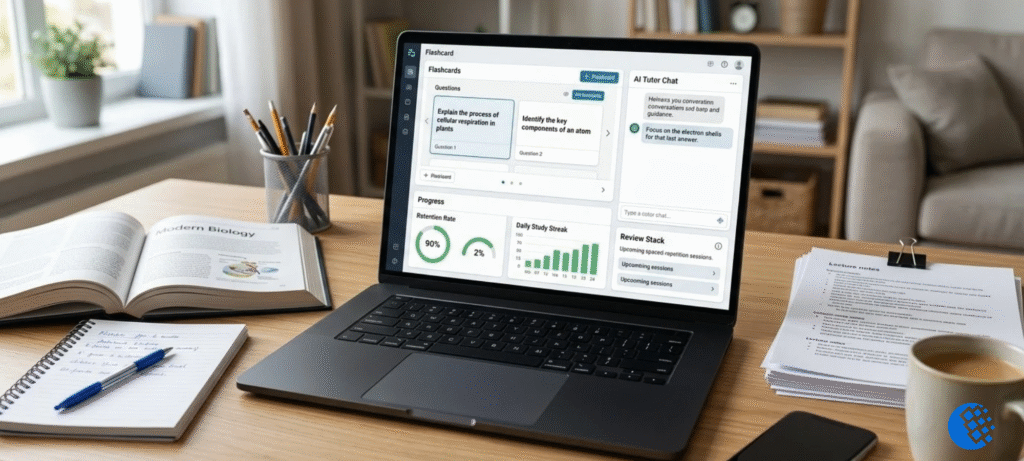
Gizmo AI looks like a flashcard app when you first open it. That’s what most people call it. But it does a bit more than that. You throw in a PDF, a YouTube link, some slides or your messy class notes, and it turns them into flashcards and quizzes. After that it keeps showing you the cards you keep getting wrong.
Now, AI making flashcards isn’t new. Lots of apps do it. What I wanted to know is whether Gizmo makes studying easier in real life, whether the tutor is worth bothering with, what you actually get for free, and whether the game stuff helps or just gets in the way. So that’s what I’ll cover here.
What Is Gizmo AI?
Gizmo AI is a study app. You give it your own material, and it makes flashcards and quizzes out of it. Then it schedules your reviews using active recall and spaced repetition. There’s also an AI tutor, streaks, XP, live quiz games and a big library of public decks. You can use it on the web, iPhone or Android.
If you want a simple picture, imagine a helper who makes the cards for you, plus a game that nudges you to come back tomorrow. The helper kills the boring work. The game keeps you showing up.
What Does Gizmo AI Actually Do?
Say it’s the night before a biology test and you’ve got a 40-page PDF. Normally you’d lose a couple of hours writing cards, and by the end you’re too tired to learn anything. With Gizmo, you upload the PDF and it drafts a deck. A few minutes later you’re already quizzing yourself.
It takes a lot of different inputs:
- PDFs and PowerPoint slides
- YouTube videos and web pages
- Typed notes
- Photos of handwritten notes
- Decks from other apps like Quizlet or Anki
How Does Gizmo AI Work?
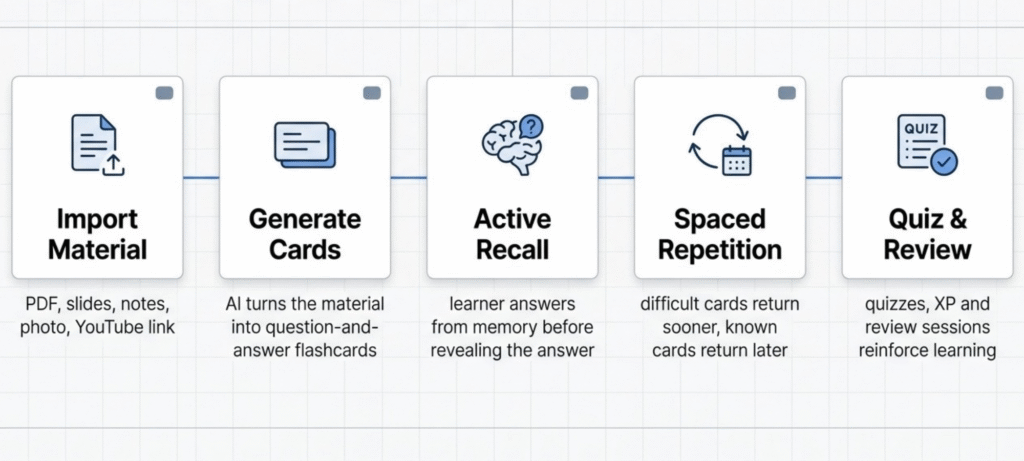
A lot of reviews just list features. I think what you really want to know is what happens when you sit down and use it. It comes down to five steps.
1. Add Your Study Material
You pick something to import, like a file, a link or a photo of your notes. Gizmo calls this “magic import.” My advice: use your own class stuff first. Cards built from your teacher’s slides will match your exam far better than a random deck off the internet.
2. Gizmo Creates the Flashcards
The AI reads what you gave it and writes question-and-answer cards. You can usually see your source on one side and the cards on the other, so you know where a card came from.
3. You Review With Active Recall
Most people skip this part when they study from paper notes. You read the question, try to answer from memory, and only then look at the answer. Yes, it’s a bit uncomfortable. That’s exactly why it works. Just rereading your notes feels productive, but you don’t remember much afterwards.
4. Spaced Repetition Brings Cards Back
Get a card wrong and it comes back soon. Get it right a few times and it shows up less often. It’s based on spaced repetition, which spreads your reviews out over days instead of cramming them into one night. And you don’t have to plan any of it yourself, which is honestly the best part.
5. Quizzes and Game Features Keep You Going
There are quiz modes, XP, streaks, leaderboards and a lives system. It all makes studying feel a bit like a game. Some people love that. Others find it annoying. I’ll get to that further down.
Gizmo AI Flashcards: How Good Are They?
Flashcards are the main reason anyone uses Gizmo, so they need a closer look.
Turning PDFs Into Flashcards
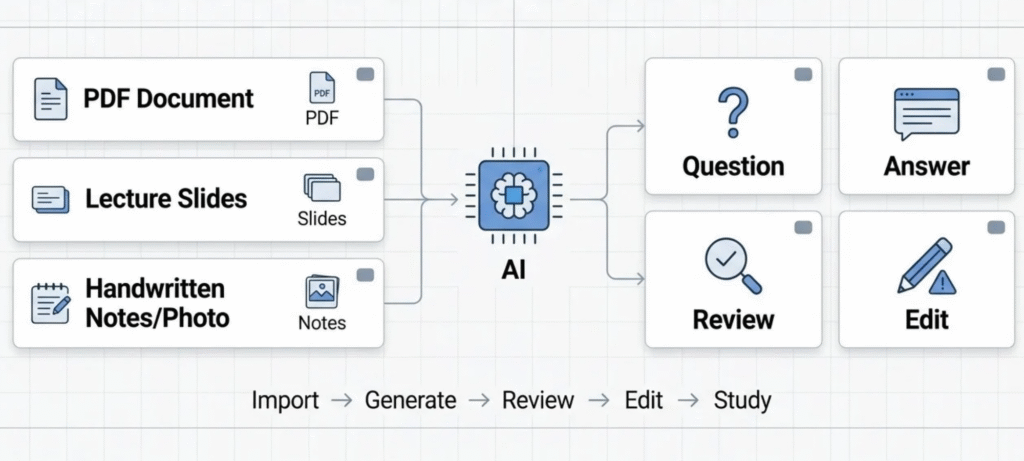
This is the big feature. It works best with clean files that are mostly text, like lecture notes or chapter summaries. If your PDF is a scan, or packed with diagrams, or slides that are basically pictures, the AI has less to work with. The cards come out weaker.
Flashcards From YouTube Videos
Paste a lecture link and it builds a deck from the video. That’s handy for recorded classes or long explainers you don’t want to watch twice. One warning though. The cards are only as good as the video. If the speaker rambles, the cards ramble too.
Notes, PowerPoints and Web Pages
Typed notes and slides work the same way. If your teacher posts slides before class, you could have a rough deck ready by the time the lesson ends.
Can You Edit AI-Generated Flashcards?
Yes, and you really should. You can fix the wording, delete bad cards and write your own from scratch. Treat what the AI gives you as a first draft, nothing more.
Public and Shared Decks
Gizmo also has a huge library of public decks. They’re great when you need a quick start on a common topic. Just remember that anyone can post one. A public deck hasn’t been checked by your teacher.
The catch: AI cards aren’t perfect. Sometimes a card makes an idea too simple, or leaves out an important exception. If it’s something high-stakes like medicine, chemistry or law, check the key cards against your textbook before you trust them.
Gizmo AI Tutor: What Can It Help With?
The tutor is the second big piece. It can explain a hard concept in plainer words. It can walk you through a homework problem one step at a time. It can help you work out an exam question, and it’ll answer follow-ups when the first explanation didn’t make sense.
That last bit is where it’s most useful, I think. A textbook can’t explain itself a second way. A tutor can.
Is the Gizmo AI Tutor a Replacement for a Teacher?
No. It’s more like a study helper you can reach at 11 pm. It can explain things and point you the right way, but it can also be wrong, and it has no idea how your teacher grades. Your course material is still the final word. If the tutor and your textbook disagree, go with the textbook and ask your teacher.
Gizmo AI Study Features: What’s Actually Worth Using
Let’s be honest, most app features are just decoration. A feature is only useful if it changes how you study. So here are the ones that do.
Active recall is the real engine here. Quizzing yourself works way better than reading your notes for the fifth time. Want the reasoning? This post on retrieval practice breaks it down nicely.
Spaced repetition picks what you should look at next. That means no more wasting time on cards you’ve already got down.
AI-generated quizzes are handy when flashcards start feeling samey. Sometimes you just need a different format to stay interested.
Streaks and XP can get you into a routine, and that’s useful. But keep an eye on yourself. If you’re only tapping through easy cards to save a streak, the game is winning and you’re not learning much.
Live and multiplayer quizzes are a good time with friends. Great for energy, not so great for deep learning. I’d use them as a warm-up or a break, not as your main way to study.
So, does gamification really help? For some people, yes. They end up studying more often, and that matters. It only works, though, if the time goes into the right material.
Is Gizmo AI Good for Studying?
Mostly yes, with some limits. It depends on what you’re studying.
| Situation | How well it fits |
|---|---|
| Exam revision | Strong |
| Memorizing facts and definitions | Strong |
| Vocabulary and languages | Strong |
| Medical and science recall | Useful, but verify cards |
| Homework explanations | Useful |
| Learning a topic from scratch | Decent, with the tutor |
| Essay writing and deep analysis | Limited |
| Last-minute cramming | Works, but not ideal |
When Gizmo AI Works Best
It’s at its best when you’ve got loads of material and not much time. It also suits subjects full of facts, and people who like short, game-style sessions.
Where It Falls Short
It’s weaker for subjects built on reasoning, like essays, proofs and long arguments. Flashcards test whether you remember something, not whether you understand it. And if you hate game mechanics, the lives and streaks might just annoy you.
Is Gizmo AI Free?
Gizmo AI has a free tier, but it comes with limits. If you use it a lot, you’ll probably get pushed toward a paid plan. That’s the short answer to “is Gizmo AI free” and “does Gizmo AI cost money.”
What Can You Do With the Free Version?
You get the core flashcards, a few AI quizzes and a little tutoring, all capped by daily usage. It’s plenty to find out whether the app suits you.
What Does the Paid Version Add?
Paid plans lift most of the caps and open up things like unlimited AI tutoring and more imports. It’s been billed weekly or yearly, and there have been student discounts, but prices change. Look at the current price in the app or on the pricing page before you pay. Weekly billing adds up quicker than it looks.
Gizmo AI App vs Website
Both exist, and they’re good for different things.
The web version is better for importing big files, building decks and long sessions. A bigger screen makes editing cards less painful.
The mobile app (iOS and Android) is better for quick reviews on the bus, in a queue or between classes. The reminders help too.
My simple rule: build your decks on the web, then review them on your phone.
Gizmo AI Login, Sign Up and Getting Started
This part’s easy.
How to Sign Up
Go to the site or open the app, tap sign up, and make an account with your email or a Google account.
Gizmo AI Login
Log in with the same method you signed up with. If it fails, try the other option. Signing in with a different Google account is a common reason for sync problems.
Where to Find the Official Website
The official Gizmo AI website is the safest place to start. Get the app from the App Store or Google Play link there, not from some random site.
Is Gizmo AI Safe?
Depends what you mean by “safe.” There are really three questions hiding in there.
First, your data. Whatever you upload, assume someone could eventually see it. I wouldn’t put in IDs, personal paperwork, or anything from a job that’s meant to stay private. If you’re on the fence, the privacy policy takes two minutes to skim.
Second, the answers. Gizmo can be wrong. Not often, maybe, but it happens, and it sounds confident either way. Anything that’s going to show up on an exam? Check it against your textbook.
Third, school rules. Making flashcards with AI? Totally fine. Getting it to write your graded homework? That’s a different thing, and plenty of schools have a policy on it. Look yours up so you’re not guessing.
So no, no AI study tool is perfectly safe or perfectly right. What matters is what you feed it, how much you trust it, and how you use it for class.
Gizmo AI Pros and Cons
Pros
- Builds cards fast from lots of file types
- AI tutor you can ask follow-up questions
- Active recall and spaced repetition built in
- Game features that help some people stay consistent
- Works on web and mobile
- Big library of public decks
Cons
- AI cards sometimes need fixing
- The game style isn’t for everyone
- Heavy users can hit the free limits
- Tutoring isn’t the same as feedback from a teacher
- Some of the best features need a paid plan
Gizmo AI Reviews: What Should You Look For?
You’ll see star ratings and glowing quotes all over the web, but a rating on its own doesn’t tell you much. When you read reviews, look for comments on card quality, how easy imports are, whether the tutor actually helps, how the app feels on a phone, how tight the free plan is, and how accurate the answers are.
Here’s my honest take. The flashcard maker is the strongest part. The tutor is a nice extra. The free tier is a fair way to try it out. It’s not a rave review, but it’s an honest one.
Why Is Gizmo AI Not Working?
If you’re searching “is Gizmo AI down” or “why isn’t Gizmo AI working,” try these in order.
First, Check Whether It’s Down
Look at Gizmo’s social accounts or ask in a study group. If other people are stuck too, just wait.
If It’s Working for Everyone Else
- Refresh the page or reopen the app
- Check your internet
- Update the app
- Clear your browser cache
- Try another browser or device
- Sign out and sign back in
- Check if only one import is failing
- Contact support
If only one PDF or one YouTube video fails, the problem is probably that file, not Gizmo. Scanned files and videos without captions are the usual troublemakers.
How to Use Gizmo AI for Better Studying
Hitting the buttons is easy. Getting good results out of the cards takes a bit more thought.
Start with your own stuff. Notes from class, slides from your teacher. They’ll always beat a generic deck someone else made.
Resist the urge to build a huge deck on day one. I’d make a tiny one first, maybe 15 cards, and read through them. Some will be fine, some will be weird. If a lot of them look off, regenerate before you waste a week studying bad cards.
Then the actual studying. Answer first, flip second. Say it out loud if you can, or scribble it down. Yes, it feels slow. It’s also the whole point. And don’t lie to yourself on the hard cards: mark them hard. Tap “easy” on everything and the scheduling has nothing to work with.
Ten minutes a day beats a two-hour panic the night before. Every time. Throw in some real exam questions or your teacher’s handouts too, because AI cards alone leave gaps.
Who it’s good for
School students get plenty out of vocab, dates and formulas. For college, it works best with lecture slides and those endless readings. Learning a language? You can build a word deck in a few minutes. Got an exam coming up? The spaced scheduling is what you want. Teachers can also feed in lesson slides and get practice quizzes back.
Just don’t expect miracles. It helps you remember things. It won’t write your essay, and it can’t do the thinking for you.
How to Cancel a Gizmo AI Subscription
Where you cancel depends on where you signed up. If you paid through the App Store or Google Play, cancel in that store’s subscription settings. If you subscribed on the web, check your account or subscription settings, or contact support. Menu names change, so confirm the steps in the app.
Cancelling a subscription isn’t the same as deleting your account. Cancelling usually just stops future billing.
How to Delete a Gizmo AI Account
If you want your account gone completely, do it in this order. Cancel any active subscription first. Then look for the delete option in your account settings, or ask support. Think about your decks before you confirm, because deleting may be permanent.
Gizmo AI Alternatives
If all you want is AI-made flashcards, compare Gizmo with other study tools on import types, spaced repetition, tutoring, mobile access and price. Quizlet, Anki, Knowt and RemNote are the usual names to try. For a wider list, have a look at the best study apps and see what fits your subject.
Who Should Use Gizmo AI?
A good fit: students with piles of PDFs and notes, people revising for exams, anyone who likes flashcards, learners who need lots of repetition, and people who enjoy game-style study.
Less suitable: people who learn best from long reading, students who need detailed feedback from a teacher, anyone who dislikes game mechanics, and anyone who’d trust AI answers without checking.
FAQ
What is Gizmo AI?
It’s a study app that turns PDFs, notes, slides and videos into flashcards and quizzes, with an AI tutor and spaced repetition.
Is Gizmo AI free?
There’s a free tier with daily limits. If you use it heavily, you’ll need a paid plan.
How does Gizmo AI work?
You import your material, it makes the cards, and you practice with active recall while spaced repetition schedules your reviews.
Is Gizmo AI good for studying?
Yes for fact-heavy subjects and exam revision. Not so much for essays or deep analysis.
Does Gizmo AI have an AI tutor?
Yes. It explains concepts and helps with questions, but it won’t replace a teacher.
Can Gizmo AI turn PDFs into flashcards?
Yes. Clean, text-based PDFs work best.
Can it make flashcards from YouTube videos?
Yes, just paste the video link.
Is Gizmo AI safe?
Treat it like any AI tool. Don’t upload sensitive files and double-check important answers.
Why is Gizmo AI not working?
Check if it’s down, then refresh, update, clear your cache, switch devices and try logging in again.
How do I cancel or delete my account?
Cancel where you subscribed, either the store or your account. Deleting the account is a separate step.
Final Verdict:
Gizmo AI makes the most sense when your problem isn’t “I need another chatbot” but “I’ve got too much material and I don’t want to turn all of it into cards myself.”
The flashcard maker is the best feature. The tutor is a handy second tool. Spaced repetition gives it staying power. The game side is down to taste. The free tier is a fair way to test it out. And whatever you use, check the facts that matter.