

Before you sign up, you probably want to know two things: is StealthWriter AI any good, and is it worth the money? Let’s find out.
Here’s the basic idea. Take something written by ChatGPT, Claude or Gemini, paste it in, and StealthWriter AI rewrites the wording so it stops sounding like a bot wrote it. It also comes with a detector built right in. That part’s simple. The harder question is whether the rewritten text is actually usable, and whether it slips past AI checkers like people hope it will.
I’ll walk through what it does, what the free and paid plans give you, and where the writing is fine and where it falls apart. I’ll also go over what other reviewers found in their tests, plus what to do when you can’t log in or need to cancel. And there’s a name mix-up that trips up loads of people, so I’ll sort that out too.
Quick heads up. This review is about stealthwriter.ai. There’s another site called stealthwriter.io with different pricing and features. Don’t mix them up. I’ll come back to this near the end.
What Is StealthWriter AI?
It’s a web tool that rewrites AI-generated text. You paste a draft, choose a setting, and it hands back a few reworded versions. There’s also a detector that checks how likely your text is to be flagged as AI.
On the official site, the company lists three things: a humanizer, a detector, and a generator that writes text meant to sound human from the start. Their FAQ says it runs in the browser only. No public API, no browser extension for now. So if you searched for a “StealthWriter AI text optimizer plugin” and expected one, there isn’t an official one that I could confirm.
What Does StealthWriter Actually Do?
Think of it as a rewriting step between your AI draft and your final copy. It won’t research anything. It won’t fact-check. It won’t make your argument better. All it does is change how the sentences are put together.
In practice, that means:
- Breaking up the same-length sentences AI loves to write
- Swapping obvious wording for something less predictable
- Moving clauses around so paragraphs flow differently
- Giving you a few versions of the same passage to pick from
That last one is handy. You’re not stuck with a single take-it-or-leave-it result. You can borrow the best bits from each.
StealthWriter AI Features Explained
The StealthWriter Humanizer and Rewrite Levels
The StealthWriter humanizer is why most people show up. You set how hard it rewrites using a slider from 1 to 10. According to the official FAQ, levels 1 to 3 make small changes, while 7 to 10 rewrite much more heavily.
Here’s the catch. The heavier you go, the messier things tend to get. Several reviewers say that at the top levels you start seeing clunky phrasing, repeated words and the occasional sentence that doesn’t quite make sense. My advice: start low and only go higher if you need to.
Ghost Models and Other Options
Which model you get depends on your plan. Older reviews mention one called Ninja on the free tier. The current pricing page lists Ghost 5.2 Mini for free users, and Ghost 5.2 Pro plus some legacy models for paid plans. Tools like this change fast, so trust the live site over any review, this one included.
Built-In AI Detector
StealthWriter AI also includes a detector, which shows how your text could come across to an AI checker. I’d use it as a quick gut check while you’re editing, nothing more. Detectors don’t share one method, so two of them can read the same paragraph and give you very different numbers. One score shouldn’t be what decides anything.
Sentence-Level Alternatives
Say a paragraph is mostly fine but one sentence just sounds off. Instead of redoing the whole thing, you can request fresh versions of that single line. If you’d rather keep control of your own edits, this is probably the most underrated feature in the tool.
How to Use StealthWriter AI: Step-by-Step Guide
- Create a free account. Sign up on the official site, then log in and you’ll land on your dashboard.
- Paste in your text. At the time of writing, a free account allows up to 1,000 words per input.
- Choose your settings. Pick a model and a rewrite level. Begin on a low level, since pushing it higher later is easy.
- Run the humanizer. It returns several versions, so read through them before settling on the first.
- Check it against your original. Rewrites can quietly alter small details, so go over the numbers, names and dates.
- Edit it yourself. Tidy any clumsy lines, trim the filler and put some of your own voice back in.
- Scan it if you like. Run the built-in detector, but take the score as a rough guide only.
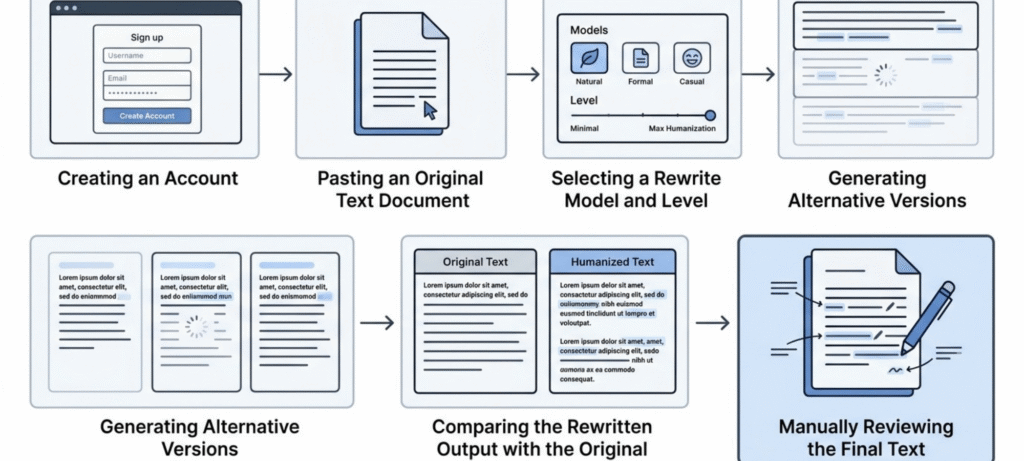
Step six is the one people skip. It’s also the one that decides whether your text reads well or just has a lower score.
StealthWriter AI Review: Writing Quality, Accuracy and Limitations
A lower detection score doesn’t mean good writing. These are two separate things, and a lot of reviews blur them together.
From what other reviewers have published, the same problems keep coming up:
- Wordiness. In one EssayDone test, the rewritten sample came out almost 100 words longer than the original. Grammarly also flagged a pile of correctness and clarity suggestions.
- Awkward phrasing at high settings. Odd word swaps and repeated words show up more as you raise the level.
- Meaning drift. Any rewriting tool can nudge a claim a little. That matters more for medical, legal, financial or technical topics.
- Tone problems. A casual post can come back stiff.
So treat the output as a draft, not a finished article. If you publish it raw at a high setting, expect it to read a bit strangely.
I haven’t run my own large test for this review, and I’m not going to pretend I did. What you’re reading is a summary of what others have documented plus what the company says on its own site.
Does StealthWriter Work With AI Detectors?
Sometimes. The outcome shifts with the detector you use, how you set the tool, and what the original text looks like.
Take the EssayDone test. They put one ChatGPT sample through StealthWriter, and the humanized version scored about 0% on Quillbot and Writer, around 10% on ZeroGPT, 11% on GPTZero and 40% on Originality.ai. Pretty good. But after the reviewer cleaned up the grammar in Grammarly, the picture flipped: Originality.ai climbed to 100% and GPTZero to 91%.
Two cautions before you read too much into that. It was one sample, so it says little about how the tool would handle your writing. And the jump after the grammar edit is just what the reviewer saw, not proof of why it happened.
Other reviewers got different results. A few watched their GPTZero scores drop sharply, while others still saw high numbers on Originality.ai. So the result depends on your text, your settings and the checker you choose. If you want a fair test, don’t stop at one try. Run several samples with the same settings each time, and compare them on more than one detector.
Here’s a simple way to think about testing it yourself:
| What to check | Why it matters |
|---|---|
| Original AI text | Gives you a baseline score |
| StealthWriter output | Shows how much the score changed |
| Output after your own edits | Shows what human editing adds |
| More than one detector | Detectors disagree with each other |
| Readability and meaning | The score isn’t the whole story |
This is a suggested checklist, not my own test results.
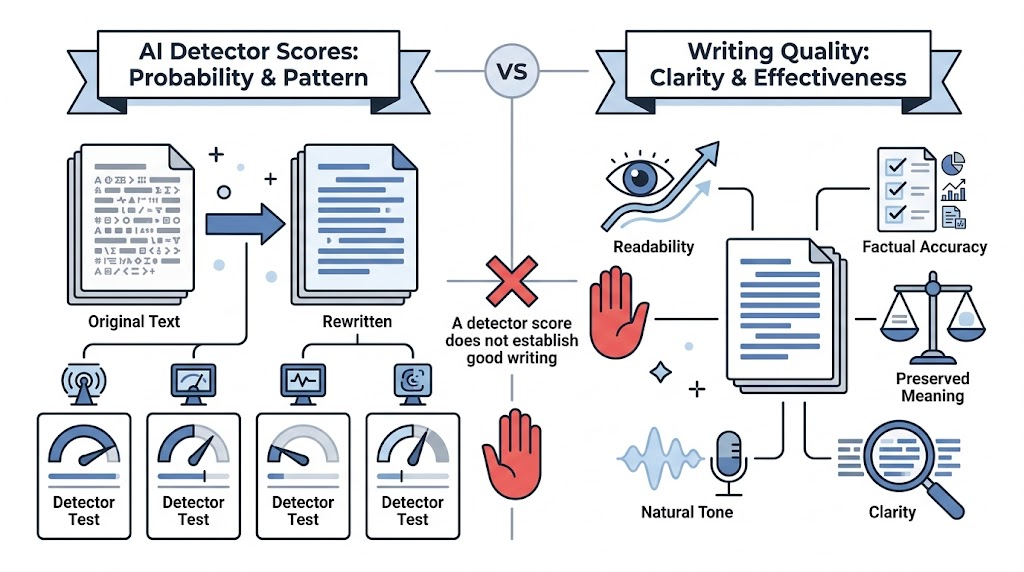
Some independent tests found rewritten text can still score high on tools like GPTZero and Originality.ai. But no single test tells you how any detector will treat every passage. Detectors also get fully human writing wrong sometimes. So a score alone doesn’t prove who wrote something.
StealthWriter Pricing in 2026: Free vs. Paid Plans
Pricing is where older reviews fall behind. The competitor article I looked at still mentions a 300-word free limit. The official pricing page now shows more. This is what it listed when I checked:
| Plan | Monthly price | Humanizations per day | AI scans per day | Words per input |
|---|---|---|---|---|
| Free | $0 | 10 | 10 | 1,000 |
| Starter | $20 | 50 | 50 | 5,000 |
| Plus | $50 | 150 | 150 | 5,000 |
| Pro | $100 | 350 | 350 | 5,000 |
| Business | $200 | 800 | 800 | 5,000 |
| Scale | $400 | 2,000 | 2,000 | 5,000 |
Yearly billing is advertised with a 17% saving. Prices are in USD and can change, so check the pricing before you buy.
Don’t mix up three different numbers: the monthly price, the daily allowance, and the word limit per input. A cheap plan with a low daily cap can still be wrong if you write long articles every day.
Refunds and renewals. According to the official policy, you can ask for a refund within 24 hours of a purchase or renewal, as long as you haven’t used paid features in that time. Plans renew automatically. If you cancel, you keep access until the end of the period you already paid for.
Is StealthWriter Legit and Safe to Use?
StealthWriter.ai is a working online tool with public features, pricing and support info. That doesn’t make it the right choice for everyone. It depends on the output quality you get, the subscription terms, and what you plan to use it for.
A few things to think about:
- Some reviewers complain about strict refund and cancellation rules, so read the policy first.
- Don’t paste confidential material into any online tool without reading its privacy terms.
- Detector results aren’t guaranteed.
On privacy, the company’s FAQ says submitted text isn’t stored, shared or used for model training after processing. That’s the company’s own statement, not an independent security audit. Still avoid pasting sensitive documents, and read the current privacy terms.
There’s also the ethics side. Students should check their school’s rules on AI help before using any humanizer. The company’s own FAQ warns against misrepresenting authorship or breaking institutional rules. Our guide on how to use AI humanizers responsibly covers sensible limits. And if you’re curious how schools think about detection, read our piece on AI detection tools and academic integrity.
StealthWriter Login and Dashboard: How to Access Your Account
Go to the official site, click Sign In and use the email you registered with. Once you’re in, you land on the dashboard where you run the humanizer and detector and manage your plan.
Paid features not showing? Make sure you’re using the same email you paid with. Look for the confirmation email. If it’s still missing, contact support.
Why Is StealthWriter Not Working? Common Fixes
Before blaming the whole service, try the boring stuff first:
- Refresh the page.
- Clear your cache or open a private window.
- Turn off extensions like ad blockers.
- Try another browser or network.
- Check whether you’ve hit your free daily limit.
- Confirm your payment went through.
Still stuck? Look for outage reports on a status site or the company’s social pages. Being unable to log in doesn’t mean StealthWriter is down for everyone. I can’t confirm a live outage from here, so check at the time you’re reading this.
How to Cancel a StealthWriter Subscription
To cancel, log in and head to your account or billing page. Do it before the next renewal date, or you’ll get charged for another period. Once you cancel, your paid access stays until the period you’ve already paid for runs out. Want a refund? It has to be within 24 hours, and only if you haven’t used any paid features. Can’t spot the cancel button? Email support and keep your receipt handy.
StealthWriter Alternatives: Which Tool Fits Your Needs?
If StealthWriter isn’t working for you, there are plenty of other humanizers. The better question is what you actually need.
Here’s a simple way to compare them. I haven’t listed exact prices or limits for the other tools because those change often. Check each official page before deciding.
| Tool | Main purpose | What to compare |
|---|---|---|
| StealthWriter.ai | AI text rewriting plus a detector | Free limits, rewrite controls, detector |
| Undetectable AI | AI text humanizing | Pricing, rewrite quality, workflow |
| WriteHuman | AI text humanizing | Free access, output quality, editing needed |
Don’t rank any of them only by how well they beat detectors. Look at readability, whether the meaning survives, cost and privacy too. Be careful with reviews written by competing tools. They tend to push their own product.
StealthWriter.ai vs StealthWriter.io. These are two different websites with different details. Don’t blend info from one into the other. When you read a review, check which domain it covers.
StealthWriter Pros and Cons
Pros
- A free plan with a 1,000-word input limit
- Several rewrite versions to choose from
- A built-in detector for quick checks
- Adjustable rewrite level
- Sentence-level alternatives
Cons
- Output can get wordy and awkward at high levels
- No guaranteed detector results
- Strict refund and cancellation terms
- No extension or public API
- You still need to edit by hand
Who Should Use StealthWriter AI?
It suits bloggers and marketers who already draft with AI and want to loosen up the stiff parts before editing. It’s a poor fit if you expect a one-click fix. It’s also a bad idea if your school or workplace bans this kind of tool.
Frequently Asked Questions
What is StealthWriter AI?
It’s a web-based tool that rewrites AI-generated text to sound more human. It also has a built-in detector.
Is StealthWriter AI free?
Yes, there’s a free plan with daily limits and 1,000 words per input. Paid plans start at $20 a month.
Is StealthWriter legit?
It’s a working product. Results vary, though, and the cancellation terms are strict, so read the policies first.
How good is StealthWriter AI?
It’s decent as a drafting aid. The output usually needs editing, especially at higher levels.
How accurate is the StealthWriter AI detector?
Like any detector, it can disagree with others. Use it as a rough guide, not proof.
Does StealthWriter work with GPTZero or Originality.ai?
Independent tests give mixed results. Some show high scores even after rewriting, so don’t count on it.
How much does StealthWriter cost?
Free, then $20, $50, $100, $200 and $400 a month for the higher plans. Check the pricing page for current numbers.
How do I log in to StealthWriter?
Use the Sign In button on the official site with the email you registered with.
Why is StealthWriter not working?
Start with browser and network fixes, check your daily limit and payment, then look for outage reports.
Is StealthWriter down right now?
Check a status page or the company’s social accounts. A login problem on your end doesn’t always mean an outage.
How do I cancel my StealthWriter subscription?
Cancel from your account before the renewal date. Access runs until the billing period ends.
What is the best StealthWriter alternative?
It depends on what you need. Compare free limits, writing quality, price and privacy.
Is StealthWriter.ai the same as StealthWriter.io?
No. They’re separate sites with different details.
Final Verdict
Overall, StealthWriter AI does the job as a rewriting tool. The free plan is usable, and a couple of features are genuinely nice, like getting several versions and rewriting single sentences. But it won’t fix everything. Detector scores jump around, high levels can make the text harder to read, and somebody still has to go through it by hand.
Treat it as a drafting helper and read every line, and it’ll save you some time. Expect it to beat every detector and you’ll likely be disappointed. My suggestion is to try the free plan on your own writing first, and upgrade only if the limits and the quality fit how you work.