

Free AI grading tools for teachers are easy to find and surprisingly hard to compare, because almost every vendor says “free” and then puts the real limit a click or two deeper. One tool caps you at 25 submissions. Another gives you feedback comments but no scores. A third reads handwriting well, but only on a paid plan.
This guide covers seven options, what each free plan actually includes, and where each one falls short. The details come from vendor pricing pages and recent independent comparisons, and they were current in September 2026. Limits change often, so check the live page before you build a routine around any of them.
What Are Free AI Grading Tools for Teachers?
Free AI grading tools for teachers are web apps or browser extensions that apply your rubric to student work and draft a score, a comment, or both. You review the draft and change whatever you disagree with.
Almost none of them are free without limits. “Free” usually means a monthly cap on submissions, a word limit per essay, or a feature that only unlocks on a paid plan. Some offer a 14-day premium trial that quietly drops you to the free tier afterward.
Most tools can handle some mix of these:
- typed essays and short answers
- PDFs and Word documents
- Google Forms responses
- handwritten worksheets, using OCR (text recognition)
- lab reports and math working
They are good at the repetitive first pass: applying the same criteria to thirty papers and drafting comments that would otherwise be typed thirty times. They are not a substitute for you deciding what a grade means.
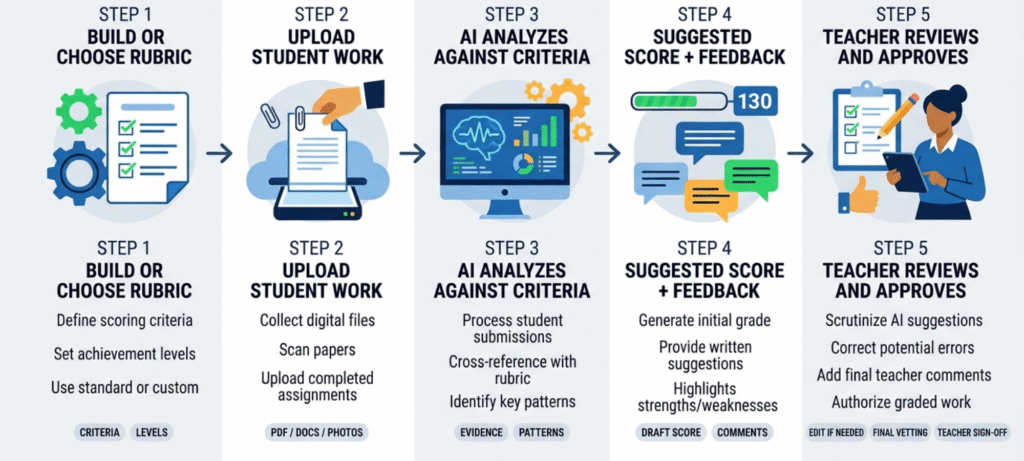
How AI Grading Works, Step by Step
The workflow is nearly the same everywhere.
You start with a rubric, either your own or one the tool drafts. A vague rubric gives vague grading, so this is where most of the quality comes from. Next you add student work by uploading files, snapping phone photos, or importing from Google Classroom. The tool compares each submission with your criteria and produces a suggested score and feedback. Then you review. This step is not optional, and the good tools make it easy by showing evidence for each score. Finally you approve or edit and send the grades back.
If a tool skips the review step and pushes grades straight to students, don’t use it.
7 Free AI Grading Tools for Teachers in 2026
1. CoGrader
Best for: batches of typed essays graded against a rubric
CoGrader’s free Starter plan includes 100 student submissions a month, a rubric builder, and Google Classroom integration, according to its own pricing page. New accounts get a 14-day trial of the paid plan and then drop to Starter without losing their work.
The paid Standard plan costs $15 a month billed annually or $19 monthly. It adds handwritten assignments, grammar checking, AI and plagiarism detection, and a class dashboard. So if your students write on paper, you may need a paid plan for that workflow. CoGrader’s own pages also disagree slightly on whether Canvas and Schoology imports are free or paid, so confirm that before you count on it.
Catch: it is built for essays. A recent independent review calls it strong for English, humanities, and social studies but not built for STEM or scanned exams.
2. EssayGrader AI
Best for: teachers who mostly grade writing and want a large rubric library
EssayGrader offers a free plan, but the numbers depend on which page you read. Its own comparison of grading tools says the free version grades 50 papers a month with a 1,000-word cap. Another EssayGrader page says new teachers get 100 free gradings in the first 14 days and then 50 a month. Third-party reviews report anything from 25 to 50. Treat 50 a month as the working figure and verify it at signup.
The 1,000-word cap matters. A typical high school argumentative essay can run past it, so the free plan suits short responses better than long papers. Paid plans start under $7 a month.
Catch: the word cap, and LMS bulk import is reserved for paid plans according to its own how-to guide.
3. GradingPal
Best for: mixed classes with handwritten worksheets, math, and essays
GradingPal is one of the few free options aimed at more than essays. It handles handwritten work, math, science, and other assignment types, and it connects to Google Classroom.
The free allowance is where you need to be careful. Most of its pages, including the free-plan page, say 100 submissions a month. Its handwritten grading page says 50, and its pricing page has advertised 150. The offer has clearly changed over time, so open the current plan before you plan a semester around it. Paid plans start at $14 a month billed annually.
Catch: the vendor states FERPA compliance and SOC 2 security, but one independent roundup notes it carries no independent security assessment. If your district is strict about vendors, ask for the documentation.
4. Gradeasy.ai
Best for: schools trying AI grading without going through procurement
Gradeasy is described in a Classe365 comparison as a free entry point with built-in handwriting recognition. The company reports use by more than 15,000 educators across over 100 U.S. districts. Teachers upload scanned or digital work, add a rubric, and get scored results to review.
I couldn’t confirm Gradeasy’s exact free limits from an official pricing page, so check that first. Also note that the company’s own terms say handwritten or ambiguous responses can cause errors, which is true of every OCR grader.
Catch: unclear caps, and handwriting recognition is never perfect.
5. Brisk Teaching
Best for: written feedback inside Google Docs
Brisk runs as a Chrome and Edge extension with a free-forever educator plan that includes 20+ tools. It reads a student response in a Doc and drafts feedback in styles such as Glow & Grow, Next Steps, and rubric-criteria comments, which you edit and post.
The important detail is what free doesn’t include. Comparison reviews report that rubric scoring and unlimited batch feedback sit in school and district plans, so a free user mostly gets comments, not grades. If you think of grading as producing a number, Brisk’s free tier will feel incomplete. If you think of it as writing better comments faster, it fits well.
Catch: free means feedback, not scoring, and it only works where you work in Google or Microsoft documents.
6. MagicSchool
Best for: teachers who want assessment help inside a wider AI toolkit
MagicSchool’s free plan offers 80+ teacher tools with limits on generations. Independent comparisons list batch class writing feedback among the paid Plus features, so expect single-assignment help on the free tier.
It’s more of a teacher assistant than a dedicated grader. It shines for rubrics, quizzes, differentiation, and planning. One independent rubric-generator comparison ranks it the best all-round option for building rubrics, which is a useful starting point even if you grade with another tool.
Catch: grading and feedback are shallower than in tools built for that single job.
7. GradeFlow
Best for: teachers who download submissions from Canvas
GradeFlow gives you 25 graded submissions a month on its free plan and a $12 a month Pro tier. You upload your rubric, drop in a zip of submissions, and it drafts a score with quoted evidence plus a short comment. It accepts Word, PowerPoint, Excel, PDF, and text files, and it has a strictness slider for borderline cases. The vendor says student files are read on your device instead of uploaded to its servers. Verify that claim against your district’s policy.
Catch: 25 a month is only about one small class set.
Also worth a look: GradeWithAI has a free plan of 25 AI requests a month that includes handwritten work, Google Classroom, Canvas, and Google Forms. Its Pro plan is $20 a month.
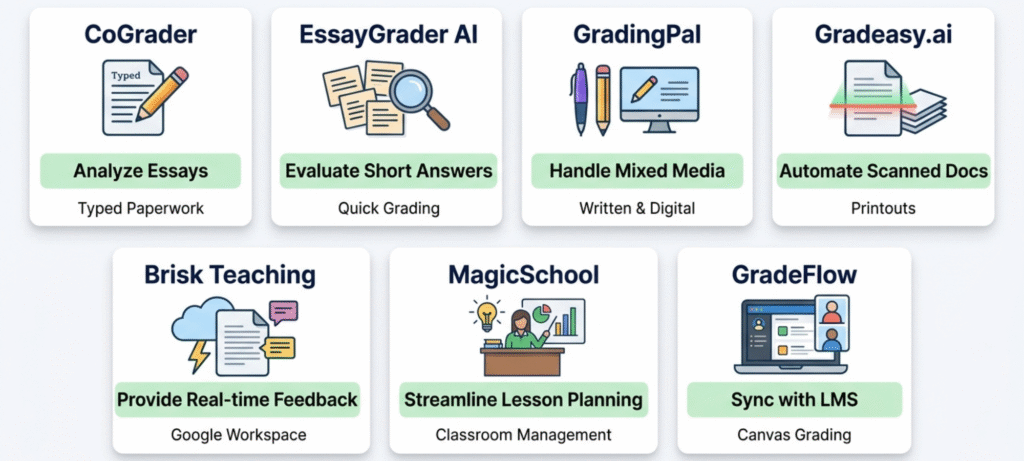
Free AI Grading Tools Compared
| Tool | Free allowance (Sept 2026) | Handwriting | Best for | Main catch |
|---|---|---|---|---|
| CoGrader | 100 submissions/month | Paid plan only | Typed essays | Essay-focused |
| EssayGrader AI | About 50/month, 1,000-word cap | Varies by plan | Short writing | Word cap |
| GradingPal | 50 to 150 (pages disagree) | Yes | Mixed subjects | Verify limit and security |
| Gradeasy.ai | Free tier, caps unconfirmed | Yes | Paper-heavy classes | Limits unclear |
| Brisk Teaching | Free forever, usage limits | No | Feedback in Docs | No rubric scoring on free |
| MagicSchool | Free, limited generations | Not the focus | Planning plus assessment | Lighter grading |
| GradeFlow | 25/month | Vendor claim, verify | Canvas zips | Small allowance |
What “Free” Actually Means
With free AI grading tools for teachers, the word “free” rarely means unlimited. Before you commit, watch for these four patterns:
- Monthly caps reset, but they can run out mid-unit. A teacher with 120 students and one essay a month is over 100 before the first week ends.
- Per-item limits, like a word cap or page cap, can quietly exclude the assignments you most want graded.
- Feature gates decide what you actually get. Handwriting, LMS import, and plagiarism checks are commonly paid.
- Trials that revert feel generous for two weeks and then change your workflow.
The safest habit is to check the plan page the day you sign up and screenshot it. Vendors change these numbers, and you’ll want a record.
How to Choose the Right Tool for Your Classroom
When you compare free AI grading tools for teachers, start with what you grade, not the tool’s marketing.
If it’s mostly essays, start with CoGrader or EssayGrader and compare which rubric handling you prefer. If it’s mostly handwritten, test GradingPal or Gradeasy on a few real, messy pages. Clean sample images tell you nothing. One independent comparison of handwriting graders says essay-focused tools such as CoGrader and EssayGrader don’t grade handwritten written answers, which is a good reason to test rather than assume. If you live in Google Docs, try Brisk for comment drafting. If you use Canvas, GradeFlow’s zip workflow avoids retyping anything.
Then check your gradebook. A tool that saves ten minutes of grading but costs ten minutes of copying grades hasn’t saved you anything.
Student Privacy: What to Check Before Uploading
Student work contains names, writing samples, and sometimes accommodations. Treat it differently from something you’d paste into a chatbot.
Ask five questions:
- Is student data used to train AI models?
- Where is it stored, and for how long?
- Does the vendor sign a data privacy agreement?
- Can you remove names before uploading?
- What does your school or district policy allow?
If you’re unsure, test with anonymized or already-graded sample work first. Our guide to protecting student data during grading covers the habits worth building before you upload anything.
Can AI Grade Accurately? A 10-Minute Test
Accuracy depends on the assignment. A multiple-choice test with an answer key is easy. An essay that weighs argument and evidence is not. Handwriting adds a second problem, because the tool has to read the page correctly before it can grade it.
So test before trusting. Pull five to eight assignments you’ve already graded and include a strong one, a weak one, a borderline one, and something odd, like an off-topic answer. Run them through the tool using your real rubric, then compare:
- Are its scores within one rubric level of yours?
- Does the explanation point to real evidence in the student’s text?
- Does it favor length or polish over content?
- Does it drift on one criterion, such as always scoring “organization” high?
If it misses one criterion repeatedly, the fix is often a clearer rubric, not a different tool. If the reasoning is wrong even when the score matches, that’s a bad sign, because a right number for the wrong reason will fail you on the next assignment.
Where AI Grading Fits, and Where It Doesn’t
Use it for first drafts, repeated comments, and spotting patterns across a class. That last one is underrated. If eleven students lost points on the same criterion, that’s a reteaching signal.
Keep the final call with you for high-stakes work, ambiguous answers, students with accommodations, and sensitive feedback. One more caution: AI detection flags inside these tools are probabilistic and get things wrong. Don’t treat a percentage as proof of anything.
Free AI Grading Tools for Teachers PDF and Download Options
Searches for a “free AI grading tools for teachers PDF” or “download” usually mean one of two things: a printable comparison, or software to install.
Most of these tools are web-based, so there’s nothing to download. Brisk is a browser extension. For a printable version, make your own one-page checklist with the tool name, free limit, assignment types, handwriting support, LMS support, privacy policy link, and the date you checked. That last column is the one you’ll wish you had in January.
For software itself, use the vendor’s official site. Old PDFs and third-party installers are more likely to be out of date, and sometimes unsafe.
A Realistic Weekly Workflow
Here’s a routine that keeps you in control.
On assignment day, write or paste your rubric and run a small test on three papers. When the batch comes in, let the tool draft scores and comments. Then read every score, starting with the lowest and highest, since those are where errors hide. Rewrite the top two comments per student so they sound like you and refer to something specific. Finally, note which rubric criterion caused the most trouble and use it in tomorrow’s lesson.
This won’t halve your grading time on day one, but it should reduce it as the rubric improves. For non-AI ways to save time, see our guide on how to cut your grading time in half.
Common Mistakes to Avoid
- Trusting the first batch. Test on graded work before using it live.
- Uploading identifiable work without checking policy.
- Using a vague rubric. “Good analysis” gives the AI nothing to hold onto.
- Sending AI comments unedited. Students can tell when feedback is generic.
- Picking on the free cap alone. A generous cap on the wrong assignment type is useless.
- Forgetting the gradebook. Export time counts.
What Tools Do Teachers Need?
People also ask what tools teachers use to teach and grade. Most classrooms combine a learning management system such as Google Classroom or Canvas, a gradebook, a document and presentation suite, a communication channel with families, and an assessment or quiz platform. AI grading is one layer on top, not a replacement for any of these.
Frequently Asked Questions
What are the best free AI grading tools for teachers?
It depends on what you grade. CoGrader and EssayGrader AI focus on essays. GradingPal and Gradeasy.ai handle handwritten work. Brisk Teaching drafts feedback inside Google Docs, MagicSchool adds planning and assessment tools, and GradeFlow suits Canvas downloads.
Are there free AI grading tools for teachers in 2026?
Yes. CoGrader, EssayGrader AI, GradingPal, Brisk, MagicSchool, GradeFlow, and GradeWithAI all offer free plans or allowances. The limits vary a lot, so confirm them on the vendor’s current page.
Is there a free AI essay grader for teachers?
Yes. CoGrader offers 100 free submissions a month, and EssayGrader AI offers roughly 50 a month with a word cap on the free plan.
Can free AI grading tools read handwriting?
Some can. GradingPal, Gradeasy.ai, and GradeWithAI support handwritten work. OCR can still make mistakes, so review every score.
Can AI replace a teacher’s grading?
No. It can draft scores and feedback quickly, but a teacher should check the evidence and make the final decision, especially on subjective or high-stakes work.
Is AI grading safe for student data?
It depends on the vendor. Check whether data trains AI models, how long it’s kept, and whether the company offers a data privacy agreement. Follow your school’s policy, and test with anonymized work first.
Is free AI grading accurate enough?
It can be, for repetitive first-pass grading. Test it against assignments you’ve already graded, and watch for drift on individual rubric criteria before you rely on it.
Final Thought
The best free AI grading tools for teachers are the ones that fit the work already piling up on your desk. Essay grader, handwriting reader, or feedback drafter: pick the category first, then compare limits. Test on five graded papers, read every score before it goes out, and write down the date you checked the plan, because free tiers change without much notice.
Used that way, AI takes the repetitive first pass off your evening and leaves the judgment where it belongs.