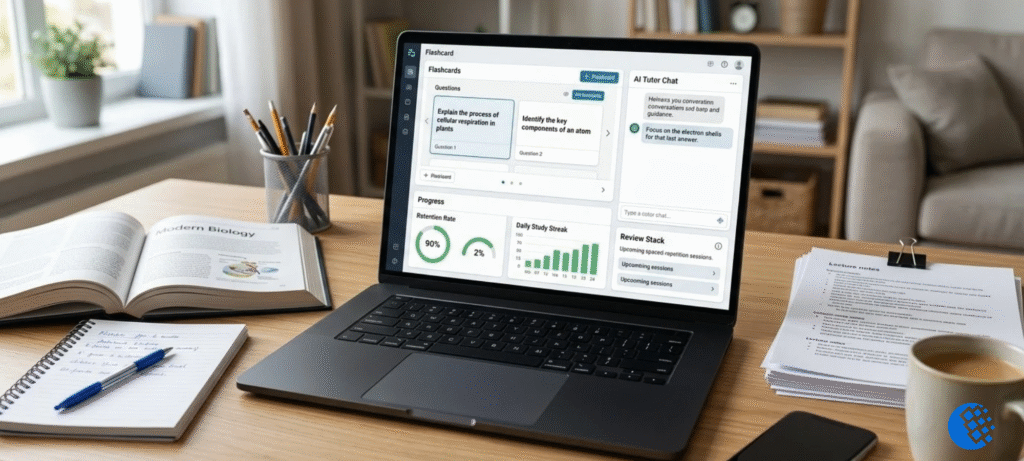

Study Fetch is a study app. You hand it your own course material, whether that’s lecture slides, PDFs, or recordings, and it turns them into notes, flashcards, quizzes, and practice tests. There’s also a chatbot tutor called Sparky. Stuck on something? Just ask it. You can start for free, but the free plan is small. Pay monthly and the paid plan runs around $19.99 a month.
That’s the short version. The longer one matters if you’re trying to decide whether to pay, if you’re wondering whether the site is legit, or if you just can’t log in. So here’s the full picture in one place: what it does, what it costs, what real users complain about, and how to cancel if you change your mind.
What Is Study Fetch?
Study Fetch is a learning platform built around the stuff you already have to study. Instead of starting from a blank page, you upload your materials and the app builds study tools out of them. Think of a professor’s 80-slide deck on cell biology. Rather than rereading it three times, you’d upload it and get notes, a set of flashcards, and a quiz in a few minutes.
The company says it began in a dorm room and grew from there. These days it’s aimed at high school and college students, plus anyone prepping for an exam. You use it on the official StudyFetch website, and there’s also a mobile app for iPhone and Android.
One thing worth saying early: making study material is not the same as learning it. A stack of flashcards doesn’t help if you never open them. The tool saves you prep time. You still have to do the studying.
How Does Study Fetch Work?
The basic flow is easy to picture. Say you’ve got a biology exam coming up.
Upload Your Study Materials
You start by adding your source material. That can be a PDF, a slide deck, a lecture recording, or a video. The platform also connects with school systems like Canvas, Blackboard, and D2L, so you can pull in class files without downloading them first.
Generate Study Resources
Once the file is in, you pick what you want out of it. Notes, flashcards, a quiz, a full practice test. It builds them from your upload, so the questions match what your class actually covered.
Study, Test Yourself, and Review Mistakes
This is the part that counts. You work through the quiz, see what you missed, and go back to the original slides for anything that looks off. If an answer seems strange, check it against your source. Generated material can contain mistakes, and your slides are the final word.
Study Fetch Features: What Can You Actually Do?
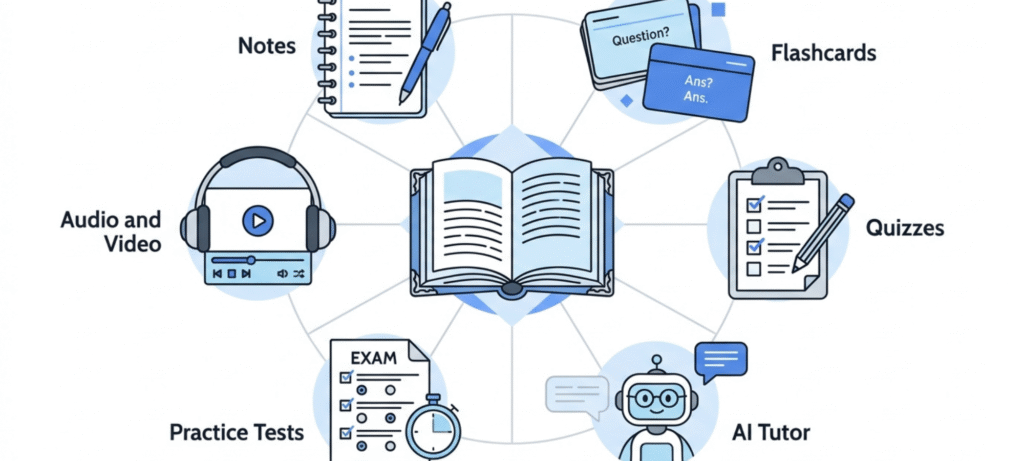
There’s a long feature list on the site. Here’s what’s worth knowing, and what each one is good for.
Notes
Upload a lecture or record one live, and you get structured notes with headings and bolded terms. You can pick a full version or a shorter summary. This helps most when you’ve got long slide decks and no time to turn them into something readable.
Flashcards and Quizzes
These are probably the most useful tools for most students. Flashcards force you to pull answers from memory, which beats rereading notes by a wide margin. The quizzes do the same thing with more context. If you only use one feature, use these.
Sparky, the Tutor
Sparky is a chatbot that answers questions about your material. You can ask it to explain a confusing chart, walk through a concept, or help you build a study plan. It’s handy at 11 p.m. when nobody else is around. Just don’t treat every answer as gospel. If it matters for an exam, double-check it.
Practice Tests and Study Plans
You can generate full-length practice tests, which is useful for practicing under exam conditions. The platform can also read your syllabus and put exam dates and deadlines onto a calendar, so you can plan your prep around them.
Audio Recaps, Explainer Videos, and Mini Apps
For people who learn better by listening, there are audio recaps that turn text into podcast-style summaries. There are also explainer videos and a section of Mini Apps, which are small study tools and games, some built by other users. These are nice extras. They’re not why most people sign up.
Is Study Fetch Free?
Yes, you can start for free. But “free” here comes with a tight limit.
What You Get for Free
According to Study Fetch’s own documentation, the free plan allows two total uploads. And here’s the catch that surprises people: deleting an upload doesn’t give you the slot back. Once you’ve used both, you’re done unless you upgrade. So pick your first two uploads carefully. A big, important lecture deck is a better test than a random handout.
Is Study Fetch Free for Students?
Students get the same free plan as everyone else. I didn’t find a separate free tier just for students. If you’re hoping to use it all semester without paying, two uploads probably won’t stretch that far. Look at the limits shown inside your own account, since they can change.
Does Study Fetch Have a Free Trial?
A free account and a free trial of the paid plan are two different things. I couldn’t confirm a current trial from the official pages, so check the checkout screen before you enter a card. Look for the trial length, whether a card is required, and what the plan renews at.
Is Study Fetch AI Free?
Using the platform and using each tool aren’t always the same thing. Some features may have their own limits on the free plan. Test the ones you care about before you decide.
Study Fetch Pricing: How Much Does It Cost?
Pricing is where people get confused, so here’s what the store listings show. On the US Apple App Store, Study Fetch lists these options:
| Plan | Price (US App Store) |
|---|---|
| Premium Monthly | $19.99 |
| Premium Quarterly | $29 |
| Premium Yearly | $96 |
Two cautions. First, these are store prices. The price on the website checkout might not match, and it can differ by country. The Pakistan App Store listing, for example, shows prices in rupees. Second, prices change, so confirm on the day you buy.
How Much Is StudyFetch Per Month?
If you pay monthly, it’s about $19.99. The yearly plan works out to roughly $8 a month, since $96 divided by 12 is $8. But you pay the full $96 up front, so that’s an equivalent monthly cost, not what leaves your account each month. Some reviews and videos mention a $19 monthly price too, which is close enough to suggest the number has moved a little over time.
Which Plan Makes Sense?
It depends how you study. If you’ve got one big exam and want a month of heavy use, monthly is fine, as long as you cancel right after. If you plan to use it all school year, yearly is the cheaper way to do it. And if you only upload a couple of files a semester, the free plan might already be enough.
StudyFetch Login, Sign Up, and App
Logging in is simple. Head to the official site and sign in the same way you signed up. That part matters more than you’d think. StudyFetch’s account help says if you signed up with Google or Apple, you have to keep using that same method. Try an email and password instead? That’s a common reason people get locked out.
There’s an app for iPhone and iPad, and there’s one for Android too. But in-app purchases and prices can vary by region. So what you see on your screen may not match what a friend in another country sees.
StudyFetch Reviews: Is It Legit and Safe?
Short answer: it’s a real product with a real company behind it. Longer answer below.
What Users Like
The positive reviews keep coming back to the same things. People like that it saves time turning slides into study material. They like the flashcards and quizzes. And they like having a tutor to ask questions when they’re stuck.
What Users Complain About
The complaints are just as consistent. Some people report trouble accessing their accounts. Others mention technical glitches or running into usage limits sooner than they expected. And a number of reviews bring up billing and cancellation, usually people who didn’t realize a plan was renewing. These are individual experiences. They don’t prove everyone will have the same problem. But if several people mention the same thing, it’s worth paying attention to.
Is Study Fetch Legit?
There’s an official website, listings in both major app stores, published support pages, and public terms. That’s what a legitimate product looks like. It doesn’t mean every feature will work perfectly or that you’ll love the subscription. Legit and perfect are different things.
Is Study Fetch Safe?
Two questions hide inside that one. For your account and payments, stick to the official site or app, read the renewal terms, and keep a copy of any confirmation you get. For your files, Study Fetch says uploaded material is private by default. That’s the company’s claim, so read the actual privacy policy before you upload anything sensitive.
Is Study Fetch Worth It?
It depends on you, which I know is an annoying answer. Here’s how I’d break it down.
It could be worth paying for if you’ve got lots of long lectures, you like having notes, flashcards, and quizzes all in one place, and you’d actually use the tutor. If it saves you a few hours of prep every week, the price makes sense.
The free plan may be enough if you only need help with a couple of big files, or you’re still testing whether the format suits you. Two uploads is enough to find out.
You might want something else if you mostly need simple flashcards, you don’t upload your own files much, or you just don’t want another monthly charge. And if you tend to forget about subscriptions, set a reminder the day you sign up.
If you’re also working on study habits more broadly, our guide to online learning tips that actually work pairs well with any study app.
Study Fetch Coupon Code and Student Discount
Searches for a coupon code are common, but I’m not going to hand you one, because I couldn’t verify a working code. Anything you find on random coupon sites should be treated carefully.
A better move is to check the official pricing page and the checkout screen yourself. See if a discount is shown, whether it applies to monthly or yearly billing, whether you need to verify you’re a student, and whether it renews at the discounted rate or jumps back to full price. Those details matter more than the code itself.
What Is Study Fetch Focus Flight?
“Focus Flight” keeps showing up in searches, but I couldn’t tie it to any feature on Study Fetch. What turned up instead was a separate app with a very similar name, a standalone focus timer. You pick an airport, set your time, then “fly” while you get on with your work. As far as I can tell, the platform didn’t build it.
That said, there is a Mini Apps section full of community-made study tools. So could something with a similar name be sitting in there? Possibly. If you spotted it next to the platform’s name somewhere, open that exact listing and look before assuming it’s a built-in feature.
How to Cancel Study Fetch Subscription
Cancelling is one of the most searched questions, and it’s easy to get wrong because it depends on where you paid.
If You Subscribed on the Website
According to StudyFetch’s help pages, log in, open the account menu, go to Settings, find the Billing Portal, and follow the cancellation prompts.
If You Subscribed Through an App Store
Cancel through the store instead, not the website. On an iPhone, that’s your Apple ID subscription settings. On Android, it’s the subscriptions section in Google Play. Cancelling on the website won’t touch a subscription you bought through the app.
Check the Renewal Date
After you cancel, make sure the subscription status actually changed, and save the confirmation. If something goes wrong, contact StudyFetch support and keep the emails. Don’t count on a refund. Whether you get one depends on the terms and the situation.
StudyFetch Alternatives
No single tool wins for everyone, so it’s better to pick by what you need.
| Tool | Best for |
|---|---|
| ChatGPT | General explanations and brainstorming |
| NotebookLM | Asking questions about sources you supply |
| Quizlet | Classic flashcards and revision |
| Knowt | Study sets and practice tools |
| StudyFetch | Turning class material into notes, quizzes, and more in one place |
Check each tool’s current features and pricing before you commit. A good question to ask yourself: do I need something that builds study material from my files, or do I just need a place to drill flashcards? If it’s the second one, you probably don’t need to pay much.
One more thing on using these tools responsibly. Schools are paying more attention to how students use them, and our piece on AI detection tools and academic integrity explains what that means for your own work.
Frequently Asked Questions
What is Study Fetch used for?
It’s used to turn course materials into notes, flashcards, quizzes, and practice tests, with a tutor chatbot for questions.
Is Study Fetch free for students?
You can start for free, but the free plan is limited to two total uploads, and deleting one doesn’t give the slot back. Paid plans unlock more.
How much does Study Fetch cost per month?
The US App Store lists Premium Monthly at $19.99, with quarterly at $29 and yearly at $96. Prices can differ by region and where you buy, so check before paying.
Is Study Fetch worth it?
It depends on how much you study from uploaded material. Heavy users may find it worth it. Light users can often get by on the free plan.
Is Study Fetch accurate?
Mostly useful, but not perfect. Notes and answers can contain errors, so check anything important against your original slides or textbook.
How do I cancel Study Fetch?
On the website, go to Settings, open the Billing Portal, and follow the prompts. If you bought through an app store, cancel in that store’s subscription settings.
Final Thoughts
Exam prep has a boring part, and Study Fetch cuts most of it out. Notes, flashcards, quizzes, all built from your own files. That alone saves real time. But it has limits. The free plan is small. The monthly price adds up quicker than you’d expect. And the reviews about billing and access? Worth reading before you pay anything.
My advice is simple. Start free. Put your two uploads on the heaviest material you have, then look at the output. Does it actually help you? Then pick a plan that matches how long you’ll really use it, and write down the renewal date so it doesn’t catch you off guard. If it doesn’t help, you’ve lost nothing. Whatever you decide, the studying part is still yours.