

I’ll be upfront about something. Most articles about the Writesonic AI Humanizer are really about beating AI detectors, and that’s the wrong place to start. The tool sits inside the Writesonic editor, and its job is to take stiff, robotic drafts and make them sound like a person wrote them. Whether a detector believes it is a different question entirely.
So this review splits the two. First, what the tool does and how you use it. Then, whether the rewrites read better, and what the published detector tests actually show.
Quick verdict: it’s a handy extra editing pass if you already write in Writesonic. If you’re hoping it’ll get you past every AI detector, don’t count on it. Nothing can promise that.
What Is Writesonic AI Humanizer?
Writesonic AI Humanizer is a rewriting feature inside the Writesonic platform. You paste in text that sounds mechanical, and it gives you back a version with different sentence structure, rhythm and word choices.
It isn’t a separate app. The official Writesonic documentation says you reach it through the AI Document Editor, which means you need a Writesonic account first. That clears up a common search. Plenty of people type “Writesonic AI Humanizer download” looking for an installer, but as far as the docs go, it runs in your browser.
Humanizers in general all lean on one idea. AI drafts tend to fall into patterns. Sentences come out about the same length, transitions are predictable, and the phrasing stays safe and generic. A humanizer tries to shake those patterns loose. Whether the shaken-up version is actually better writing is the real question, and that’s what the rest of this review digs into.
Writesonic AI Humanizer Features
There isn’t a huge feature list here, which makes the tool easy to judge.
Sentence and word-level rewriting. This is the main job. The tool reorders, splits and merges sentences, and swaps stock phrases for other wording. The goal is text that sounds less like it came off a template.
Enhanced Readability. The docs mention this option and add a warning I didn’t expect: turning it on can raise the chance of your text being flagged as AI-written. That’s a pretty honest thing for a product to admit. It tells you that clean, easy-to-read writing and “undetectable” writing don’t always go together. A lot of competing reviews skip right past it.
Editor integration. The real advantage is workflow. You draft, edit and humanize in one place, so there’s no jumping between tabs. If you’re already paying for Writesonic, that’s most of the appeal.
Language support. Third-party reviews can’t agree. Some say 20-plus languages, others say 30-plus. The official documentation, at the time of writing, describes English as the supported language. Go with the docs, and test your own language in the editor before you build a workflow around it.
Tone controls. Some third-party reviews describe tone options. Those can change as the product updates, so check what your editor shows today before you rely on a particular setting.
How to Use Writesonic AI Humanizer
Once you have an account, this takes about two minutes. The steps below follow the official guide.
- Log in to Writesonic and open the AI Document Editor.
- Select the Humanizer tool.
- Choose your language.
- Paste in the text you want rewritten.
- Apply any settings you see, such as Enhanced Readability.
- Click Humanize, then read what comes back.
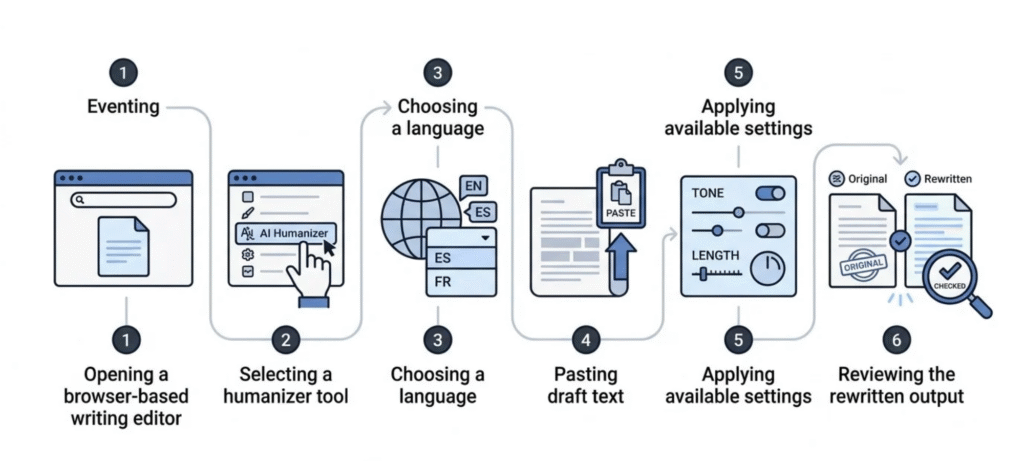
That last step is the one people skip, and it matters most. Put the result next to your original and go through it line by line. Make sure your numbers, names and technical terms survived. Make sure no sentence now says something you never meant. A rewriter can smooth a line so nicely that the meaning shifts a little, and you won’t notice until a reader points it out.
A few habits help:
- Work in small sections. Short chunks tend to come out cleaner, and mistakes are easier to catch.
- Start with a decent draft. A humanizer polishes. It can’t rescue a weak argument or fill in missing facts.
- Add your own details. A real example, a number from your own experience or an opinion you actually hold will do more for the writing than any setting.
Is Writesonic AI Humanizer Free?
Short answer: it’s been described as free to try, but we couldn’t verify a fixed free word limit from the official documentation.
One published review reported a cap of 200 words per session on the free version. If that’s right, long articles would be a chore, since you’d have to split the text and run each piece separately. But I wouldn’t treat that number as settled. Plans change often, and the pricing page we found focuses on other Writesonic products rather than spelling out humanizer limits. Your own account dashboard is the best place to see your current allowance, trial terms and credits.
Here’s a rough way to think about the cost:
| Your situation | What to check |
|---|---|
| Trying it once or twice | Whether your free allowance covers a few short tests |
| Humanizing short snippets now and then | Whether the per-session limit forces you to split text |
| Writing long-form content regularly | What your plan allows, and what that costs at your volume |
| Only wanting a humanizer | Whether a standalone tool is better value than a full writing suite |
That last row deserves a second look. Writesonic is a complete writing platform, and the humanizer is one slice of it. If that slice is all you need, a bundle might not be the best deal.
Does Writesonic AI Humanizer Actually Work?
It depends on what you mean by “work.”
If you mean “does it make text sound more natural,” the answer is often yes, with some caveats. It can loosen stiff phrasing, mix up sentence lengths and swap out robotic transitions. You’ll still want to edit the result.
If you mean “will it pass AI detectors,” nobody can honestly promise that, including the tool itself.
The most useful public evidence we found is the test published by EssayDone. They wrote a 186-word passage on online shopping and Gen Z, ran it through Writesonic’s humanizer in academic mode, then checked it with five detectors. The scores ranged from 5% AI on one detector to 100% AI on several others. After grammar fixes, a couple of scores dropped, but others barely moved.
Here’s what I take from that test.
First, detectors disagree with each other. When one tool says 5% and another says 100% on the same text, they clearly measure different things in different ways.
Second, one short sample doesn’t prove much. A single 186-word passage in one tone can’t tell you how the tool handles every kind of writing.
Third, the source has a stake in the result. EssayDone sells a competing tool and recommends it in the same article. That doesn’t make the numbers wrong, but it does mean they’re one data point and not the final word.
If you run your own test, keep it fair. Use three kinds of text: a casual blog intro, a technical paragraph and a formal paragraph. Save the original and the rewrite each time, and note the detector, the date and the word count. Then judge the writing itself, not just the score. Ask yourself whether the meaning stayed put, whether any fact or term changed, whether the rewrite added filler, and how long it took to fix by hand.
One more thing worth saying plainly. A low AI score doesn’t prove you wrote something, and a high score doesn’t prove you cheated. Detectors throw false positives, and schools and publishers are still figuring out how much to trust them. Our post on using AI detection tools without hurting academic integrity explains why a score should start a conversation and not end one.
Writing Quality, Accuracy and Meaning Preservation
Grammar is the easiest thing to measure, so a lot of reviews lean on it. The EssayDone test reported a Grammarly score of 90 that rose to 100 after accepting suggestions. That tells you the sentences are correct. It doesn’t tell you they’re good, accurate or yours.
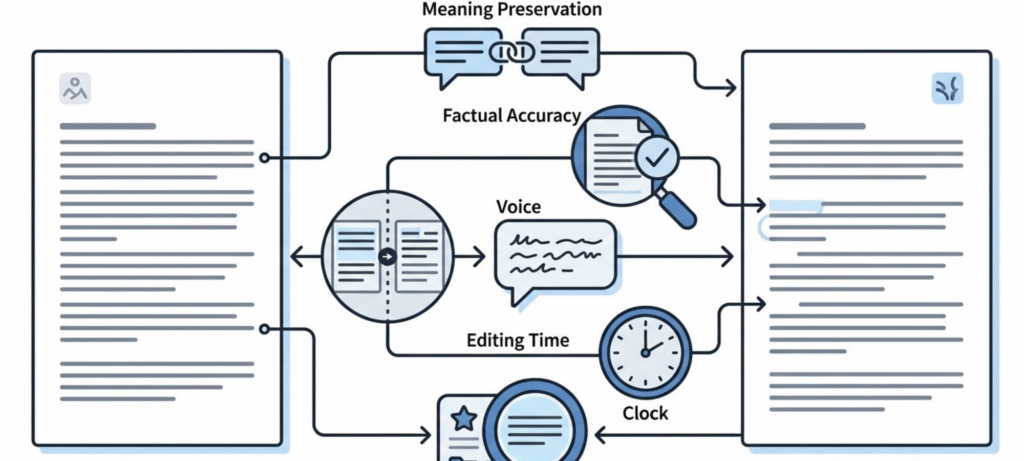
When I judge a rewrite, I look at five things.
Meaning. The rewrite should say what you said. Watch for claims that got softer or stronger, and for swapped terms. “Reduces risk” and “eliminates risk” are very different sentences.
Facts and terms. In technical, medical, legal or financial writing, one changed word can change the substance. Check every specialist term.
Voice. Good writing sounds like somebody. Humanizers tend to pull text toward a bland middle style, so if your voice is distinctive, expect to put it back.
Editing time. If cleaning up the output takes as long as rewriting the paragraph, the tool hasn’t saved you anything.
Search value. Google has said that how content gets made isn’t the deciding factor. What counts is whether it’s helpful and shows real quality, which its guidance on AI-generated content lays out. For publishers, that means a humanizer can’t stand in for original information, real expertise and honest sourcing.
Writesonic AI Humanizer Pros and Cons
Pros
- Built into the Writesonic editor, so no copying between tools
- Simple to learn
- Can loosen stiff, repetitive AI phrasing
- Handy as a quick second pass on short sections
Cons
- Free limits aren’t clearly documented
- Official language support looks limited to English
- Published detector results vary a lot
- The readability option can raise detection risk, per the docs
- You still have to check every output for meaning and accuracy
- A full suite may not be worth it if you only want a humanizer
Who Should Use Writesonic AI Humanizer?
Existing Writesonic users. If you already draft there, the built-in pass is convenient and costs you nothing extra in workflow.
Bloggers and marketers. It can soften a stiff first draft, as long as you edit the result and add something original.
Editors. It’s a quick way to see other phrasings for a clunky paragraph.
Students. Be careful. Polishing your own draft is one thing. Disguising work you didn’t write is another, and it can break your school’s rules. Read our student guide to using AI humanizers responsibly and check your school’s policy before you paste anything.
Anyone chasing guaranteed detector results. You should be the most cautious of all. No tool can give you that guarantee.
Writesonic AI Humanizer Alternatives
If the Writesonic AI Humanizer doesn’t suit you, compare other tools on the same yardstick instead of going by marketing claims. The names that come up most in searches are QuillBot, Undetectable AI, Clever AI Humanizer and EssayDone.
This table is a checklist for your own comparison, not a verified feature or price list. Check each tool’s official site before you decide.
| Tool | What to compare |
|---|---|
| Writesonic AI Humanizer | Fit with your existing Writesonic workflow |
| QuillBot | Rewriting and paraphrasing workflow |
| Clever AI Humanizer | Current free access and usage limits |
| Undetectable AI | Current features, pricing and output quality |
| EssayDone | Its published claims, and which features you can verify yourself |
Be wary of any review that ranks its own product first, including some of the pages ranking for this keyword right now. The best test is simple. Run the same short sample through two or three tools and see which one keeps your meaning and sounds most like you.
Frequently Asked Questions
Is Writesonic AI Humanizer free?
It has been described as free to try, but we couldn’t verify a fixed free word limit from the official documentation. One review mentioned 200 words per session. Check your account for current limits.
Can I download Writesonic AI Humanizer?
It doesn’t look like it. The official documentation describes access through the browser-based AI Document Editor, and we found no standalone app.
Does it support languages other than English?
Some third-party reviews claim 20 or more languages. The official documentation describes English support. Test your language in your own account before relying on it.
Will it bypass AI detectors?
Not reliably. Published tests show scores from very low to 100% AI depending on the detector, and no tool can guarantee a result.
Can it change the meaning of my text?
Yes. Any rewriter can shift emphasis, terms or facts, so always compare the output with your original.
Is it better than QuillBot?
It depends on your text and goals. Run both on the same sample and compare meaning, tone and how long the cleanup takes.
Final Verdict
The Writesonic AI Humanizer is a convenient add-on if you already write inside Writesonic, and it can take some of the stiffness out of a rough draft. It’s no magic switch, though, and the published tests show detector results swinging wildly. Use it as an editing pass, read every line, and put your own knowledge into the final version. If a humanizer is all you need, try a couple of alternatives before you commit to a plan.