

You open tomorrow’s lesson and see the problem right away. A few students will need extra help. A few will finish in ten minutes. Adjusting a good curriculum for both groups can eat your whole evening.
Coteach AI is built to cut that time down. It’s an AI planning assistant for teachers using IM® v.360 and EL Education. Here’s what it does, what it costs, and where it falls short.
A quick note on sources. I haven’t tested Coteach in a real classroom. This review is based on Coteach’s own pages, its privacy policy, and Illustrative Mathematics’ announcement. I’ll tell you which claims are official and which ones I could check elsewhere.
What Is Coteach AI?
Short answer: Coteach AI is a planning assistant for K–12 teachers. You pick a lesson from your curriculum, then chat with it to adapt that lesson for your class.
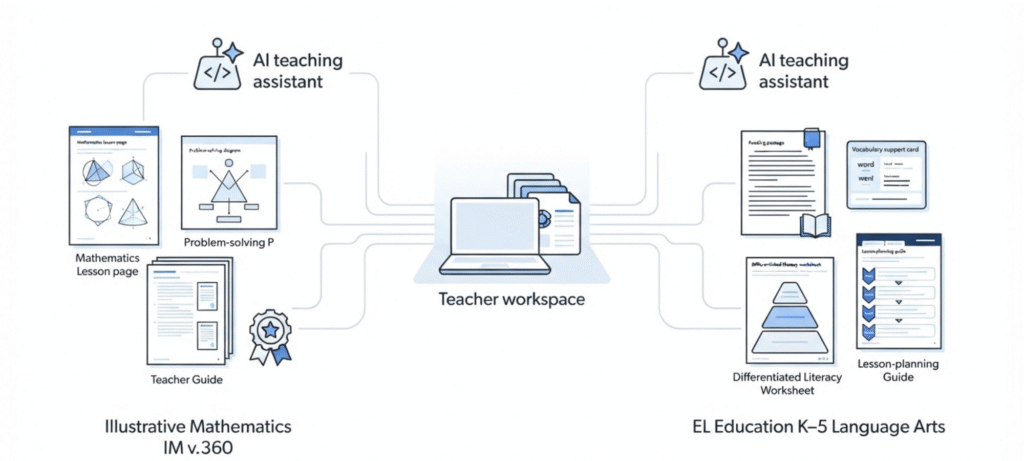
Right now it supports IM v.360 from Illustrative Mathematics and EL Education’s K–5 Language Arts curriculum. It’s built by Teaching Lab Studio.
Here’s the backstory. Coteach’s About page says it started at Teaching Lab, a group that has spent years working with teachers who use high-quality curriculum. Coteach’s About page says the platform launched in March 2025 and now supports thousands of teachers across 800 districts nationwide. These are company-reported figures, not independently audited statistics. Those numbers come from Coteach itself. I couldn’t check them independently.
How is it different from a regular chatbot?
A general chatbot knows a little about everything. So you paste in your lesson, explain your class, and hope the AI gets what the lesson is really about.
Coteach works the other way around. Its site says it already has the lessons, teacher guides and support materials. The lesson context is there before you type a word.
The trade-off is range. It’s built for two curricula. If you teach something else, it won’t be a good fit.
Not the same as similar names
I found no official source linking coteach.ai to coteachai.com or coteach.app. Treat them as separate products. This review covers only coteach.ai.
How Does Coteach AI Work?
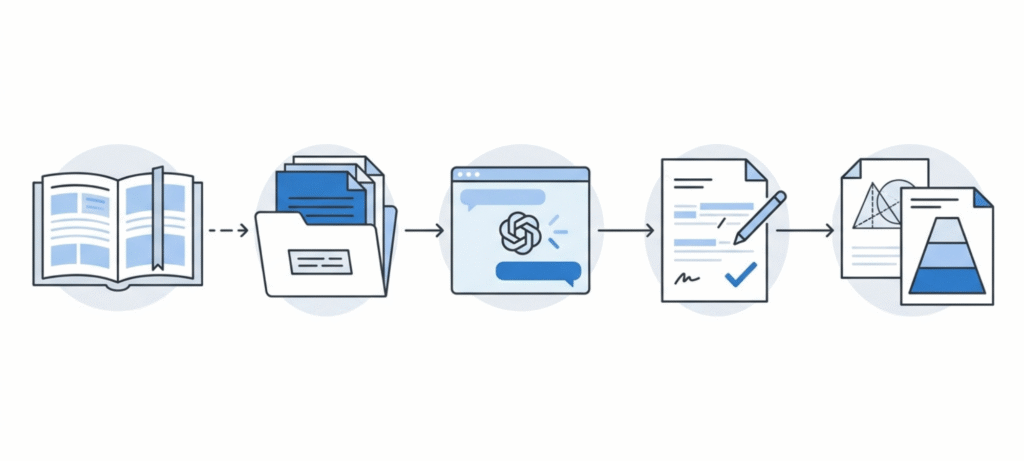
Short answer: You pick a lesson, tell Coteach what you need, tweak the result in chat, and export it.
Based on Coteach’s own pages, it goes like this:
- Sign in at coteach.ai and start a chat.
- Add the grade, unit and lesson you’re teaching. Coteach’s latest release post shows chats with units like IM Grade 5, Unit 3 attached.
- Ask for what you need, like a scaffold, practice problems or a pacing change.
- Keep chatting until the result fits your students.
- Export it so you can edit, print or share it.
Here’s a prompt you could try. It’s my own example, not an official Coteach template:
“Create three scaffolded warm-up questions for this lesson. Start with a visual entry point, include one question that checks prerequisite knowledge, and end with a problem that prepares students for the main task.”
The site also has a prompt library if you want ready-made starting points. And Coteach says the tool is there to support your judgment, not replace it. You still make the calls.
Coteach AI Features
Short answer: Coteach AI helps you adapt lessons, build scaffolds, create practice and diagrams, adjust pacing, and export your materials.
Here’s what the official pages and blog posts describe:
| Feature | What it does | Where it helps |
|---|---|---|
| Lesson adaptation | Reviews and adjusts IM v.360 and EL lessons | Fitting a lesson to your class |
| Scaffolds | Adds supports so students can reach grade-level work | Students who need extra access |
| Practice problems | Generates practice tied to the lesson | Intervention and targeted practice |
| Diagrams and visual aids | Builds visuals for math ideas | Making a concept easier to see |
| Pacing help | Helps you fit a lesson to your time | Short periods, missed days |
| Cool-down insights | Uses cool-down results to guide planning | Small groups and next steps |
| Skills | Reusable instructions for how you like to teach | Not retyping the same prompt |
| Exports | Google Docs, Google Slides, Word, PowerPoint, PDF | Printing, editing, sharing |
Coteach’s main pitch is access without lowering the bar. The idea is to give students more ways into grade-level work, not an easier task.
The November 12, 2026 release matters for everyday use. According to Coteach:
- IM v.360 workbooks, practice sets and assessments now look like IM’s own student pages.
- EL Education handouts keep the layout of the originals.
- Coteach checks its documents before handing them over and fixes things like a problem split across two pages.
- One chat can now pull from both IM and EL.
The rebuild also adds assessment features. Coteach says it can now draw on what your students have learned, not just on the curriculum. That’s the company’s description of the feature. I haven’t tested it.
One warning. Exports can still look off. Coteach’s FAQ has a troubleshooting question about formatting problems in Google Docs exports. Open every file before you print it.
How Coteach AI Integrates with Illustrative Mathematics
Short answer: Coteach is built around IM v.360, and Illustrative Mathematics has certified it as a partner.
IM v.360 is the problem-based math curriculum from Illustrative Mathematics, a nonprofit. According to IM, Coteach understands how lessons connect to learning goals, unit progressions and the ways students think about a task. That’s the heart of the Coteach AI Illustrative Mathematics connection.
What Does IM Certified® Mean?
On February 25, 2026, Illustrative Mathematics announced Coteach as a new IM Certified® partner. IM’s partner page explains the badge. It means IM reviewed the offering for alignment with IM Math’s instructional model. Coteach is listed among the supplemental partners, which IM describes as tools that support IM Math without breaking up instruction.
Now the part people skip. Certification is about alignment with the curriculum’s approach. It doesn’t promise that every answer key, worksheet or diagram is correct. AI can still get math wrong. Check the numbers before anything reaches your students.
Also, Illustrative Mathematics and Coteach are two separate organizations. Teaching Lab Studio builds Coteach. IM certified it.
Coteach AI for EL Education
Coteach AI also supports EL Education, although that does not mean the curriculum provider has approved or endorsed the tool.
Its EL Education guide is aimed at K–5 teachers and outlines five practical ways to use the platform: internalising lesson texts, creating scaffolds and extensions, supporting multilingual learners, adjusting lesson pacing, and helping school leaders with instructional planning.
There is an important distinction between this integration and Coteach’s relationship with Illustrative Mathematics. Coteach is developed independently by Teaching Lab Studio. Its website states that the platform is not affiliated with or endorsed by EL Education. It also clarifies that EL Education has not reviewed Coteach-generated or adapted content.
For teachers, that distinction matters. Support for EL Education means Coteach can help you work with the curriculum; it does not mean every generated activity or adaptation has been checked by EL Education. Review the output against your original lesson materials and learning objectives before using it in class.
Coteach AI Pricing: Is It Free?
Coteach AI offers a free plan for teachers who want to explore its lesson-planning features without paying for a subscription. However, free access comes with usage limits and depends on platform capacity. Teachers who need more room for longer conversations and complex planning tasks can consider the Premium plan.
Here’s what the official Coteach pricing lists:
| Plan | Price | What you get |
|---|---|---|
| Free | $0 | Access subject to usage limits and capacity, IM v.360 and EL lesson review and adjustment, saved chats, exports to Google Docs, Slides, Word, PowerPoint or PDF |
| Premium | $15/month, billed annually | Everything in Free, 10x more usage, early access to new features |
| Districts and schools | Contact for a quote | Everything in Premium, plus more usage, analytics, resource library, custom onboarding, single sign-on, webinars, bespoke professional learning, dedicated success manager |
Read the Premium line closely. The $15 is labeled “billed annually.” The page also has a yearly/monthly toggle, so check what the monthly option shows before you pay.
Twelve payments of $15 comes to about $180 a year. That’s the math at the advertised rate. Your checkout may display it differently, so look at the final screen before you pay.
Coteach doesn’t publish numbers for its usage caps. Free is “subject to usage limits and based on capacity.” Premium is just “10x more.” My advice: start free. See if you hit the limit in a normal week before you spend anything.
How Teachers Can Use Coteach AI
These are example ideas. I haven’t verified how Coteach responds to each one.
Get ready for tomorrow’s lesson
Add the lesson. Ask what the main idea is and where students usually get stuck. If your period is short, ask for a pacing plan too.
Support a group without changing the goal
Say a few students struggle with the vocabulary. Ask for language supports and a visual for the key idea. Tell Coteach the learning goal has to stay the same. Then compare the result with the original lesson.
Plan practice after a cool-down
Coteach has a data-informed series covering small group instruction, targeted practice and independent enrichment. After a cool-down, you could ask for a short practice set for students who missed the idea. Then ask for an extension task for those who got it fast.
Is Coteach AI Safe for Teachers and Students?
Coteach AI has published privacy and security policies that make several important commitments, including not using teacher or student data to train AI models, not selling personal information, and encrypting data both in transit and at rest. However, these are commitments described by the company, not independent proof that every security measure has been tested or certified by an outside auditor.
Here’s what its privacy policy (updated April 2026) says:
- It will never use educator data or student data to train or improve AI models.
- It won’t sell that data or use it for marketing.
- Service providers are bound by agreements that ban AI training and marketing use.
- Data is encrypted in transit and at rest, and stored in the United States.
- Data is deleted within 60 days after an account or contract ends, unless the law requires otherwise.
Those are commitments published in Coteach’s policy. I didn’t find an independent security audit or certification in the public materials I reviewed. So don’t treat the policy alone as proof of verified security.
The policy also says Coteach is designed to work with little or no student data. It strongly recommends avoiding student personal information. And it puts the job on educators to get school approval before they enter any student data.
Here’s what I’d do:
- Leave out student names and identifying details.
- Check your school’s AI policy before you start.
- If you’re a district, ask for a data privacy agreement and the subprocessor list. Coteach provides the list on request at privacy@coteach.ai.
Coteach AI Careers: Jobs and Opportunities
Short answer: I couldn’t find a confirmed Coteach vacancy, but there’s a general future-opportunities listing.
If you searched for Coteach AI careers, you probably want a job or some background on the company. Here’s what I could confirm.
Coteach is built by Teaching Lab Studio and started at Teaching Lab. Its privacy policy calls it a product being incubated at Teaching Lab Ventures Inc. Coteach’s About page also links to a “View open roles” page.
Teaching Lab Studio’s job board currently has a remote “Future Employment Opportunities” listing. It invites people to send in their résumé for possible future roles. It’s not a posted Coteach opening. I won’t mention pay or hiring plans because I couldn’t confirm any. Check the official job board for updates, and be careful with third-party listings that don’t link back to the company.
Coteach AI Pros and Cons
| Pros | Cons |
|---|---|
| Built around IM v.360 and EL, not generic prompts | Only two curricula supported |
| IM Certified® by Illustrative Mathematics | No equivalent endorsement from EL Education |
| Free plan with exports | Usage caps aren’t published as numbers |
| Materials styled like the curriculum’s own pages | Output still needs your review |
| Privacy pledges against AI training | Pledges aren’t independently audited, as far as I found |
Coteach AI Alternatives
The best alternative to Coteach AI depends on what you want help with. Some tools offer a broad collection of classroom resources, while others focus on adapting reading materials, creating teaching activities or helping with everyday lesson preparation.
Features and pricing can change, so check each provider’s official website before choosing a plan.
| Tool | Why consider it | Main difference from Coteach |
|---|---|---|
| ChatGPT | Flexible for ideas, explanations and drafts | General-purpose. You supply the curriculum context |
| MagicSchool AI | Broad toolkit. Its pricing page lists a free tier with 80+ standards-based teacher tools | Wider range, less tied to IM or EL |
| Brisk Teaching | Works inside tools teachers already use. Free for teachers, with school and district plans by quote | Different workflow from curriculum-based planning |
| Diffit | Leveled versions of a text, graphic organizers, scaffolds and vocabulary supports, per its own site | Focused on adapting content, not on IM or EL lessons |
Coteach makes the most sense if you teach IM v.360 or EL K–5. If you teach something else, a broader tool will probably fit better. And if you’re looking at student-side tools instead, we’ve covered two: Collegize AI and Jenni AI.
Frequently Asked Questions
What is Coteach AI?
An AI planning assistant for teachers using IM v.360 and EL Education. It helps adapt lessons, build scaffolds and create practice.
Is Coteach AI free for teachers?
Yes. Coteach AI offers a free plan that allows teachers to review and adapt supported IM v.360 and EL Education lessons, save chats, and export materials into formats such as Google Docs, Slides, Word, PowerPoint and PDF. However, free access is subject to usage limits and platform capacity. Teachers who need more extensive access can consider Premium, which advertises 10 times more usage.
How does Coteach AI work?
You pick a lesson, chat about what you need, refine the result, then export it.
What is Coteach AI Illustrative Mathematics integration?
Coteach is built around IM v.360, with access to its lessons, teacher guides and support materials, per its site.
Is Coteach AI IM Certified®?
Yes. Illustrative Mathematics announced it as an IM Certified partner on February 25, 2026. That covers alignment, not error-free output.
Does Coteach AI support EL Education?
Yes, but it isn’t affiliated with or endorsed by EL Education.
Can Coteach AI create lesson plans and practice problems?
It adapts lessons and generates practice problems and scaffolds. Review everything before you use it.
Can teachers export Coteach AI materials to Google Docs or Slides?
Yes. Free exports include Google Docs, Google Slides, Word, PowerPoint and PDF.
What’s the difference between Coteach Free and Premium?
Premium adds 10x more usage and early access to new features.
Is Coteach AI hiring, and where can I find Coteach AI careers?
I couldn’t confirm a specific vacancy. Teaching Lab Studio’s job board has a remote future-opportunities listing. Check the About page’s open-roles link too.
Final Verdict
Coteach AI is a focused tool, and that’s what makes it useful. If you teach IM v.360 or EL K–5, the free plan is worth a try this week. Use it to draft scaffolds and practice. Then check the math and the privacy settings yourself. If you teach another curriculum, look elsewhere.