

Jenni AI is an academic writing assistant for students and researchers. You use it to draft essays and papers, manage sources, and format citations in one editor. But does it really make academic writing easier? And can you trust what it does with your sources?
That’s what this Jenni AI review is about. We’ll cover how it works, what the features actually do, what you get for free, what the paid plans cost, and where you still need to do the checking yourself. One heads-up first: a few popular reviews are years old, and the tool they describe isn’t the one you’ll see today.
What Is Jenni AI?
Jenni AI began as a general AI writing tool and moved toward academic work over time. The official site now calls it an AI workspace where researchers read, write, and cite. It’s built for essays, research papers, theses, and literature reviews, not for ad copy or social posts.
So what does Jenni AI do that a chatbot doesn’t? Three things, mainly. You can build a library of sources (PDFs or imports). You can write in a proper editor where AI suggestions sit inline. And citations and the reference list are handled inside the same document.
The company says it has more than 8 million users and over 15 million papers written. Those are Jenni’s own numbers, so treat them as marketing. The site footer lists the company as Jenni, Inc., if you’re wondering who owns it.
Why Older Jenni AI Reviews Can Mislead You
If you search for Jenni AI reviews, one of the best-known results is a very critical one from April 2023. It described 200 free words a day, a $20 monthly price, and a citation tool that looked like a shortcut to Google Scholar.
None of that matches what’s on the site now. Today there are three plans (Free, Plus, and Pro), a PDF library, Zotero and Mendeley imports, and a Reviews tool that didn’t exist back then. The changelog shows updates as recent as October 2026.
That doesn’t make the 2023 review wrong. It made sense for the product at that time. But if you’re comparing different Jenni AI reviews, check the date and ask which version each person tested.
Also keep in mind that Jenni runs an influencer program, and tool reviews often carry affiliate links. That’s common and not automatically bad, but it’s a good reason to double-check claims on the official pages, including the ones in this article.
How Does Jenni AI Work?
Think of it as a path from a blank page to a cited draft. The homepage describes three steps: import your sources, write alongside the AI, then cite and export.
Start a document. You create a document and set up the topic, plus any citation settings. You can also state requirements in the prompt, like peer-reviewed papers only or a publication-year range.
Bring in sources. Upload PDFs, import from Zotero or Mendeley, or search Jenni’s academic index. The homepage says the search covers 200 million or more papers.
Write with suggestions. According to the docs, autocomplete reads your headings, earlier text, any section prompts, and the sources you’ve cited. A gray suggestion appears, and you accept, partly accept, or dismiss it.
Cite and check. Inline citations and a reference list are built as you go. Then you can run a review on the draft.
Export. You can export to Word, LaTeX, or HTML.
Jenni AI Features: What Can You Do With It?
AI Autocomplete and Writing Suggestions
This is the feature most people know. It’s predictive text for academic writing. It helps most when you know your point but can’t find the sentence. It helps least when your argument isn’t clear yet, because it can only follow the direction you’ve set.
AI Chat and Research Assistance
The chat panel can answer questions about your library, like what a methods section is doing or how two papers compare. You can mention a specific PDF in your question. Recent updates also added code execution in chat and charts, though you should check which plan includes what.
Research Library and PDF Reader
You can organize papers into collections and read PDFs inside the app. Upload size depends on your plan. The pricing page lists 25 MB and 150 pages per PDF on Free, and bigger limits on paid plans.
Citation Management
You can add citations by typing @ in the text, using the Cite button, or pasting a DOI. The docs say you can browse 10,000+ styles, with APA 7th, MLA 9th, Chicago, IEEE, and Harvard in the default list. It also builds your bibliography automatically.
One practical catch is worth knowing. According to the docs, editing a source in your library doesn’t change citations you’ve already placed in a document. Each citation keeps its own copy of the details. If you fix a source later, you may need to edit or reinsert the citation in your text.
Paraphrasing and AI Editing
Select a passage, type an instruction, and review the proposed change before accepting. Use it on your own sentences. Always read the result, because a rewritten sentence can drift from what you meant.
Reviews: Five Kinds of Checks
The Reviews tool is newer, and it’s more than a grammar check. Jenni’s documentation lists five types:
- Proofread: grammar, punctuation, word choice, formality, passive voice, and repetition.
- Claim Confidence: flags claims that look unsupported, weakly supported, overstated, misrepresented, or contradicted by the cited source.
- Source Quality: looks at your citations for things like retracted papers, preprints, and journals Jenni can’t verify.
- Tone of Voice: checks whether the style matches a target voice.
- Peer Review: a simulated reviewer-style assessment with strengths, weaknesses, and questions.
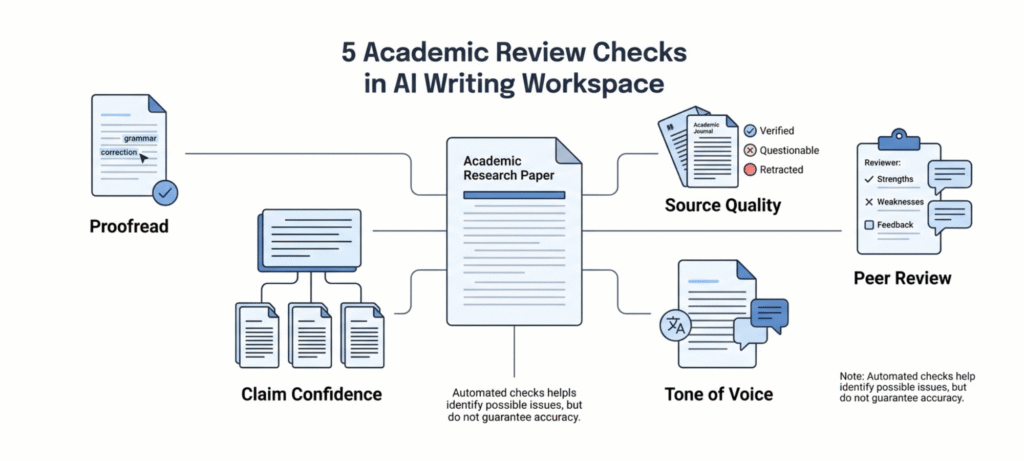
Treat these as prompts for your own judgment. A flag doesn’t prove a problem, and a clean result doesn’t prove the paper is right. Also note that each review type counts separately against your plan, so running all five on one document uses five reviews.
Collaboration and Export
You can share a document as a commenter or viewer, which is handy for supervisor feedback. Full-document export is a paid feature. On Free, export covers body content only.
How to Use Jenni AI for Academic Writing
Here’s a simple way to get started.
- Go to the official site. Use jenni.ai and click Log In or Start writing.
- Create an account. The site says no credit card is needed to start.
- Set up your document. Add your topic and your requirements, such as citation style and source type.
- Build your library first. Upload the PDFs you already have, then search for a few more.
- Write, then check the suggestions. Accept only lines that say what you mean.
- Verify every citation. Open the source and find the sentence that supports your claim.
- Run a review and export. Work through the flagged items, then export in the format you need.
If you want a bigger study system around this, our guide to how to use AI study tools to learn better shows how to combine tools like Jenni with active recall.
Can Jenni AI Help With a Literature Review?
Yes, and this is one of the more interesting parts. Jenni has a dedicated Literature review workflow, which you open from the Workflows page.
According to the docs, it goes like this: you enter a topic, choose where to search (web, your library, or a specific collection), set filters like publication year, and start the run. The docs say it usually takes 15 to 20 minutes and moves through searching, selecting literature, drafting sections, and assembling and citing. When it’s done, you get a new document and an email notice.
There’s also a Research gap analysis workflow, which maps established findings, disputed claims, and under-explored areas. The docs list it at about 3 to 6 minutes. Each run counts as one workflow against your plan.
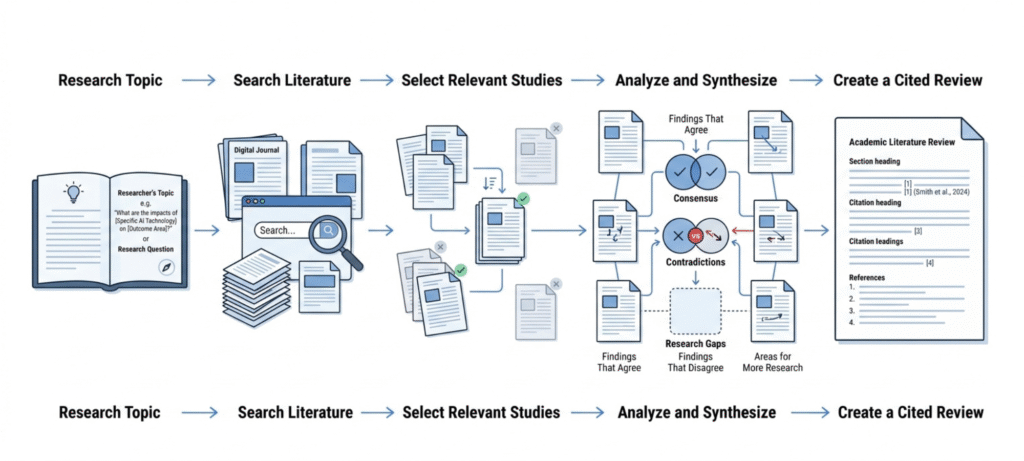
Now the honest part. A generated review is a starting draft. It can’t replace reading the papers, judging study design, or noticing when two studies disagree for a good reason. That’s the real work of a literature review, and it’s yours.
A realistic way to use it: run the workflow on a narrow topic, read the sources it picked, rewrite the synthesis in your own words, and delete anything you can’t back up. Don’t assume it replaces a full systematic review. Nothing on the official pages claims that.
Are Jenni AI Citations Reliable?
This was the loudest complaint in older reviews, so it matters. Jenni’s docs say it attaches citations to identifiable sources and shows the source details so you can verify them. For best results, the docs suggest searching by DOI or exact title, or uploading the full PDF rather than just metadata.
That’s a better setup than asking an AI to recall references from memory. But even so, you should run a quick check on each one:
- Does the paper exist? Look up the title or DOI.
- Do the authors, journal, and year match?
- Does the paper really say what your sentence says?
- Is it the right kind of evidence for your claim?
A correctly formatted reference can still be irrelevant. Jenni itself says to always review a source before relying on it. And in specialist fields, a tool can summarize a paper accurately and still miss why a particular method or limitation matters. That judgment is yours.
If your instructor allows AI and asks you to cite it, the APA Style guide to citing generative AI explains the current reference formats.
Jenni AI Pricing: Is It Free?
Here’s what the official pricing page listed in November 2026. Plans change, so check the Jenni AI pricing before you pay.
| Plan | Monthly price displayed | Main allowances |
|---|---|---|
| Free | $0 | 10 autocompletes per day, 10 PDF uploads, 3 AI edits, 5 AI chat messages, 3 reviews, 3 workflow runs |
| Plus | $12 per month | 5,000 autocompletes per month, unlimited PDF uploads, 500 AI edits, 500 chat messages, 10 reviews, 10 workflow runs, full export, live chat support |
| Pro | $29 per month | Unlimited autocompletes, edits, chat, reviews and workflows, 1,000-page PDF limit, priority support |
Pricing and usage limits can change. The figures above reflect the official pricing information checked in November 2026. Free autocomplete suggestions reset daily at midnight UTC, while free AI edits and chat messages are one-time allowances that don’t reset. Free workflow runs are a lifetime allowance of three. Plus limits reset with your billing cycle, and unused allowances don’t roll over. The pricing page also has a monthly and annual toggle, so check the checkout screen for the exact amount you’ll pay.
One small inconsistency: the pricing page lists 3 free AI edits, while the help docs list 5. Either way, it’s a small one-time amount.
Is Jenni AI Free for Students?
There’s a free plan for everyone, and the pricing page doesn’t show a separate student discount. The docs do mention regional pricing, with purchasing-power discounts applied automatically at checkout in eligible regions.
Does Jenni AI Offer a Free Trial?
The docs say new users get a trial of premium features, with the remaining days shown in the sidebar. If you don’t subscribe before it ends, your account goes back to the Free plan. Trial terms can change, so check what your own account shows.
Is There a Jenni AI Promo Code?
We didn’t find an official promo code on the pricing page or in the docs. Be careful with coupon sites that promise one. Any real discount should show up at checkout.
How Much Is a Jenni AI Subscription?
Plus is listed at $12 per month and Pro at $29 per month. The docs say annual billing is cheaper than monthly, so look at both options before you pay.
How to Cancel a Jenni AI Subscription
To cancel, open Jenni in a desktop browser, go to Settings, then Billing, and select Cancel beside Cancel plan in the Danger zone section. You keep access until the current billing period ends, and the subscription won’t renew. Your documents are preserved, according to the docs.
Note that the docs say you can’t cancel from a mobile browser. Refunds are generally not offered. If you think a bug or product error deserves one, Jenni asks you to contact support and book a call. Local consumer laws may add exceptions, so check the terms for your region.
Does Jenni AI Have a Mobile App?
Not a native one, according to the docs. Jenni works in a mobile browser with a touch-friendly layout, and core writing and research features are available. Account actions like cancelling need a desktop browser.
Is Jenni AI Good? Our Assessment
This section is an assessment based on Jenni’s own pages and documentation, not a claim of long-term personal testing. Use it as a guide for what to try yourself.
What it does well. The connected workspace is the main draw. Sources, notes, draft, citations, and reviews live together, so you aren’t hopping between apps. Zotero and Mendeley imports help if you already keep a library. The Source Quality and Claim Confidence checks are a thoughtful addition, since they point at weak spots a spellchecker never would.
Where it may fall short. The free plan is small. Five chat messages and three reviews won’t last through a real project. The unlimited features sit on the $29 plan. And like any AI tool, suggestions can sound generic if your input is thin.
Is it worth paying for? It depends on how much you write. A thesis writer working with dozens of PDFs may find Plus useful. Someone with one short essay a semester probably won’t.
Is Jenni AI Detectable by Turnitin?
Nobody can honestly promise a result either way. AI detectors estimate patterns in text, and they can be wrong in both directions.
It helps to keep four different checks apart:
- AI writing assistance: a tool helps you draft or edit.
- Plagiarism checking: software compares text against existing sources.
- AI-text detection: software guesses whether text looks machine-written.
- Source verification: a person confirms that references are real and support the claim.
They’re different jobs, and passing one says nothing about the others. Jenni doesn’t promise undetectable writing, and you should avoid any tool that does. Our explainer on how Turnitin AI detection works goes deeper. The safest approach is to follow your course’s AI policy, keep your drafts and notes, and write the final argument yourself.
Jenni AI vs ChatGPT: Which Is Better?
| Area | Jenni AI | ChatGPT |
|---|---|---|
| Main purpose | Academic writing and research workflow | General-purpose AI assistant |
| Writing support | Inline autocomplete in a document editor | Flexible writing and editing through chat |
| Research workflow | PDF library, source search, Zotero and Mendeley imports | Depends on the tools and plan you use |
| Citations | Built-in citation tools in 10,000+ styles | References need manual checking |
| Literature review | Dedicated workflow | Can help organize and analyze, but you manage the process |
| Best for | People who want an academic writing workspace | People who need broader, everyday help |
Neither is better for everyone. If your work revolves around PDFs, references, and long documents, a dedicated workspace can feel smoother. If you mostly want quick explanations or brainstorming, a general assistant covers more ground.
Best Jenni AI Alternatives
If Jenni isn’t the right fit, here are some alternatives worth comparing. Check each tool’s current features and pricing before choosing.
| Alternative | Best suited for |
|---|---|
| ChatGPT | General writing, explanations and brainstorming |
| Paperpal | Academic language and manuscript editing |
| Grammarly | Grammar, clarity and tone |
| QuillBot | Paraphrasing and sentence-level editing |
| Elicit | Research discovery and paper analysis |
| SciSpace | Reading and understanding research papers |
You don’t need to test all of them. Pick two that match your main bottleneck, run the same small task through each, and see which one saves you the most editing time.
Who Should Use Jenni AI?
It’s a good fit if you:
- Write research papers, theses, or dissertations and manage lots of PDFs.
- Switch citation styles often.
- Want shared comments with a supervisor in one place.
- Need a head start on a literature review and plan to do the analysis yourself.
Who Should Consider an Alternative?
You may want something else if you:
- Only need occasional grammar fixes or short explanations.
- Prefer one general assistant for lots of different tasks.
- Expect guaranteed citation accuracy, which no tool can give you.
- Study under a strict no-AI policy.
- Don’t want to pay $12 to $29 a month for features you’ll rarely use.
Frequently Asked Questions
What is Jenni AI used for?
It’s used for academic writing and research: drafting papers, working with PDFs, managing sources, and formatting citations.
Is Jenni AI free?
There’s a free plan with limits, and the site says no credit card is needed. Paid plans raise those limits.
Is Jenni AI free for students?
Students use the same free plan as everyone else. The pricing page doesn’t list a separate student discount.
How does Jenni AI work?
You import or search for sources, write in the editor with AI suggestions, then add citations, run reviews, and export.
Is Jenni AI good for academic writing?
It can be a useful workspace, especially for source-heavy writing. You still need to verify sources and build your own argument.
Can Jenni AI write a literature review?
It has a literature review workflow that produces a cited draft. You still need to read the sources and write the synthesis.
Can Turnitin detect Jenni AI?
No tool can promise either result. Detectors estimate patterns and can be wrong, so follow your institution’s AI policy.
Does Jenni AI generate real citations?
Its docs say citations attach to identifiable sources with visible details. Always open the source and confirm it supports your claim.
How do I log in to Jenni AI?
Use the Log In button on the official site, which leads to the web app.
Does Jenni AI have a mobile app?
No native app, according to its docs. It works in a mobile browser, but cancelling requires a desktop browser.
How do I cancel my Jenni AI subscription?
On a desktop browser, go to Settings, Billing, then Cancel plan under Danger zone. You keep access until the billing period ends.
What are the best alternatives to Jenni AI?
ChatGPT, Paperpal, Grammarly, QuillBot, Elicit, and SciSpace, depending on what you need.
Who owns Jenni AI?
The website footer lists Jenni, Inc.
Final Verdict
Jenni AI makes the most sense as a workspace for source-heavy academic writing. The library, citation tools, literature review workflow, and Reviews checks are aimed at people who juggle a lot of papers, and the free plan lets you try it before paying. The paid plans make sense if you write often. If you don’t, they’re hard to justify.
It isn’t a shortcut around reading, thinking, and checking. Every citation still needs a human to open the source. Try the free plan on a real assignment, see how much time it actually saves, then decide whether Plus or Pro earns its price.