
It’s 11 pm, your exam is in two days, and you’re staring at a 60-page PDF you barely opened. This is the moment most students reach for a study AI. Sometimes it saves the night. Other times it hands you a neat summary that you forget by breakfast.
The difference isn’t the tool. It’s how you use it. In this guide, you’ll see which study AI tools are worth trying, what the free options really include, how they handle PDFs, and a simple routine that turns them into proper revision instead of fancy copy-and-paste.
What Is Study AI?
“Study AI” is a loose label. Most people mean AI tools that help with studying: explaining a topic, turning notes into quizzes, building flashcards, or planning revision. Some of these are general chatbots. Others are apps built only for students.
It gets confusing because several products have almost the same name. Studley AI, Studdy AI, and StudyAI are three separate services. They aren’t versions of one thing. So when you read a review, check which one it actually covers, and don’t assume features carry over.
One more thing, and it’s better to say it early. A study AI helps your learning along, that’s all. It won’t take the place of your textbook, your teacher, or the effort you put in. Nothing will. Which tool is best? That depends on the job. Making sense of a hard idea is one task. Memorizing facts is another. Grinding through past papers is a third. Each one wants something different from the tool.
Best Study AI Tools for Students
Here’s a quick look at the tools that keep showing up in search results. I’ve described each one by what it’s built for, not by a score.
| Tool | Good for | Check before relying on it |
|---|---|---|
| ChatGPT | Explanations, practice questions, study plans | Free-plan limits and file upload rules |
| Gemini Notebook (formerly NotebookLM) | Studying from your own PDFs and notes | Current daily limits |
| RemNote | Flashcards and spaced repetition | Which features are free |
| Studley AI | Notes, flashcards, and quizzes from uploads | Free usage and formats |
| Studdy AI | Step-by-step help on a whiteboard | Subject coverage |
| StudyAI | Notes, past papers, and quizzes | Plan limits and supported curricula |
| Wolfram|Alpha | Maths and STEM calculations | Which step-by-step solutions need a paid plan |
ChatGPT is the one you’ll probably open first, because it handles almost anything. Ask it to explain an idea in plain language and it will. Want a quick quiz? Done. Say “that still doesn’t make sense” and it takes another run at it, usually with a different example. Where it slips is your own course material. Unless you paste that in, it falls back on whatever it knows in general. Worse, it sounds certain even when it’s wrong. I’d keep the textbook open next to it.
Gemini Notebook is the new name for Google NotebookLM, which is what plenty of students still call it. Google made the change in July 2026 and left everything else alone. Same product, same notebooks. You upload your sources, and from then on its answers come from your files, each with a citation that links back to the original passage. Flashcards, quizzes, study guides and audio overviews all get built from that same material. It’s the better pick when your teacher’s slides count for more than the open internet. Citations do make checking faster. They don’t make every answer right, though, so verify anything important.
RemNote is built around memory. It turns notes into flashcards and schedules reviews so the hard cards come back more often. It’s less about explaining and more about making facts stick.
Studley AI? Throw your notes, slides, even a recording at it, and out come flashcards, quizzes and study sets. That’s the pitch, anyway. Studdy AI plays it differently, more like a tutor standing at a whiteboard while you work through maths and science together. StudyAI sits somewhere in between: notes, past papers, quizzes. Quick confession, though. I haven’t tested any of these three myself. So what you just read is how they describe themselves, product descriptions and nothing more. Start with the free version and see if it clicks before you commit to anything.
Wolfram|Alpha isn’t a chat tool at all. It’s a computation engine. It’s very handy for checking equations or calculus, though full step-by-step solutions may sit behind a paid plan.
Best Free Study AI Tools
Plenty of students search for a free study AI, and “free” can mean four different things. It might be a real free plan, a limited free tier, a short trial, or a paywall that shows up after three questions.
Of all the tools here, Gemini Notebook is the one where I could actually confirm the free side. Cost? Nothing. The standard plan is free, and a Google account is all it takes to get in. As for the caps, current guides and university pages put it at 100 notebooks, 50 sources per notebook, and 50 chats a day. On top of that, you get roughly 10 flashcard or quiz generations, 10 reports and 3 audio overviews daily. Those numbers aren’t fixed, though. Google posts the exact figures on its Gemini Notebook plans and limits page, and they’ve moved around before. So look there first, before you build a whole study week around them.
ChatGPT also has a free tier, but what it includes changes over time. RemNote, Studley AI, Studdy AI, and StudyAI each advertise some way to get started without paying. I couldn’t confirm what those free plans cover today. Whether any of them is enough for a whole semester is something only a week of real use will tell you.
A simple test helps. Take one chapter, run it through two free tools, and see which one asks you better questions. And don’t call anything “100% free” until you’ve actually hit its daily limit once.
Which AI Works Best With PDF Study Material?
If your notes live in PDFs, this part matters most. There are two kinds of tools to think about.
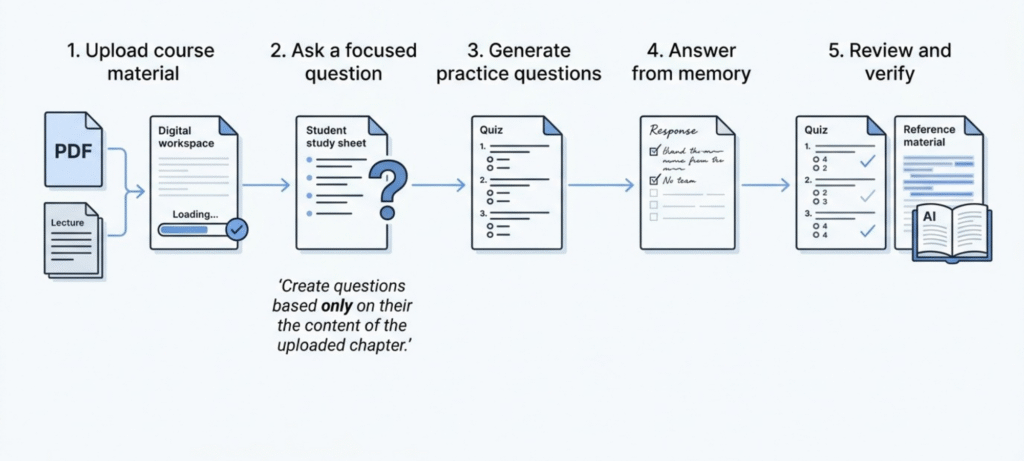
The first kind is built around your uploads. Gemini Notebook is the best-known example. Ask a question and it points to the passage it used, which makes checking quick. That’s useful when you need to match your teacher’s exact wording.
The second kind is a general chatbot that you hand a PDF to. It can be excellent at explaining, but it may blend your file with things it already knows. That’s fine for brainstorming. It’s riskier when an exam expects what your course said, not what the internet says.
Try a prompt like this: “Use only the uploaded chapter. Write 8 short-answer questions, keep the answers hidden, and tell me which section each answer comes from.” Then answer from memory first. Only after that, reveal the answers and compare.
A few warnings are worth knowing. Scanned pages, handwriting, diagrams, and equations are where things go wrong most often. If the tool misreads a formula, it will cheerfully build a quiz on the wrong one. So glance at the original page whenever something looks off.
How to Study With AI: A Workflow That Works
Honestly, re-reading is the trap. It feels like work, but you’re mostly just recognising the words. Active recall fixes that. Shut the book and try to say the answer out loud, or write it down cold. Messy? Probably. That’s fine, that’s the part that sticks. Then spaced repetition, which is just a fancy way of saying don’t cram it all in one night. Come back a day later, then a few days after that. Each time you have to dig a little harder, and the memory gets stronger for it.
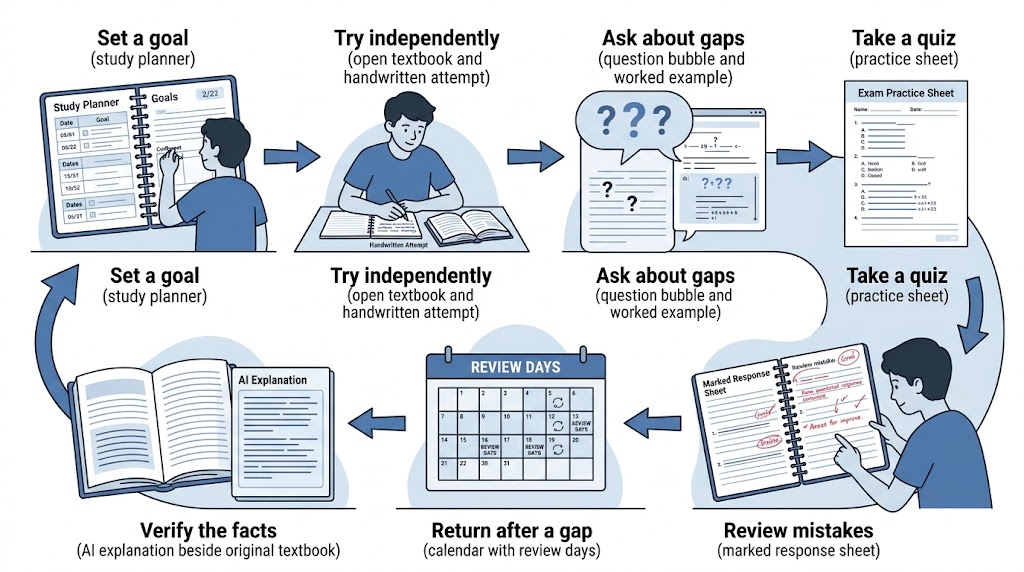
- Set a small goal. “Understand photosynthesis, chapter 4” beats “study biology.”
- Try first. Read the section or attempt the problems before you ask AI anything.
- Ask about the gaps. Say exactly what confused you, and ask for one example.
- Get quizzed. Ask for questions, then answer them without looking.
- Get feedback. Paste your answers back and ask where your thinking slipped.
- Come back later. Redo the weak topics after a day or two.
- Verify. Check formulas, dates, and quotes against your textbook.
Here’s how it looks with a real topic, quadratic equations.
Say factoring has you stuck. Don’t ask for the answer. Type something like this: “I’m solving x² + 5x + 6 = 0. I think the factors are (x + 2)(x + 4). Tell me if I’m right, but if I’m wrong, give me a hint instead of the answer.” The AI comes back and points out that 2 times 4 is 8, not 6. Fair. So you rethink it, land on (x + 2)(x + 3), and the equation falls apart. Next, ask for three similar problems, answers hidden. Work them out on paper. Check only at the end.
You did the thinking. The AI acted like a patient tutor who happens to be awake at midnight.
Universities say much the same thing. The University of Calgary’s guide to using generative AI as a study tool advises students to check that their use is allowed, judge every output with their own thinking, and keep testing themselves without the AI. That holds no matter which tool you pick.
If maths is your weak spot, pair this routine with our guide on how to study for a math exam.
Using Study AI for Different Subjects
Different subjects need different habits, so here’s how I’d split it.
Maths and science. Ask for a worked example, then request fresh problems of the same type. When you get one wrong, ask the AI to find the exact step where you slipped. That’s far more useful than being handed a corrected answer.
Biology, history, and vocabulary. These are memory-heavy. Lean on flashcards, timelines, and quick self-tests. A concept map of a process, like the water cycle or the causes of a war, can make the links easier to see.
Research and university work. AI can help you find sources, summarize a paper, and sharpen a question. It can also invent references that look real. Never cite something you haven’t opened yourself.
Languages and writing. Ask for grammar feedback, vocabulary drills, or a plain-English explanation of a tricky paragraph. Use it to understand your mistakes, not to write the final piece for you.
The rule across all four is the same. The tool should help you reason your way to the answer. It shouldn’t simply produce something to hand in.
Is Using AI to Study Bad?
Not by itself. It depends on how you use it.
The upsides are real. You get quick explanations at any hour. You can ask the same question five different ways without feeling silly. And you can turn a messy pile of notes into practice questions in about a minute.
The risks are real too. AI makes confident mistakes, and the term for it is hallucination. It can invent a citation or botch a formula while sounding completely sure. There’s also a quieter risk. You read a lovely summary, feel like you understand it, and haven’t learned much at all. A smooth explanation can feel like knowledge when it isn’t.
Privacy matters as well. Don’t upload anything with personal details, and read how a tool handles your files. Then there’s academic integrity. Many courses allow AI for studying but not for graded work, and the line isn’t always obvious. If you aren’t sure, ask your teacher before you submit anything.
A good habit is simple: attempt first, then ask. Copying a finished solution is easy, but it won’t help you when the exam paper lands on your desk.
How to Choose the Best Study AI Tool
Skip the “top 10” lists that crown a single winner. Ask yourself these questions instead.
- What’s my main task? Understanding, memorizing, or practicing?
- What material do I have? PDFs and slides call for a source-based tool. Open questions suit a chatbot.
- Does it give feedback? A good tool tells you why an answer is wrong, not just that it is.
- What does it cost? Look at the free limits, not only the headline.
- What happens to my files? Read the privacy page.
- Do I enjoy using it? If the interface annoys you, you’ll quit by Friday.
If I had to give a short answer, I’d say this. Try Gemini Notebook when you’re studying from your own files. Use a chatbot like ChatGPT when you need something explained. Pick RemNote when memorizing is the bottleneck. Then stay with whatever you actually keep opening.
Frequently Asked Questions
What is study AI?
It’s a general name for AI tools that help you study, such as explaining topics, making quizzes, and building flashcards. It’s also part of the name of specific products like StudyAI and Studley AI, which are separate services.
What is the best AI for studying?
There’s no single winner. Gemini Notebook suits your own PDFs, ChatGPT suits explanations, and RemNote suits memorizing. Pick based on your task.
Is there a free study AI tool?
Yes. Gemini Notebook (formerly NotebookLM) has a free standard plan with daily limits, and some other tools offer free tiers. Always check the current limits on the official page.
How do I use AI to study for exams?
Try the material first, ask the AI to explain what’s unclear, get quizzed with the answers hidden, then review your mistakes a day or two later.
Which AI works best with PDF study material?
Tools that build answers from your uploaded files and show where each one came from, like Gemini Notebook, are easiest to check. Still double-check scanned pages and equations.
Is using AI to study bad?
Not if you use it to practice and understand. It becomes a problem when you copy answers, skip your own thinking, or ignore your school’s rules.
Final Thoughts
A good study AI is a bit like a patient friend who knows a lot but sometimes gets things wrong. Use it to explain, quiz, and check your thinking. Don’t let it do the thinking for you.
Start small this week. Pick one chapter and one tool. Try the material first, ask about the parts that confuse you, and get quizzed on it. When you’re ready to build on that, our tips for online learning that actually works make a good next read.