

Most students don’t struggle with essays because they can’t write. The trouble starts earlier. The assignment is vague, your sources are spread across ten tabs, and the deadline is tomorrow.
AI tools say they’ll fix that. A lot of them just dump a pile of generic text on you and walk away.
This EssayGenius AI review covers what the tool does right now, what the free and paid plans include, and where it falls short. One heads-up before we start: some older write-ups describe a different version of the product, so part of what you’ve read elsewhere may be out of date.
What Is EssayGenius AI?
EssayGenius is an AI writing tool built for academic essays. You plan, research, draft, cite, and revise in one editor. Your outline, sources, notes, and citations stay attached to the draft, so you’re not juggling separate apps.
The official site says it wants to sharpen your argument “without taking over your voice.” The pricing page lists about 308,000 student writers and 2.7 million essays written. Those are the company’s own numbers, so take them as marketing, not independent proof.
The site also says there’s no one-click “write my whole essay” button, and that’s on purpose. It’s pitched as a tutor, not a ghostwriter. Whether it works that way for you depends on how you use it.
Why Older EssayGenius Reviews Don’t Match the Current Product
Search for this tool and you’ll find reviews that talk about GPT-3, essays generated in under a minute, and modes like Genius, Paraphrase, Expand, and Continue. Those reviews aren’t wrong. They just seem to describe an earlier version.
The current site is different. It shows a “Welcome to the new EssayGenius” banner, and the pitch is now research next to your draft, voice tools, citation checks, and a process report. That’s a different kind of product from a plain essay generator.
So if you’re comparing different EssayGenius AI reviews, look at which version each reviewer actually tested. A review of the old generator won’t tell you much about today’s research-focused workflow. And if a review only talks about how fast it spits out text, check the publish date first.
EssayGenius AI Features
Turning a Brief Into a Thesis
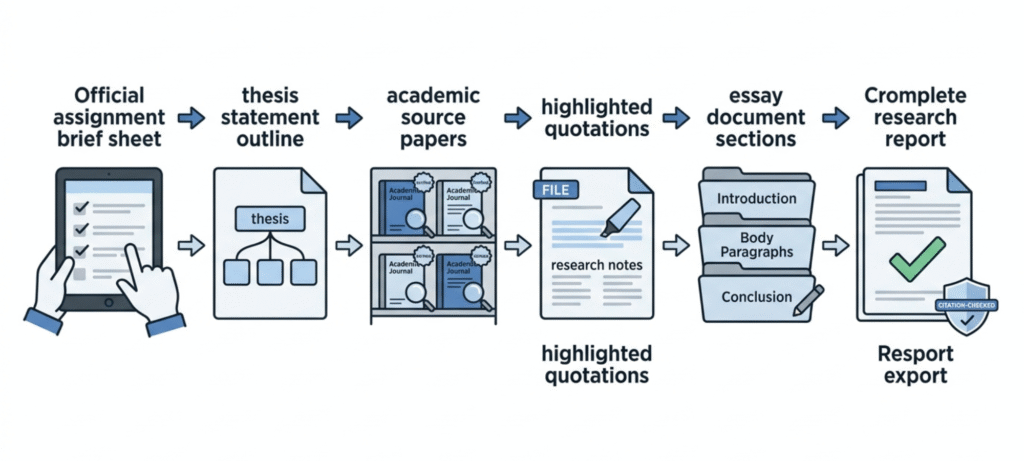
Start with your assignment. According to the site, you can upload the brief (a PDF, for example) and the tool picks out the word count, the number of sources, the citation style, and the essay type. After that, it suggests an angle you could build your argument around.
This matters more than you’d think. A lot of weak essays are already doomed in the first ten minutes, because the student misread the prompt. So anything that forces you to pin down the requirements first is a help.
Still, treat the suggested angle as a starting point and nothing more. Hold it up against your rubric and your reading list. Say your instructor wants you to engage with a specific text. Then your thesis has to show that, whatever the tool suggests.
Source Discovery and Citations
This is the part where EssayGenius works hardest to look different from a general chatbot. The FAQ says the source results come from academic databases like OpenAlex and Crossref, and each one comes with a DOI and a link to the original paper. Since the platform describes its sources this way, it may cut down the risk of made-up references. It won’t get rid of that risk, though. You still have to check that each result is real, relevant, and described accurately.
You can save quotes along with page numbers, and add a note on how each source supports your point. Citations come in the major styles. On the Pro plan you also get citation-manager exports (BibTeX, RIS, EndNote), and the homepage mentions importing from Zotero.
The company says to open every source before you cite it, and that’s solid advice. Just because a paper is real doesn’t mean it backs up your claim. It could be too old, too narrow, or about a different group of people than your argument assumes.
Drafting With Inline Suggestions
As you type, the editor offers inline suggestions (the pricing page calls them ghost text), and you accept them with a keypress. There’s also a side assistant you can ask about your draft, like whether a paragraph leans too hard on one source.
The big difference from a regular chat window is context. The assistant can see your thesis and sources, so you’re not pasting your whole essay in every time you have a question. On a long paper, that saves real effort.
Voice Matching
EssayGenius lets you save writing samples to build a voice profile. The homepage demo shows a tone-match score and a note when a paragraph reads more passive than your usual style. The pricing page lists “voice tools” as a Pro feature.
It’s a handy self-check, especially if English is your second language. Just remember a score is a software estimate. Plenty of people write differently depending on the assignment, so treat the number as a hint.
Review Tools Before You Submit
The homepage shows a review panel with tabs like Argument Map, Citation Audit, and AI Grader. The pricing page places the “Deep Analysis and review suite” and citation integrity checks on Pro. The idea is to point you to the biggest weakness first, like an unsupported claim in paragraph two.
That’s a smart way to approach revision. Many students polish sentences when the real issue is a missing argument. Still, automated feedback can’t read your instructor’s mind. Use it to spot patterns, not to guess your grade.
The Process Report
Every essay auto-saves with timestamps, and you can export a process report showing how the draft came together. The homepage preview mentions edit counts, focused writing time, and saved drafts.
It’s a thoughtful answer to a real worry. AI detectors get things wrong, and a visible writing history is easier to defend than a debate about your style. But it doesn’t guarantee your instructor will accept AI-assisted work. That still comes down to your course policy.
Practical Extras
A few smaller features are worth knowing about:
- Offline editing: the pricing page lists offline-first editing, and the homepage says changes sync when you reconnect.
- Sharing for feedback: send a link and collect comments beside the draft.
- Citation overlap check: shows where your wording sits close to a source.
- Export: Word and PDF on the free plan, plus Markdown, HTML, and plain text on Pro.
- English as a second language: a mode aimed at polishing clarity while keeping your own phrasing.
How to Use EssayGenius Step by Step
Here’s a sensible way to work with it.
- Start with the brief. Add your assignment and confirm the word count, citation style, and number of required sources.
- Write the thesis yourself. Use any suggested angle as raw material, then put the claim in your own words.
- Build your source list. Search for papers, open them, and save the passages that really support your points.
- Draft one section at a time. Write first, then use suggestions to tighten things up. Accepting every suggestion defeats the purpose.
- Run a review pass. On Pro, try the argument and citation checks. On Free, compare your draft against the rubric by hand.
- Verify and export. Check every citation against the original source, then export in the format your instructor wants.
If you’d like a bigger system around this, our guide on how to use AI study tools to learn better shows how to combine tools like this with active recall and spaced practice.
EssayGenius AI Pricing
Here’s what the official pricing page listed in November 2026. Plans and limits change, so confirm everything on the EssayGenius pricing before you pay.
| Plan | Price | What you get |
|---|---|---|
| Free | $0 | Unlimited essays, source library, citations, Word and PDF export, one full essay draft, 10 AI messages and 30 inline suggestions per month |
| Pro – Monthly Billing | $10 per month | Everything in Free, plus academic source discovery, review suite, citation integrity checks, voice tools, PDF and paper analysis, 500 AI messages and 2,000 inline suggestions per month |
| Pro – Semester Pass | $40 every 4 months | The same Pro access, paid once per four months |
| Pro – Annual | $108 per year | Pro for 12 months, about $9 per month |
Pricing, usage allowances, and feature availability are subject to change. The figures above reflect the official pricing information checked in November 2026. Confirm the latest limits and billing terms on the checkout page before subscribing.
A few things stand out. The free plan gives you a way to try the editor, source organization, and citation workflow. But 10 AI messages a month go fast, so it may feel limiting if you write often.
The Semester Pass may suit students who mainly need the advanced tools during one semester, not all year. The site says you can cancel from billing settings, and that downgrading doesn’t remove your essays, notes, or sources. Only the AI limits change.
One more thing. The FAQ on the homepage lists slightly different numbers than the pricing page. Go with the pricing page and double-check at checkout.
EssayGenius AI Pros and Cons
Pros
- Research, notes, citations, and your draft sit in one place, so there’s less tab-hopping.
- Sources are said to come from academic databases rather than a language model’s memory.
- No one-click full-essay button, which nudges you to do the writing.
- Version history and the process report give you a record of your work.
- The free plan needs no card and covers the basics.
- Pro pricing is fairly low, especially on the semester and annual options.
Cons
- Ten free AI messages a month won’t stretch far.
- The strongest tools, like source discovery and the review suite, are behind Pro.
- It’s not built for fiction, poetry, code, or formal proofs, according to its own FAQ.
- Suggestions can still sound generic if your prompt or thesis is vague.
- Independent testing is hard to find, so many claims come from the company itself.
What Are the Limitations of EssayGenius AI?
The pros and cons give the quick version. Here’s the practical side.
Source relevance isn’t guaranteed. A paper can be real and still be wrong for your claim, so you have to read it. The AI can also misread what your assignment actually asks for, especially if the brief has several parts or unusual instructions.
Voice matching isn’t proof you wrote something. It’s a style estimate, and nothing more. Automated citation checks help, but they can’t replace opening the original source and confirming the page, quote, and context.
Free usage limits may interrupt a longer writing session, and you may hit them right when you need help most. And no matter what the tool allows, your school’s AI rules still apply. If your course bans AI help, the tool doesn’t change that.
EssayGenius vs ChatGPT
The two tools overlap, but they’re built for different jobs.
| Area | EssayGenius | ChatGPT |
|---|---|---|
| Main focus | Academic essay workflow | General-purpose AI help |
| Research organization | Essay-focused workspace | Depends on your workflow and the tools you have |
| Draft context | Sources and draft stay connected | Depends on the conversation and features |
| General tasks | More specialized | Much broader range |
| Best for | Structured academic writing | Brainstorming, explanations, varied tasks |
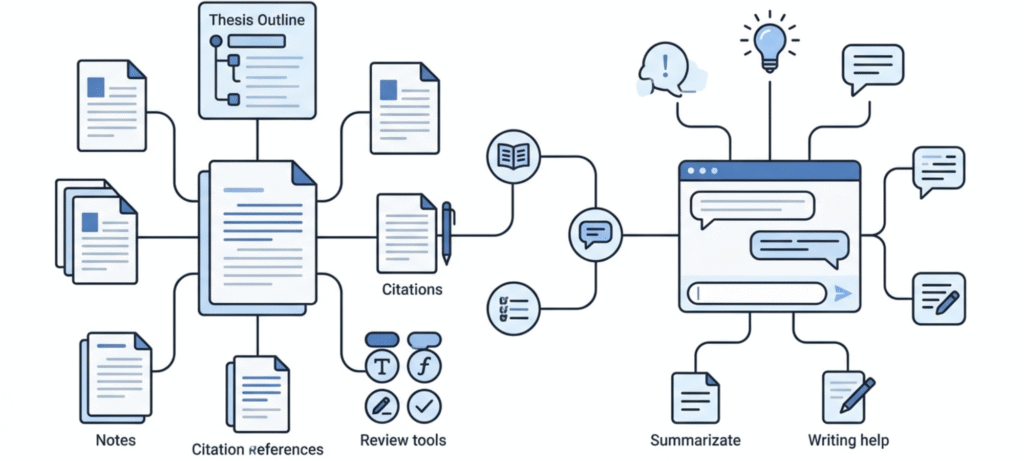
Honestly, it comes down to flexibility versus focus. ChatGPT takes whatever you throw at it: explain a concept, pitch topic ideas, fix a paragraph that’s bugging you. For that stuff it’s great. On a long paper, though, it gets old fast. New chat, paste the prompt again, paste the draft again, paste the sources again. And the references? Check every single one. [Add a real example of a fake or wrong citation you’ve seen.]
EssayGenius is built around the essay itself. Thesis, sources, and draft all sit in one place, and it says its citations come from actual databases. That’s a big claim, so I’d still spot-check a few. If you’re writing something long and research-heavy, it’s worth a look. If you just want a quick explanation? Probably overkill.
The fairest test is simple. Give both tools the same low-stakes assignment and compare the outline, the sources, and how much editing each one needed.
Is EssayGenius Safe and Allowed?
Two separate questions here.
Privacy. The homepage FAQ says essays are stored in your browser by default, and that only the relevant text goes to AI providers (it names OpenAI and Anthropic as examples) under contracts that bar them from training on your work. It also says cloud-synced drafts are encrypted. I couldn’t confirm the exact wording in the full privacy policy, so read it yourself before uploading anything sensitive, like unpublished research.
Academic integrity. This is the bigger issue, and it depends on your course. Many instructors allow AI for brainstorming and editing but not for writing submitted text. Some ban it completely. If your policy says no AI, don’t use it for that class.
Don’t lean on detectors or process reports to protect you, either. Our explainer on how Turnitin AI detection works and how accurate it is shows why these systems can flag honest work, and why being upfront is the safer move.
If your instructor does allow AI and wants it cited, APA now recommends citing the specific AI chat. The official APA Style guide to citing generative AI walks through the reference formats.
Who Should Use EssayGenius?
It makes the most sense for:
- Students writing argumentative essays, research papers, literary analysis, or history papers, where claims need evidence.
- Writers who lose time juggling sources, notes, and citations across different apps.
- Multilingual students who want clarity help without losing their own phrasing.
- Anyone who wants a record of how their draft developed.
Who may not need the paid plan? If you only want occasional brainstorming, basic grammar fixes, or short explanations, a subscription probably isn’t worth it. The free plan or a general assistant should cover that. And if your course bans AI tools, skip it entirely.
Frequently Asked Questions
Is EssayGenius AI free?
Yes, there’s a free plan. It includes unlimited essays, source organization, citations, Word and PDF export, one full essay draft, 10 AI messages, and 30 inline suggestions each month. No card is needed to start.
How much does EssayGenius Pro cost?
The pricing page lists $10 per month, $40 for four months, or $108 per year. Check the page for current rates.
Can EssayGenius write my essay for me?
Not with one click. The company says it has no button that writes the whole essay. It helps you plan, find sources, draft, and revise, but the final text is meant to be yours.
Are EssayGenius citations real?
The site says sources come from databases like OpenAlex and Crossref. Still, open every source and confirm it supports your claim before you cite it.
Will my professor know I used EssayGenius?
That depends on your instructor and your course policy. AI detectors can be wrong in both directions, so the safer path is following your course’s disclosure rules.
Is EssayGenius better than ChatGPT?
It depends on the job. EssayGenius is more structured for research-based essays, while ChatGPT covers a much wider range of tasks.
What kinds of papers does it work for?
Argumentative essays, research papers, literary analysis, history papers, and reflective essays. It’s not designed for fiction, poetry, or technical writing like code.
Final Verdict
EssayGenius is worth a look if your real problem is the whole writing process: understanding the brief, finding credible sources, keeping citations tied to your claims, and knowing what to fix before you submit. That connected workflow is the main reason to try it, not how fast it can produce text.
It isn’t a replacement for reading your sources or thinking through your argument. Try the free plan on a real, low-stakes assignment first. If the source and review tools clearly save you time, the semester plan is cheap enough to consider. If they don’t, there’s no reason to pay for more AI text.
Used like a tutor, it can help you write a better essay. Used as a shortcut, it just moves the problem to your professor’s desk.