Ask any teacher where their evenings go and you’ll hear the same thing: planning. The slides aren’t made, the worksheet is half done, and that starter activity? Still floating around in your head. Chalkie AI is built for exactly this mess. You give it a topic, and it gives you lesson slides, a printable worksheet and some classroom activities. Not perfect ones, but a draft. And a draft beats a blank screen every time.
So here’s what we’ll go through: what Chalkie AI actually does, how teachers use it, what you get for free, what the paid plans cost, how to log in, and whether it’s worth your time. The facts come from Chalkie’s own pages and public search data. When I’m giving my own opinion, I’ll tell you.
What Is Chalkie AI?
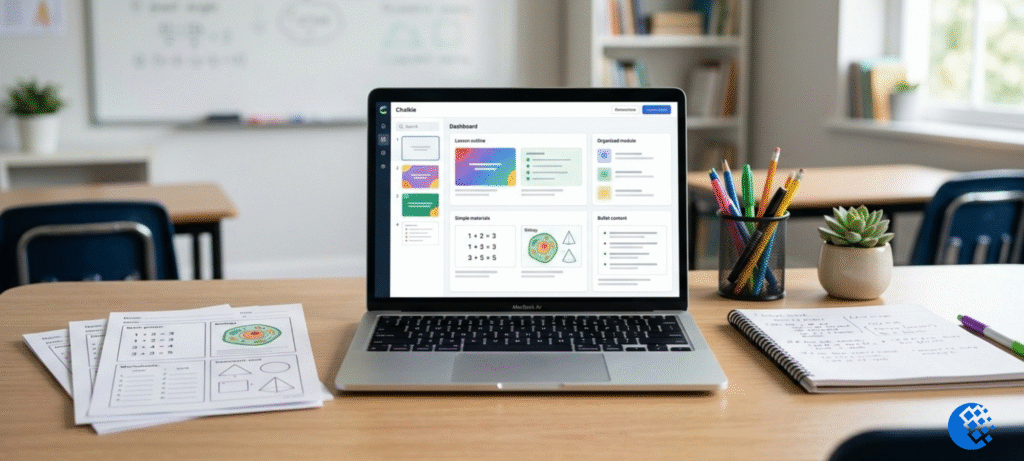
Chalkie AI is a platform made for teachers. It creates lesson slides, worksheets, activities and unit plans from a short prompt. You type in a topic, pick the year group or grade, choose your curriculum, and it builds the resource for you.
How’s that different from a regular chatbot? Well, a chatbot gives you a wall of text and you do the formatting yourself. Chalkie gives you something much closer to a finished resource. Think slide deck with learning objectives and key vocabulary, or a worksheet you can print straight away. Its website says it works with the UK National Curriculum, the Australian Curriculum, and US standards like Common Core and NGSS.
It’s meant for school teachers, mostly K-12, who prepare materials for different year groups. So if someone asks “what is Chalkie AI used for?”, the short answer is lesson prep. Slides, worksheets, quizzes and activities, plus the planning that ties them together.
What Can Teachers Create With Chalkie AI?
Most teachers end up using three things.
AI lesson generator and lesson slides
The lesson planner is the main feature. You enter a topic, a year group and a curriculum, and it builds a visual slide deck. From what’s publicly described, a typical deck runs to about 14 slides, with learning objectives, key vocabulary, the main content and some activities. Pro and Max plans allow longer decks, and I’ll get to that in the pricing section.
Now, here’s the part people skip. Once the deck is made, you can still change it. The built-in AI slide editor takes plain-English instructions, like “simplify this explanation” or “add a harder example.” You can swap images and change the theme too. Honestly, this editing step matters more than the generating step. No deck fits your class perfectly on the first go.
Chalkie AI worksheet generator
The worksheet generator makes printable, editable sheets. You get a mix of question types: multiple choice, short answer, gap-fill, vocabulary matching and homework layouts. Answer keys are optional. I’d use it alongside a lesson you’ve already planned, not instead of thinking about what your students need to practise. A fractions worksheet only helps if it hits the fraction skills your class is actually missing.
Classroom activities and unit planning
Apart from slides and worksheets, Chalkie can make starters, plenaries, group tasks, debates, matching games and quizzes. There’s a unit planner as well. It links several lessons into one sequence, so you don’t end up with a pile of random single lessons. Planning half a term on one topic? That’s the one to try. For a single lesson, the normal lesson planner does the job.
When you’re done, you can export to Google Slides, PowerPoint, PDF or Word. So you can keep working in whatever you already use.
How to Use Chalkie AI
It’s a short process. Most teachers will do it like this:
- Open the official Chalkie website and create an account, or log in if you already have one.
- Choose what you want to make: a lesson, a worksheet, an activity or a unit.
- Enter the topic, the year group or grade, and your curriculum.
- Generate the resource, then read all of it before you do anything else.
- Edit the slides or questions with the AI editor, or just by hand.
- Export or print it in the format you need.
Let me give you an example. Say you teach Year 5 science and you need a water cycle lesson. You type in “water cycle,” pick Year 5 and the UK National Curriculum, and hit generate. The deck comes back with objectives, words like evaporation and condensation, and a few activities. You read through it and notice the condensation explanation is a bit too hard for your class. So you ask the editor to simplify it, then add a challenge task for the quick finishers. That’s maybe ten minutes of editing, instead of an hour of building from scratch.
One thing to keep in mind: not every feature is on every plan. Slide limits, standards alignment and themes change depending on the tier. Check the current plan details before you count on something.
Is Chalkie AI Free for Teachers?
Yes, there’s a free plan. Chalkie advertises five free resources every seven days, and you don’t need a credit card. But read that carefully, because the five is a total. Lessons, worksheets and activities all come out of the same five. It’s not five of each.
Who’s it good for? If you just want to try the tool, or you only plan a few resources a week, the free plan can work fine. But if you prepare several lessons a week, or build whole units, you’ll probably hit the limit fast.
Before signing up, check two things on the official site. First, the current weekly limit. Second, whether the features you care about (slide count, standards alignment, themes) are included in the free plan. These things change, and a quick look now saves you a nasty surprise on a Wednesday.
Chalkie AI Pricing: How Much Does It Cost?
Chalkie works on a freemium model, with four tiers. These are the prices from current search data and the official pages. They show the monthly equivalent when you pay annually:
| Plan | Price | What’s included |
|---|---|---|
| Free | $0 | 5 resources every 7 days |
| Pro | $6.65 per month, billed annually | 200 resources per month, standards alignment, up to 25 slides per deck |
| Max | $12.99 per month, billed annually | 400 resources per month, up to 35 slides per deck, custom visual themes |
| Schools | Custom quote | Admin dashboard controls and centralised school billing |
Look closely at those numbers. The $6.65 and $12.99 are the monthly equivalent of paying for a full year. They aren’t necessarily what you’d pay if you went month to month. So if you’re wondering “how much is Chalkie AI Pro?”, it’s about $6.65 a month on annual billing, and you pay the whole year up front. Taxes might be added on top.
For one teacher, the real choice is usually Free or Pro. Pro makes sense if you keep running out of the free allowance, or if you want longer decks. Max is for heavy users who want more resources and custom themes. Schools get a custom quote, which is pretty normal for school software.
Prices can change. So before you pay, confirm the checkout price, the billing period and what’s included on the official Chalkie site.
Chalkie AI Login and App Access
To log in, go to the official Chalkie login page. You can use Google sign-in, or your email and password. There’s also a link for people who don’t have an account yet, and a reset link if you forget your password.
A lot of people search for a “Chalkie AI app.” From what I can find, Chalkie is a web platform, and you get to it through the official website. I haven’t seen proof of a separate downloadable app. So be careful with any third-party download link that claims to be one. Stick to the official site.
Chalkie AI Review: Benefits and Limitations
Quick note first. This section is my own evaluation, based on Chalkie’s published features and public information. I haven’t run it through a real classroom trial, and I won’t quote teacher experiences I can’t check.
Where it helps. The biggest win is the first draft. Getting a structured deck with objectives and vocabulary in under a minute saves real time, compared to starting from nothing. Slides, worksheets and activities also live in one place, so your materials share the same topic and level. That means less copy-pasting between tools. The curriculum selection and the plain-English editor are probably the two features you’ll notice most day to day.
Where you need to be careful. A nice-looking deck isn’t the same thing as a good lesson. Generated content can have small factual mistakes, examples that don’t suit your class, or questions at the wrong level. Answer keys need a check too. If the key is wrong and you hand it to a teaching assistant, that mistake spreads.
And there’s the teaching side of it. A tool can put slides together, but it doesn’t know your class struggled with last week’s topic. It doesn’t know three students need extra support. That part is still your job.
So, is Chalkie AI good? For getting first drafts done fast, it looks like a useful option, especially since you can test the free plan at no cost. Can it replace your planning? No. Treat it as a quick starting point, and expect to edit.
Who Owns Chalkie AI, and Is It Suitable for Schools?
Teachers often ask who owns Chalkie AI and whether it’s legit. The best place to check is Chalkie’s own website and legal pages. They list the operating company and contact details. I’d confirm it there instead of trusting a third-party summary, since ownership details can change.
As for legitimacy, there are a few good signs. The official site shows its pricing. The login works. There’s a stated privacy approach, and a paid Schools option with admin controls. None of that replaces your own checking, but it looks like an established product, not something thrown together.
If you’re thinking about using it in school, read the privacy policy and terms first, and follow your school’s data rules. Chalkie says students don’t need accounts for live activities, and that it doesn’t sell data or use student submissions to train AI models. Even so, a good habit is to keep identifiable student information out of your prompts, unless your school’s policy and the service’s terms clearly allow it. You don’t need names to make a good fractions lesson.
If you’re curious about AI tools beyond lesson planning, our guide to free AI grading tools for teachers covers the marking side of the workload.
Frequently Asked Questions
Can Chalkie AI generate worksheets?
Yes. It makes printable, editable worksheets with different question types and optional answer keys. Just check the keys before you use them.
How do I log in to Chalkie AI?
Go to the official login page and sign in with Google, or with your email and password. New users can make an account from the same page.
Does Chalkie AI support the UK and Australian curricula?
According to its website, yes. It supports the UK National Curriculum, the Australian Curriculum, and US standards including Common Core and NGSS. Still, compare the generated learning objectives with your own local requirements.
Is Chalkie AI worth it?
It depends on how often you make resources. If you build several lessons a week and the drafts save you real time, a paid plan can pay for itself. If you only need a few resources, the free plan may be enough.
Can Chalkie AI replace my lesson planning?
No. It speeds up the prep, but you still need to fact-check, adjust things for your class and design your assessments. Think of it as an assistant, not a replacement.
Is there a Chalkie AI promo code?
Offers come and go. Check the official site for anything current, and don’t just trust random coupon pages.
Final Thoughts
Chalkie AI does one job well. It gets you from a blank page to an editable draft, fast. With the lesson planner, the worksheet generator and the activity tools, it covers most of the routine materials a teacher makes in a week.
My advice? Start with the free plan. Five resources every seven days is enough to see if the output fits your subject, your year group and your style. If you keep hitting the limit, or you want longer decks, the Pro plan at roughly $6.65 a month on annual billing is the natural next step. Max and Schools are for heavier use and school setups.
Whichever plan you choose, read what it generates, fix what’s off, and make it fit your students. If you want more on balancing tech with traditional prep, have a look at our piece on digital vs paper lesson planning. The tool saves time, sure, but the teaching is still yours. You can explore the platform on the official Chalkie website.